
Read audit logs
The audit log is your organization’s compliance trail: a durable record of who did what, to which record, when, and from where. Use it for security investigations, change forensics, and auditor evidence.
What is recorded
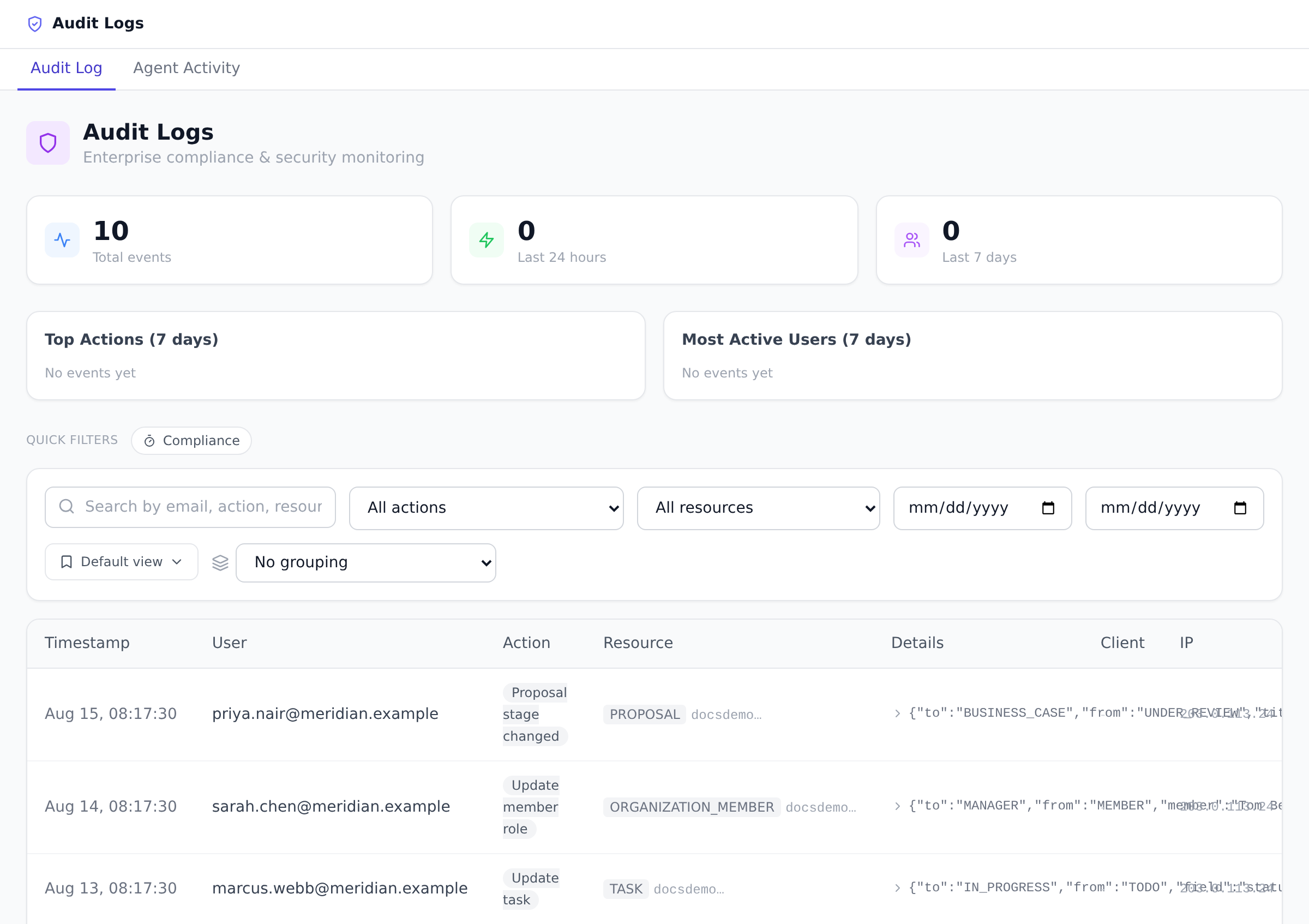
Section titled “What is recorded”Each entry captures the actor (or “system” for automated jobs), the action, the affected record, a timestamp, the IP address, and the browser. Recorded events include, among others:
- Sign-ins, including failed login and failed 2FA attempts
- Member invitations, role changes, and removals. The full invitation lifecycle is covered: sending one (individually, in bulk, or to a whole team), resending it, revoking it, and the recipient accepting it, at both organization and project level
- Organization deletion, including whether it came from the empty workspace cleanup offered after accepting an invitation
- Security setting changes (2FA enforcement, session policies, IP allowlist, permission matrix saves)
- API token creation and revocation
- SCIM provisioning events from your identity provider
- Data exports, imports, and plan changes
Browse and filter
Section titled “Browse and filter”-
Open Logs from the sidebar.
-
Filter by member, action, resource type, IP address, or date range, or use the free-text search to find a specific record.
-
Open any entry to see its full details, including the before and after values where they were captured.
-
To keep a combination you return to, such as one member’s failed sign-ins, save it as a named view from the views menu beside the filters. Saved views are personal to you and follow your account to another device. See Save your filters as a view.
The Client column: where a request came from
Section titled “The Client column: where a request came from”Newer audit entries record which client performed the action, alongside who performed it. They are different questions: the actor tells you the privilege held; the client tells you the surface the request came through. The same person acting from the web app and through a connected AI agent produces visibly different entries.
Values you’ll see: Web, Maker, Extension, Desktop, Mobile, MCP (a connected agent), PAT (a personal access token), System (background jobs), and Unknown.
Two readings that are easy to get wrong:
- Blank is not Unknown. A blank Client means the entry predates the feature, older rows are deliberately not backfilled with guesses. Unknown means the request was seen but couldn’t be classified.
- It’s an attribution hint, not a security control. Part of the signal is self-reported by the client, so filter and investigate with it, but don’t build access decisions on it.
Export for auditors
Section titled “Export for auditors”Open Organization Settings → Security & Compliance and go to the Audit Export sub-tab. Pick a date range (the export defaults to the last 30 days) and a format, CSV for spreadsheets and GRC tools or JSON for programmatic processing. The file downloads immediately.
Retention
Section titled “Retention”Audit entries are kept for one year by default. The retention policy in Security & Compliance controls this: choose a compliance preset or a custom window, including keeping logs indefinitely. Entries older than the configured window are purged automatically.
Best practices
Section titled “Best practices”- Review monthly for anomalies. Failed login spikes, off-hours admin changes, unusual IPs. Monthly scan catches patterns.
- Export quarterly for archival. Even with 1-year retention, archive exports per quarter for compliance.
- Filter by member when investigating. Catches both “member as actor” + “member as subject” of actions.
- Set retention by compliance regime. SOX = 7 years. HIPAA = 6 years. GDPR = case-by-case. Pick the preset that fits.
- Cross-reference with compliance evidence export. Compliance events are in audit log + dedicated export. See Export compliance evidence.
Troubleshooting / common pitfalls
Section titled “Troubleshooting / common pitfalls”- Specific event missing. Three causes: (a) action not yet supported; (b) actor was system (filter); (c) past retention window. Check retention.
- Export taking long. Large date ranges = slow. Narrow range or use JSON for programmatic processing.
- Audit log inaccessible. Owner/ Admin only. Portfolio Manager can’t see it.
- Filter returns 0 results. Date range mismatch (audit log uses UTC). Widen date range.
- CSV cells show formulas. Onplana sanitizes; if you see formula execution, file a bug.
How this combines with other features
Section titled “How this combines with other features”- Audit log + Compliance evidence. Compliance events in audit log; also in dedicated evidence export. See Export compliance evidence.
- Audit log + SCIM. SCIM events flow through audit log.
- Audit log + Workflows. Workflow actions audit-logged.
- Audit log + Tokens. Token activity audit-logged. See Create API tokens.
Coming from another tool
Section titled “Coming from another tool”| Tool | Mapping |
|---|---|
| Splunk audit trail | Direct concept |
| AWS CloudTrail | Direct |
| ServiceNow Activity log | Direct |
| Microsoft Compliance Center | Direct |
| Custom audit table | Onplana standardizes the pattern |
Can Portfolio Managers see the audit log? No. Audit data is restricted to Owners and Admins, both on the Logs page and in the export.
Are automated actions logged too? Yes. Background jobs, workflow automations, and provisioning events are recorded and marked as system actions, so you can distinguish them from human activity.
How do I prove a leaver lost access on a specific date? Filter the log by that member. Their deactivation event from SCIM or the manual removal is recorded with a timestamp, see Provision users with SCIM.
Is the export safe to open in Excel? Yes. Exported cells are sanitized so that values cannot execute as formulas when opened in a spreadsheet.
Can I stream audit log to my SIEM? Not natively today, periodic JSON export feeds SIEMs. Webhook streaming on roadmap.
Are audit log entries immutable? Yes, entries cannot be edited or deleted. Only retention purges them.
Does Onplana audit log include data export events? Yes, every export (audit, compliance evidence, etc.) writes its own audit entry.
Related
Section titled “Related”- Export compliance evidence, compliance-specific events
- Create API tokens, token activity recorded here
- Provision users with SCIM, SCIM events here
Was this helpful?
Thanks for your feedback!