
Set up your organization
The first few choices you make when setting up an organization (its name, default currency, time zone, working week) propagate into every report, dashboard, and notification across every project. Most of these are changeable later, but a few (currency in particular) get locked into historical data the moment you create your first project, so it is worth pausing for ten minutes to decide them well rather than accepting defaults and renaming later.
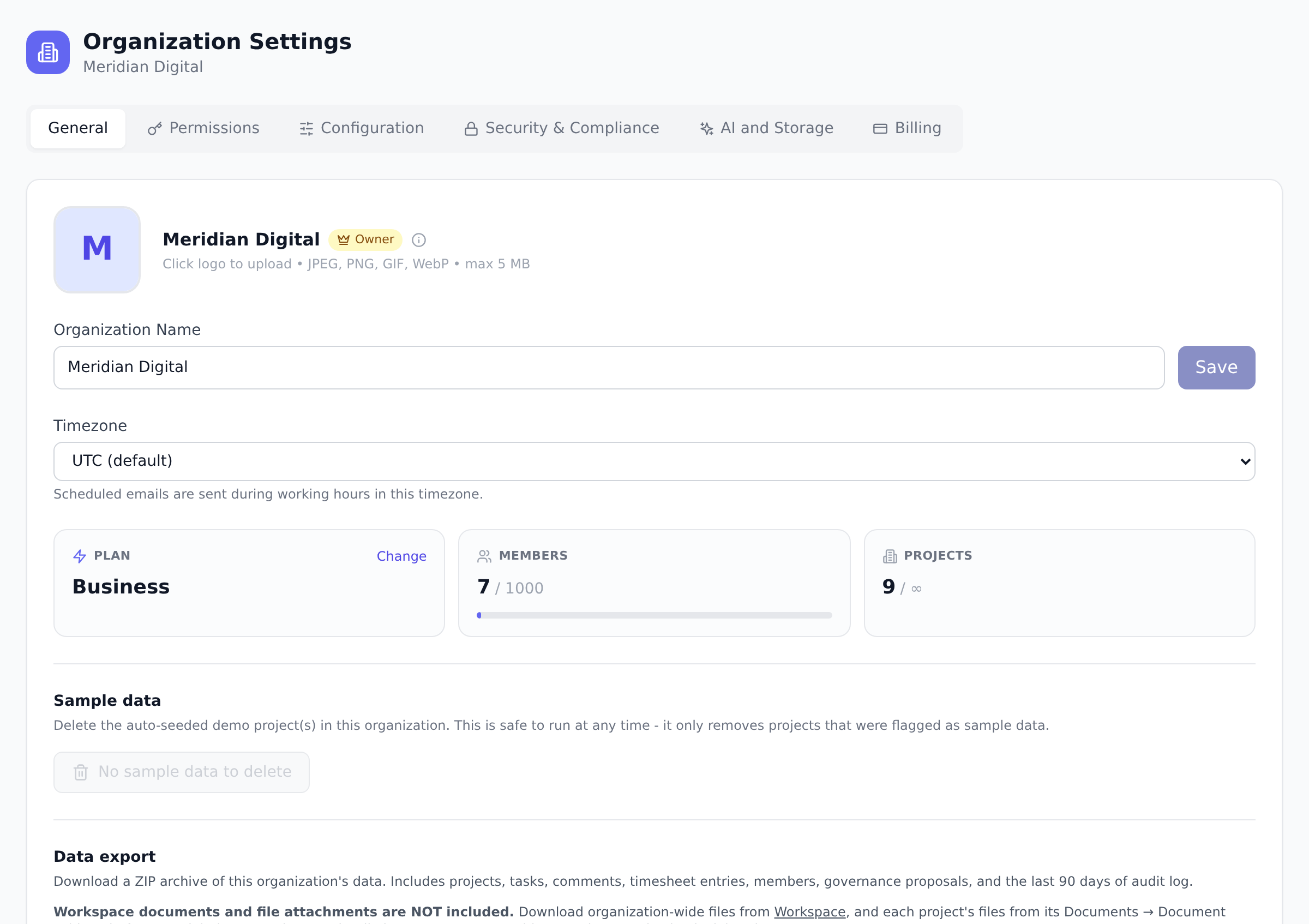
Create your organization
Section titled “Create your organization”- Sign up with your email, or with Google or Microsoft single sign-on.
- On the first-run screen, give your organization a name. If you signed up with a work email, Onplana suggests a name from your email domain.
- Choose how to start your first project: a template, the AI kickstart, or a blank project. (You can skip this and create projects later.)
Set up your workspace with AI
Section titled “Set up your workspace with AI”Rather than configure everything by hand, an Owner or Admin can let AI draft a starting configuration. On the Setup page, choose Set up your workspace with AI, describe your company in a sentence (for example, “a 30-person design agency in Germany billing in EUR”), and Onplana proposes a full setup: default currency, a working calendar with public holidays inferred from your country, a timesheet approval policy, a permission posture preset, teams, custom fields, a default hourly rate, and per-role rate cards.
-
Open Setup and select Set up your workspace with AI.
-
Describe your organization in one sentence. Add answers to any follow-up questions to refine the draft.
-
Review the proposal section by section. Each section has an include checkbox and inline editors, so you can accept, edit, or skip any of it. Nothing is saved until you choose Apply.
-
Apply. Each included section is written through Onplana’s normal settings, so the corresponding Setup checklist items complete themselves.
Your role
Section titled “Your role”Whoever creates the organization becomes its Owner. Owners have full control: billing, the permission matrix, and the ability to add or remove any member. As you invite people you assign each of them a role, which decides what they can see and do.
Switch between organizations
Section titled “Switch between organizations”If you belong to more than one organization, the switcher at the top of the sidebar moves you between them. Your profile and notification preferences follow you; your role, dashboards and access are per organization.
Set your default organization
Section titled “Set your default organization”Multi-organization users can pick which one opens at sign-in. Open the organization switcher and select the star on the row you want. The current default shows a filled star and a Default badge.
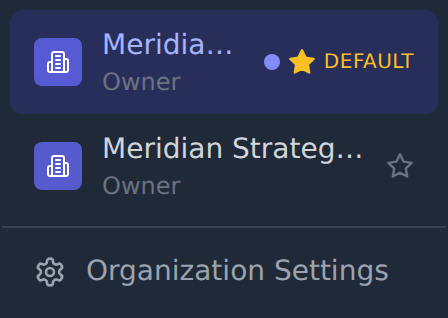
The default applies when Onplana has no better answer: a fresh sign-in, or the first time you use a new device or browser. It does not interrupt you mid-session. If you are already working in an organization and the page refreshes, you stay where you are rather than being pulled back to the default.
The choice is saved to your account rather than the browser, so it follows you to every device you sign in on. It is a personal preference: no role is required, it is on every plan, and it changes nothing for anyone else.
The star appears only if you belong to at least two organizations, and only on organizations you can actually open. An organization where your access has been deactivated cannot be set as your default, since landing there at sign-in would only bounce you straight back out.
What to do next
Section titled “What to do next”- Invite your team so you are not working alone.
- Create your first project, or import one from Microsoft Project if you already have a plan.
Best practices
Section titled “Best practices”- Pick a name your team will recognize in three years, not just today. “Project Phoenix” sounds clever; “Acme Engineering” is what shows up in every email subject for the next five years. Most organizations end up with a department or company name in the organization name slot, not a project codename.
- Set the default currency before creating projects. Existing project budgets and rate cards get priced in the organization default at creation time. Changing the organization currency later doesn’t retroactively re-denominate historical data, you end up with mixed-currency projects that the cross-project Reports builder has to unpick. Pick the currency you actually invoice in.
- Configure the working week and holidays first. The Gantt, the capacity planner, and the burndown chart all read your working calendar. Default is Mon-Fri 9-5 with no holidays; if your team works different hours or a different week (Sun-Thu in many regions), set it now so durations, capacity, and ETAs are computed against reality. See Configure working calendars.
- Add a logo even if it feels frivolous. A logo appears in exported PDF reports, in the invitation email, and on the Setup hub. It is a small thing that consistently signals “this is a real organization, not someone’s sandbox”, invitees and stakeholders react to it.
Troubleshooting / common pitfalls
Section titled “Troubleshooting / common pitfalls”- I created the organization with the wrong email and want to start over. Don’t create a second organization under the right email; instead, invite yourself (under the correct email) as Owner, sign in with the new email, and either remove the original Owner or leave it as a secondary account. Onplana data sticks to the organization, not the user.
- My organization switcher only shows one organization. That’s expected if you only belong to one. Joining a second (via an invite, or by creating one) makes the switcher useful. If you expected to see more (you remember being invited to a colleague’s organization), check your Invitations list in case there’s a pending acceptance.
- I changed the organization name but emails still show the old name. Sent emails carry the name at send time; only emails sent after the rename use the new name. Already-delivered emails do not update retroactively.
- The Setup hub is empty after I created the org. Two causes: (a) the user signing up was invited to an existing organization rather than creating one, so they get the compressed welcome; or (b) you’re on an organization plan whose features don’t surface any optional setup steps. Setup is plan-aware; a Free organization has a shorter checklist than an Enterprise one by design.
- The organization’s plan shows “FREE” but I expected Pro. New organizations start on Free. Upgrading is the Compare plans and upgrade flow: Stripe Checkout if you self-serve, or a Microsoft Marketplace purchase for tenant-managed billing. Plan changes apply within seconds after the payment confirms.
How this combines with other features
Section titled “How this combines with other features”- Organization + Working calendar. The org-wide calendar drives every project’s date math (Gantt, burndown, capacity). Configure the calendar before importing or creating projects so their schedules use the right working hours from the start. See Configure working calendars.
- Organization + Permission matrix. The five org-level roles (Owner, Admin, Portfolio Manager, Member, Guest) are configured via the matrix once at the organization level. Tune it once, and every project member inherits it. See Understand roles and permissions.
- Organization + Custom roles. On Business and above, you can extend the five defaults with org-specific roles (Finance Reviewer, Procurement Lead, etc.). Define these early so invitations land directly at the right role rather than being promoted later. See Create custom roles.
Coming from another tool
Section titled “Coming from another tool”| If you used… | The closest pattern |
|---|---|
| Asana: “Organization” | Onplana Organization is the same concept |
| Jira Cloud: “Site” | Onplana Organization ≈ Jira site; projects map 1:1 |
| Microsoft Project Online: “PWA tenant” | Onplana Organization ≈ PWA tenant; portfolios live inside the organization |
| Notion: “Workspace” | Onplana Organization ≈ Notion workspace |
| Slack: “Workspace” | Onplana Organization is closer to Slack workspace than to a Slack channel |
Can I rename my organization later? Yes. An Owner or Admin can change the name in Organization Settings at any time.
I was invited to an existing organization. Do I create my own? No. Click the invitation link and accept from there, which puts you in the inviting organization directly. Signing up at the front door instead creates a personal workspace of your own, because knowing an invited address is not proof you control it: the join happens when you present the invitation itself. See Join a workspace by invitation, which also covers tidying up the extra workspace if you signed up first.
Can I belong to more than one organization? Yes, with no extra license cost on your side; each organization has its own billing. Use the organization switcher at the top of the sidebar to move between them. Your personal preferences (notifications, profile) follow you across organizations; your role, dashboards, and access are per-org.
Who can change the organization’s plan and billing details? Only the Owner. Admins and Portfolio Managers can view billing but cannot change it. The matrix can tune some of this; the Stripe-portal gate stays Owner-only by design.
Can two organizations share the same data? No. Each organization is fully isolated: its members, projects, and permission policy live entirely inside it. If two organizations need to collaborate on a project, invite the collaborators as guests in one of them rather than duplicating the data across both.
My email domain matches another organization on Onplana. Will I be auto-joined? No, Onplana never auto-joins users based on email domain. The only way to be added to an organization is through an explicit invitation or SSO auto-provisioning (Enterprise).
Can I delete an organization? Yes, and it is self-service. It is an Owner-only, two-step action in Organization Settings → General → Danger Zone that requires typing the organization name to confirm. Members lose access immediately. Cancel the subscription first, because deleting an organization does not stop billing. If you no longer need an organization but want the data preserved, downgrade to Free and leave it idle instead. Full steps, including how to close your own account: Delete an organization or close your account.
Related
Section titled “Related”- Invite your team, the next step after the organization exists
- Admin first-week checklist, the curated journey from here through the rest of Setup
- Take the tour and finish setup, orient before configuring
Was this helpful?
Thanks for your feedback!