
Set up gate reviewers for proposals
By default, any reviewer with governance rights can move a proposal through a gate. Gate reviewers replace that with a named panel per gate: every designated reviewer gets an approval request, and the proposal advances only when the panel agrees.
How quorum works
Section titled “How quorum works”- Any rejection sends the proposal back, immediately.
- All approvals advance it to the next stage.
- Anything in between leaves it pending, and reviewers see it in their approval inbox until they decide.
Designate the reviewers
Section titled “Designate the reviewers”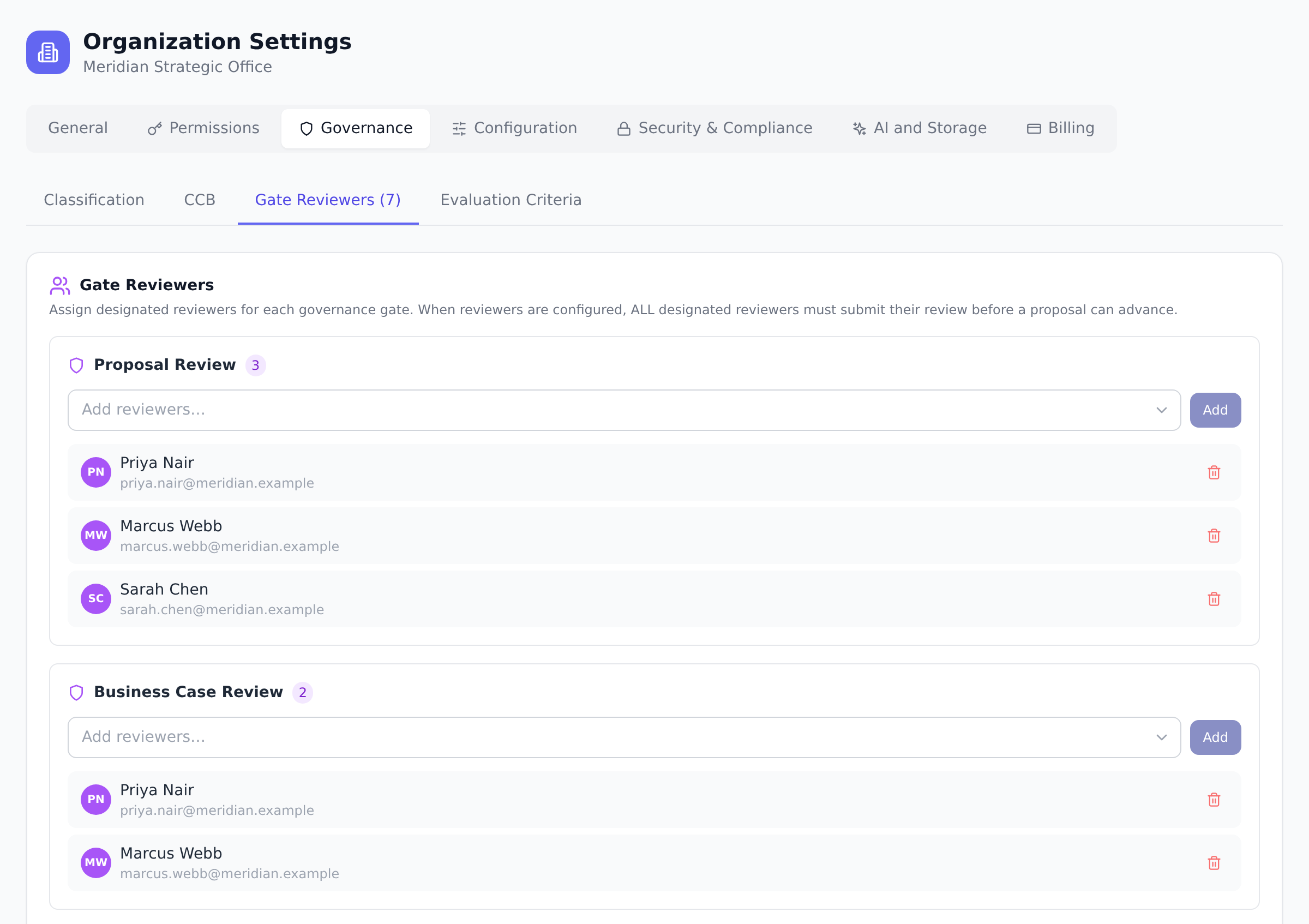
-
Open Organization Settings and go to the Governance tab, then the Gate Reviewers section.
-
Pick the gate to configure: Proposal Review, Business Case Review, or Plan Review.
-
Search for the people to add. The picker shows each person’s organization role so you can see at a glance who you are designating.
-
Add as many reviewers as the gate needs. Each becomes a required approval for every proposal that reaches this gate from now on.
What reviewers see
Section titled “What reviewers see”When a proposal enters a gate with designated reviewers, each panel member gets a notification and a pending item in their approval inbox (the badge on Governance in the sidebar). They review the proposal, score it against the gate’s evaluation criteria, and approve or reject.
Best practices
Section titled “Best practices”- Pick reviewer panels per gate, not the same panel everywhere. Proposal Review benefits from executive sponsors; Business Case Review benefits from Finance; Plan Review benefits from delivery leads. Same-panel-everywhere makes gates indistinguishable; different panels make each gate meaningful.
- Keep panels small, 3 to 5 reviewers. Two is too few (one absence stalls the gate); seven is too many (consensus takes weeks). Three plus a backup is the sweet spot.
- Designate by name, not by role. Even though org-tier reviewers (PMs, Admins) can review without designation, naming specific people is what makes the panel meaningful. “Three Portfolio Managers” means none of them feels ownership; “Sara, Marcus, and Priya” means three people who know they’re on the hook.
- Use MEMBER-role designated reviewers for subject matter expertise. Reviewers don’t need governance permissions in the matrix, the designation alone grants review access for that gate. Use this to bring in domain experts (legal, security, compliance) without widening their organization role.
- Rotate reviewers quarterly to spread the load. Permanent panels burn out their members; quarterly rotation distributes work and brings in fresh perspectives. Document the rotation in a wiki so incoming reviewers know what they signed up for.
Troubleshooting / common pitfalls
Section titled “Troubleshooting / common pitfalls”- The reviewer I added can’t see proposals. Three causes: (a) the proposal hasn’t reached that gate yet, designation only applies once it does; (b) the reviewer was added AFTER the proposal already entered the gate (existing reviews are preserved, new reviewers only apply to future proposals); (c) the reviewer is deactivated.
- My panel never reaches quorum. Quorum requires ALL designated reviewers to approve. If one consistently delays, either remove them or shrink the panel. The system won’t auto-skip a reviewer unless they’re deactivated.
- A deactivated reviewer is blocking a gate. Deactivated members are skipped from quorum automatically. If a gate seems stuck, check whether a reviewer was deactivated since their pending request, the system should have re-computed; if not, refresh, then escalate.
- My added reviewer doesn’t see the approval-request notification. Two causes: (a) the reviewer disabled approval notifications in their personal preferences; (b) the proposal hasn’t yet entered the gate. Designated reviewers get notifications ONLY at the gate they’re designated for.
- I want a “backup” reviewer who decides only if primary doesn’t. Not natively. Keep the panel small instead, and if a primary reviewer is OOO, remove them from the panel: that cancels their pending approval and quorum is recomputed immediately over the remaining reviewers. An Owner/Admin can still submit a review as a non-panel override, but it only adds to the audit trail, it doesn’t count toward the panel’s quorum or unblock the gate.
How this combines with other features
Section titled “How this combines with other features”- Gate reviewers + Evaluation criteria. Each gate’s panel scores against that gate’s criteria. The combination defines the rigor of the gate. See Configure evaluation criteria.
- Gate reviewers + Pipeline. Designated panels enforce who reviews at each gate. Without them, any Portfolio Manager can decide; with them, only the panel’s quorum decides (an Owner/Admin can still record a review, but it doesn’t count toward quorum). See Understand the proposal pipeline.
- Gate reviewers + Member deactivation. Deactivated reviewers are skipped from quorum automatically. This prevents gates from getting stuck waiting on someone who can no longer sign in.
- Gate reviewers + Audit log. Designation, un-designation, and every review submission go to the audit log, useful for compliance proof. See Read audit logs.
Coming from another tool
Section titled “Coming from another tool”| Tool | Mapping |
|---|---|
| MS Project Online | Workflow stages have designated reviewers; same pattern |
| ServiceNow Approval Groups | Direct concept; quorum models are similar |
| Spreadsheet routed by email | Onplana replaces this with an in-app inbox + auditable trail |
| Jira “Reviewers” custom field | Closest analog; Jira lacks quorum and the gate-by-gate model |
| Smartsheet Approvals | Similar; Smartsheet’s approval routing ≈ Onplana’s gate panel |
What happens to proposals already in review when I change the panel? Existing approval requests are preserved; new reviewers are added to future proposals entering the gate.
Can a deactivated member block a gate? No. Reviewers deactivated by your identity provider are skipped when quorum is calculated, so a panel never waits on someone who can no longer sign in.
Who can manage gate reviewers? Organization owners and admins. Managers can conduct reviews but cannot change the panel.
Can the same person be on multiple gate panels? Yes. A senior PM might be on all three gates; a subject expert might be on just one. No restriction on cross-gate membership.
Does adding a reviewer notify them? Yes, newly designated reviewers get an in-app notification (“you have been designated as a reviewer for Proposal Review”). They also see the gate’s pending proposals in their approval inbox.
Can I have different panels for high-risk vs low-risk proposals? Not natively today. The closest pattern: rely on org-tier reviewers (no designated panel) for low-risk, and configure designated panels for the gates where high-risk proposals get tighter scrutiny.
What happens if a designated reviewer leaves the organization? The reviewer is automatically un-designated when removed from the org, and their pending approval on any in-flight proposal is cancelled at the same time. Quorum is then recomputed over the remaining reviewers: any rejection still rejects, and all remaining approvals advance the proposal.
Related
Section titled “Related”- Review a gate, what the designated reviewer does
- Configure evaluation criteria, what they score against
- Understand the proposal pipeline, where gates sit in the flow
Was this helpful?
Thanks for your feedback!