
Understand your AI token budget
Every AI feature, chat, plan generation, risk detection, agent activity, consumes AI tokens. Your organization’s allowance works like a prepaid balance, not a metered bill: you can never be surprised by an AI invoice.
The one-time bonus
Section titled “The one-time bonus”Every plan includes a one-time AI token bonus, sized by your plan tier and the number of paid seats at the time it is granted. It does not renew monthly, and it does not grow when you add seats later; it is a starting balance to use the AI features for real before deciding how much AI your team needs.
Enterprise+ organizations have unlimited AI usage and no token accounting.
See your balance
Section titled “See your balance”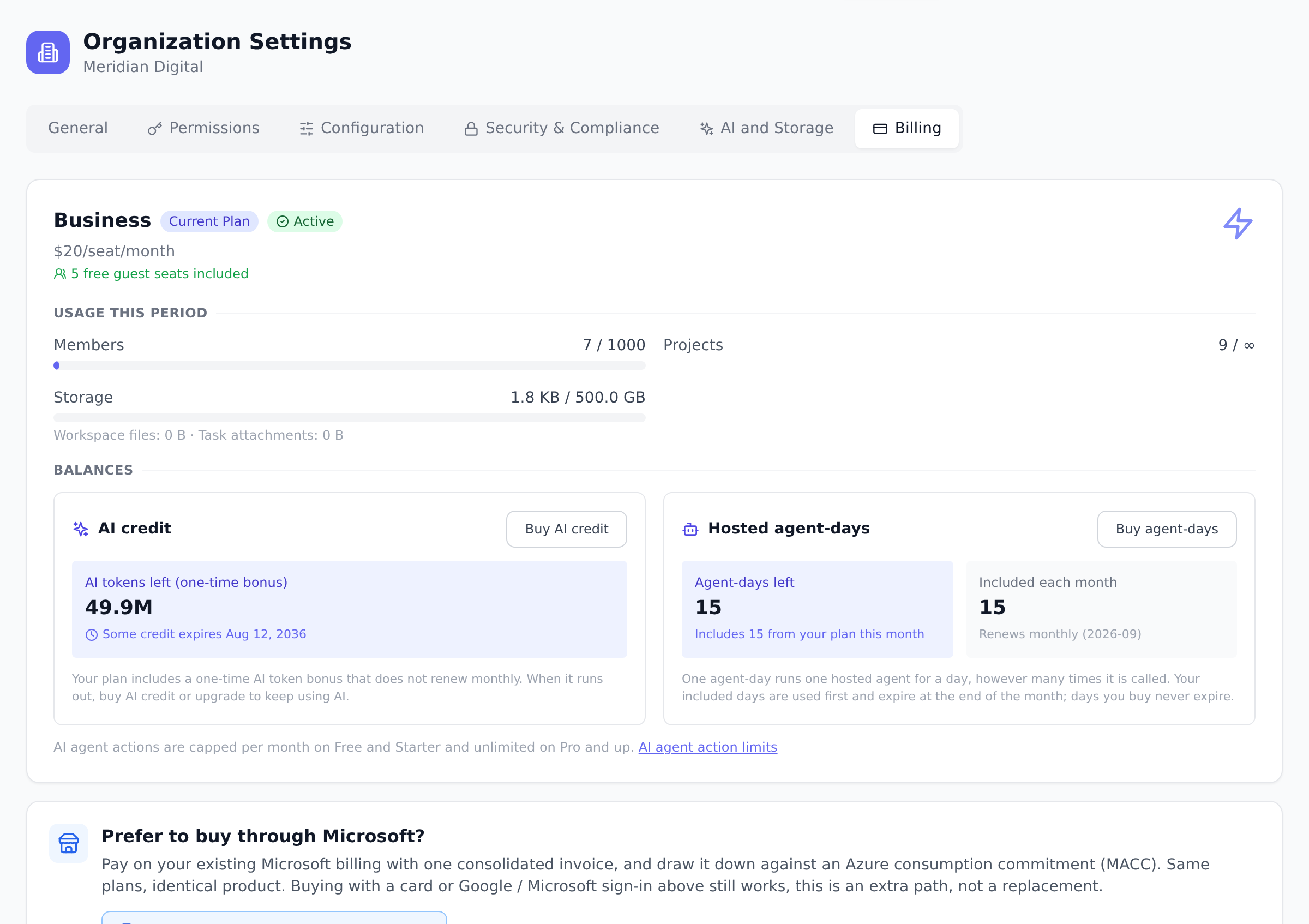
- Open Organization Settings and go to the Billing tab.
- The AI tokens card shows your remaining balance and labels it as the one-time bonus.
Buy more tokens
Section titled “Buy more tokens”Owners and admins can top up the balance directly from the app:
- Open Organization Settings → Billing and select Buy AI credit on the AI tokens card.
- Choose an amount (fixed denominations from 5 to 100 USD) and complete the checkout. This is a one-time purchase, not a subscription, and works on every plan including Free.
- The tokens appear as purchased credit next to your bonus balance. Purchased credit is spent first and is valid for 90 days from purchase.
When the balance runs out
Section titled “When the balance runs out”AI features stop with a clear “tokens used up” message; nothing else in Onplana is affected, and no charge happens. That includes work AI already produced: risks stay on the register and can still be dismissed or turned into tasks, and plans, reports and pages stay editable.
To keep going, buy AI credit. On Free through Business you can also move to a higher plan, which carries a larger one-time bonus. On Enterprise the next step up is Enterprise Plus, which is arranged with us rather than bought in the app, so credit is the self-serve route there.
The message names whichever of those you can act on. Buying is controlled by the same permission as the Billing tab, so if your workspace has not delegated it, the message tells you to ask whoever manages billing rather than offering you a purchase you cannot complete.
Spending guardrails for admins
Section titled “Spending guardrails for admins”A monthly cost cap is enforced in the backend, but it is not currently exposed in Organization Settings, so there is no panel to set one today. Your token balance is the guardrail admins can see and manage: watch it in Organization Settings → AI and Storage, and buy prepaid credit when it runs low.
Builds spend the same balance
Section titled “Builds spend the same balance”Building an app with Onplana Maker draws on this same balance: a build costs the tokens it actually uses, so a one-line tweak costs a fraction of a from-scratch app. There is no separate build currency and nothing extra to buy. See what a build costs for the details, including the Free plan’s daily build cap.
Do unused tokens expire? Depends on where they came from:
- The one-time bonus does not expire; it simply depletes as your team uses AI features.
- Purchased credit is valid for 90 days from purchase, and is always spent before your bonus balance so nothing goes to waste.
- Earned credit (referral and reward credit in Onplana Maker) never expires.
Who can see usage? Owners and admins see the balance and usage on the Billing tab. Individual members just use the features.
Does every AI feature cost the same? No, costs scale with how much the AI reads and writes. A short chat answer costs little; generating a full project plan or building an app costs more.
Worked example: $20 credit purchase
Section titled “Worked example: $20 credit purchase”- Purchase: $20 buys 3.2 million tokens at the standard rate ($5 adds 800,000). The credit appears on your Billing tab.
- Validity: purchased credit is valid for 90 days from purchase; unspent credit expires after that.
- Drain order: purchased credit is spent first, then the one-time bonus, so paid-for tokens are never the ones left to expire.
- What it covers: 3.2M tokens is roughly 3,000 chat questions, about 60 full project-plan generations, or well over a hundred app builds.
- Buy more any time: purchases stack, and the oldest credit drains first.
Best practices
Section titled “Best practices”- Watch the balance during heavy AI weeks. Plan generation, risk scanning, app builds, and agent activity add up quickly.
- Set the cost cap to WARN before BLOCK. You get email alerts as usage approaches the cap before anything is hard-stopped.
- Buy credit ahead of known-heavy periods. A $20-50 top-up comfortably covers a project kickoff with heavy AI planning.
- Let the bonus carry the steady state. The bonus is finite; use purchased credit for spikes.
- Check the usage breakdown. The Billing tab shows where the tokens are going, so you can see which feature consumes the most.
Troubleshooting / common pitfalls
Section titled “Troubleshooting / common pitfalls”- “Tokens used up” message. This is the hard stop, nothing is charged automatically. Buy credit or upgrade to keep going.
- Cost cap warning email but nothing blocked. WARN mode emails only. Switch to BLOCK mode if you want a hard limit.
- Purchased credit expired. Purchased credit unused after 90 days is gone; the one-time bonus and earned credit are unaffected.
- Bonus already exhausted. The bonus is one-time and does not renew monthly. Buy credit or upgrade for a larger bonus.
How this combines with other features
Section titled “How this combines with other features”- Token budget + Cost cap. Cost cap is a self-imposed ceiling separate from token balance.
- Token budget + Plan changes. Upgrading grants a new bonus per plan tier. See Compare plans and upgrade.
- Token budget + AI features. Every AI feature consumes tokens. Chat, plan gen, risk scan, agents.
- Token budget + Admin oversight. Admin page shows per-feature breakdown.
Coming from another tool
Section titled “Coming from another tool”| Tool | Mapping |
|---|---|
| OpenAI API credits | Direct concept; prepaid balance |
| Anthropic API balance | Direct |
| Microsoft Copilot consumption | Adjacent (per-seat licensing differs) |
| Custom AI gateway | Onplana adds first-class accounting |
| Pay-as-you-go AI | Onplana is prepaid by design |
Related
Section titled “Related”- Compare plans and upgrade, upgrade for more bonus
- Change your plan or billing cycle, plan mechanics
- Manage seats and guests, seats affect bonus size
Was this helpful?
Thanks for your feedback!