
Manage project status and progress
A project’s status and progress are how Onplana answers the question every stakeholder eventually asks: “where are we?” Status is a single word the team owns and updates; progress is a percentage Onplana calculates so nobody can polish the number. The combination makes portfolio reviews honest: a project at “Active 73%” tells the same story to the CEO that it tells to the PM, because they’re reading the same numbers from the same source.
The five statuses
Section titled “The five statuses”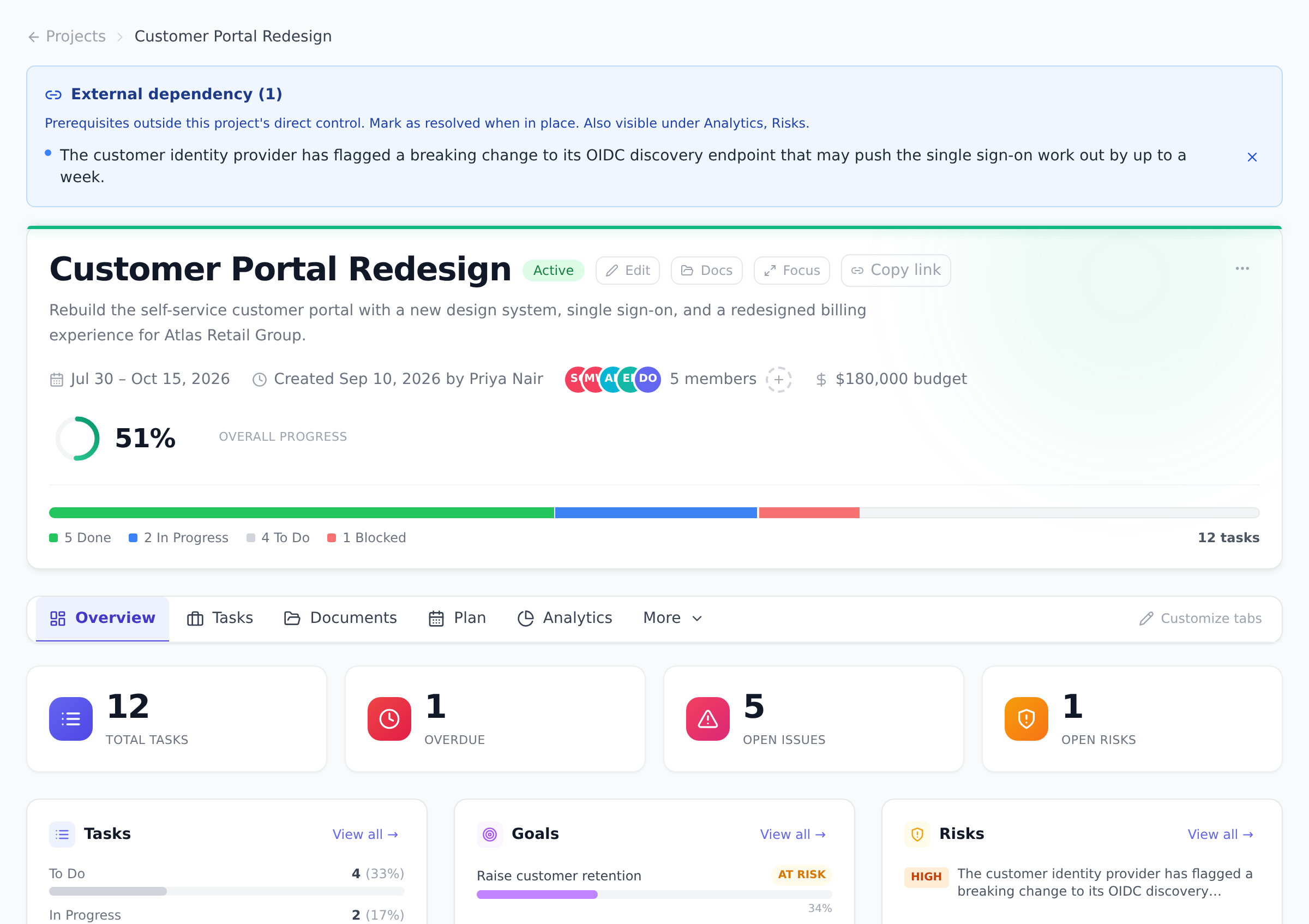
- Planning: the project is being scoped and has not started.
- Active: work is underway.
- On Hold: work is paused but expected to resume.
- Completed: the work is done.
- Cancelled: the project was stopped and will not be finished.
You change the status from the project’s actions menu via Edit Project, which also covers name, dates, budget, and other details.
Which status changes are allowed
Section titled “Which status changes are allowed”Most status changes are allowed in any direction, including putting a project back to Planning or taking it off On Hold. Two direct jumps are blocked because they skip a step that matters:
- Planning to Completed: work that never went Active should not jump straight to done. Move the project to Active first.
- Cancelled to Completed: a cancelled project must be reopened (set it Active) before it can be marked Complete.
If you try one of these, Onplana rejects the change and tells you which intermediate step to take.
How progress is calculated
Section titled “How progress is calculated”Project progress is derived from the project’s tasks and is recalculated automatically every time a task changes. You do not maintain it by hand, and any manual tweak is overwritten the next time a task is created, updated, or completed.
The calculation works in one of two ways:
- Effort-weighted: when every task carries an estimated-hours value (typical for schedules imported from Microsoft Project), each task contributes in proportion to its estimated effort. A 40-hour task moves the needle more than a 2-hour one.
- Count-based: when some tasks have no hour estimates (typical for projects built directly in Onplana), progress is the share of tasks that are Done.
Milestones are excluded from the math, and in hierarchical schedules the calculation walks the lowest-level tasks so summary rows do not distort the number.
Best practices
Section titled “Best practices”- Update status the same day reality changes. A project that’s been “Active” for three months but has actually been On Hold for two of them is lying to every dashboard. Make status updates part of the standup ritual: did anything change about the project’s lifecycle since last week? Five seconds at the standup is the cost; the price of leaving a status stale is portfolio reviews that surprise everyone.
- Use On Hold deliberately, not as “we’ll resume soon.” On Hold should mean “paused for a known reason with a resume condition.” Without a resume condition it becomes a parking lot. The discipline: add a comment when you move to On Hold explaining what would trigger resumption.
- Estimate every task in projects you care about. Once every task has an estimated-hours value, progress switches to effort-weighted math, which is dramatically more useful. The five-minute investment to estimate a 30-task project buys you a progress number that survives sprint-by-sprint variance.
- Use Cancelled, not Delete, when work stops permanently. Cancelling preserves the record (and the variance against the baseline); deleting hides it. Portfolio reviews benefit from “we cancelled 3 projects last quarter, here’s why”; they suffer when the cancelled work just disappears.
- Match Status and Completion intentionally. The “finished” state for the Projects page hide-finished filter is BOTH Completed AND 100% progress. A project at Completed but 73% is visible by default (it’s an honest signal: you marked it Complete but work remained). Same for 100% but still Active.
Troubleshooting / common pitfalls
Section titled “Troubleshooting / common pitfalls”- Onplana rejected my Planning → Completed change. That’s by design, the project must pass through Active first. Set the status to Active, then to Completed. The same applies to Cancelled → Completed.
- My project’s progress dropped when I added new tasks. The denominator grew. A project at 50% with 10 Done tasks out of 20 drops to ~33% when you add 10 more tasks (still 10 Done out of 30). The drop is honest math, not a bug.
- Progress is stuck at 0% even though I marked tasks Done. Two causes: (a) the tasks marked Done are subtasks, and the parent isn’t Done, the calculation walks lowest-level tasks; (b) milestones are excluded from the math, so a 100%-Done project of all-milestones reads as 0%.
- The Completed status shows the project as finished, but the Projects page still shows it. The Projects page “hide finished” filter requires BOTH Completed AND 100%. A Completed-but-67% project is still visible because the data says there’s unfinished work. To finish-hide it, either bring progress to 100% by closing or cancelling the remaining tasks, or filter manually.
- The status changed but the activity log didn’t record it. All status changes write to the project’s activity log (the Activity view) and the organization’s audit log (for Enterprise organizations). If the log is empty, refresh, the log is near-real-time but not instant.
How this combines with other features
Section titled “How this combines with other features”- Status + Reports. Cross-project Reports can group by project status, giving you a “how many projects are in each state?” snapshot. Useful for portfolio reviews and PMO reporting. See Run cross-project reports.
- Progress + Baseline. The Baseline view tracks the planned schedule. Progress percentage is one of the things baselines record, so you can ask “what was our progress at the time of the approved plan?” and compare to today. See Capture and compare baselines.
- Status + Notifications. Project status changes can trigger an in-app notification to project members via the “Project status changes” toggle in personal preferences (off by default to avoid noise on busy portfolios). See Manage notification preferences.
- Progress + EVM. The Finance view’s earned-value math uses progress as an input. Effort-weighted progress (when every task has estimated hours) produces more accurate EVM than count-based. See Read the EVM dashboard.
Coming from another tool
Section titled “Coming from another tool”| Tool | Mapping |
|---|---|
| Microsoft Project | Project status ≈ Project Information status; progress ≈ %Complete (manual in MSP, auto in Onplana) |
| Asana | Asana’s project status (“On track / At risk / Off track”) is closer to Onplana’s RAG health; the five statuses here are lifecycle states |
| Jira | Jira projects don’t have a lifecycle status; Onplana’s five are unique to PPM tools |
| Smartsheet | Smartsheet project sheets have similar status fields; the five-state lifecycle is direct |
| Monday.com | Status columns ≈ Onplana’s project status |
Why can’t I type a progress percentage on the project? Progress is a calculated rollup, not an opinion field. Keeping it derived from task state means two projects at 60% are comparable, and nobody can nudge a number without the underlying work moving.
Why did progress change when I added new tasks? Adding tasks grows the denominator. A project at 50% with 10 tasks drops when you add 10 more, because there is now more known work. That is the calculation being honest, not a bug.
Does marking a project Completed require 100% progress? No. Completed is a status you set; progress is calculated separately. The Projects page only treats a project as fully finished (for its hide-finished default) when it is both Completed and at 100%.
Can I have a custom project status? No, the five-state lifecycle is fixed. Custom statuses on tasks (the project’s content) are also fixed at five (To Do, In Progress, Review, Done, Blocked). The constraint is intentional, five is the most a team can hold in shared mental model, and consistency across projects is what makes portfolios comparable.
What happens if I delete tasks from a project? Progress recalculates against the smaller denominator. Deleting all Done tasks from a project drops the progress percentage; deleting unfinished tasks raises it. This is honest math but worth being aware of when bulk-cleaning up.
Why does the progress on the Finance view differ from the project header? They’re the same number, computed from the same task state. If they differ, refresh the page, there’s a small caching layer that can lag by a few seconds. Sustained difference is a bug; report it.
Can I see the progress history over time? Today the Activity view records status changes (with timestamps); the progress is just the current calculated value. To see progress over time, capture baselines at key milestones; the baseline records the progress at that moment.
Related
Section titled “Related”- Work with tasks, the underlying state progress reads from
- Capture and compare baselines, preserve progress snapshots over time
- Read the EVM dashboard, progress feeds the earned-value math
Was this helpful?
Thanks for your feedback!