
Understand roles and permissions
Onplana resolves every permission along two independent axes: the role you hold in the organization, and the role you hold inside each project. A person can be a plain Member at the organization level and still be the Project Owner of the projects they create.
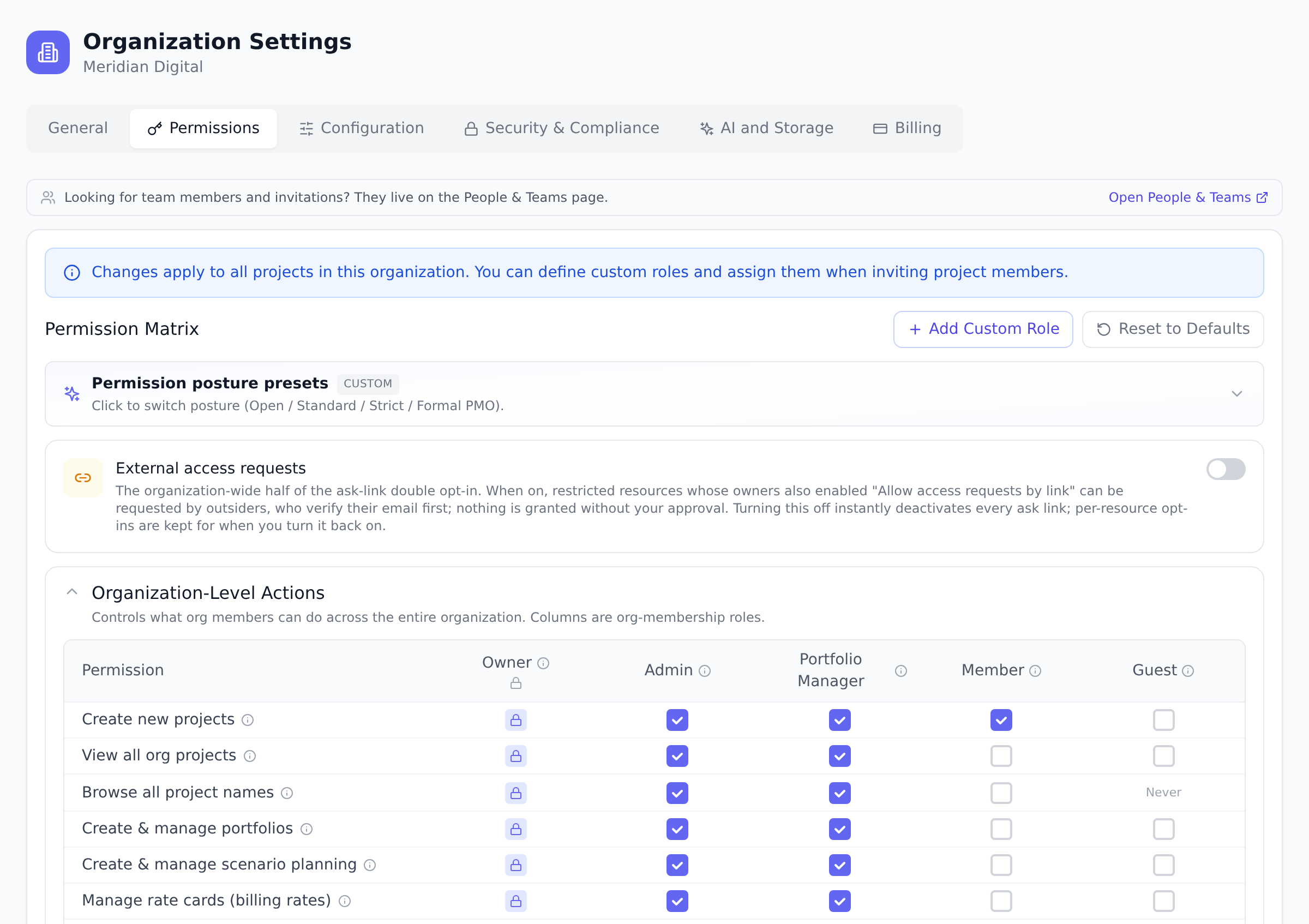
Organization roles
Section titled “Organization roles”- Owner: full control, always. Manages billing, edits the permission matrix, and can promote or demote anyone. The Owner’s access can never be restricted.
- Admin: governs the platform itself, security settings, integrations, governance configuration, and audit. Cannot change the plan or edit the permission matrix.
- Portfolio Manager: runs portfolios, teams, gate reviews, and the project pipeline. Can create projects and see every project in the organization by default.
- Member: regular contributor. Sees projects they own or are added to. By default, Members can create their own projects and become the Project Owner of those.
- Guest: external collaborator with access only to the projects they are explicitly added to. No organization-wide reads.
Preview a role before you assign it
Section titled “Preview a role before you assign it”You do not have to work any of this out from the tables. Open Organization Settings and go to the Permissions tab: under the organization-level table, Preview what each role sees shows the sidebar a person with that role gets, and a shortlist of what they can do. The same preview appears under the role picker when you invite someone, so you can check the role before the invitation goes out.
Watch the wall move as the role climbs. A Guest reaches 5 of 21 areas and a Member 11, both short by role, so a matrix change could lift them. An Admin reaches 20, and the one area still missing is held back by the plan instead, which no permission will open.
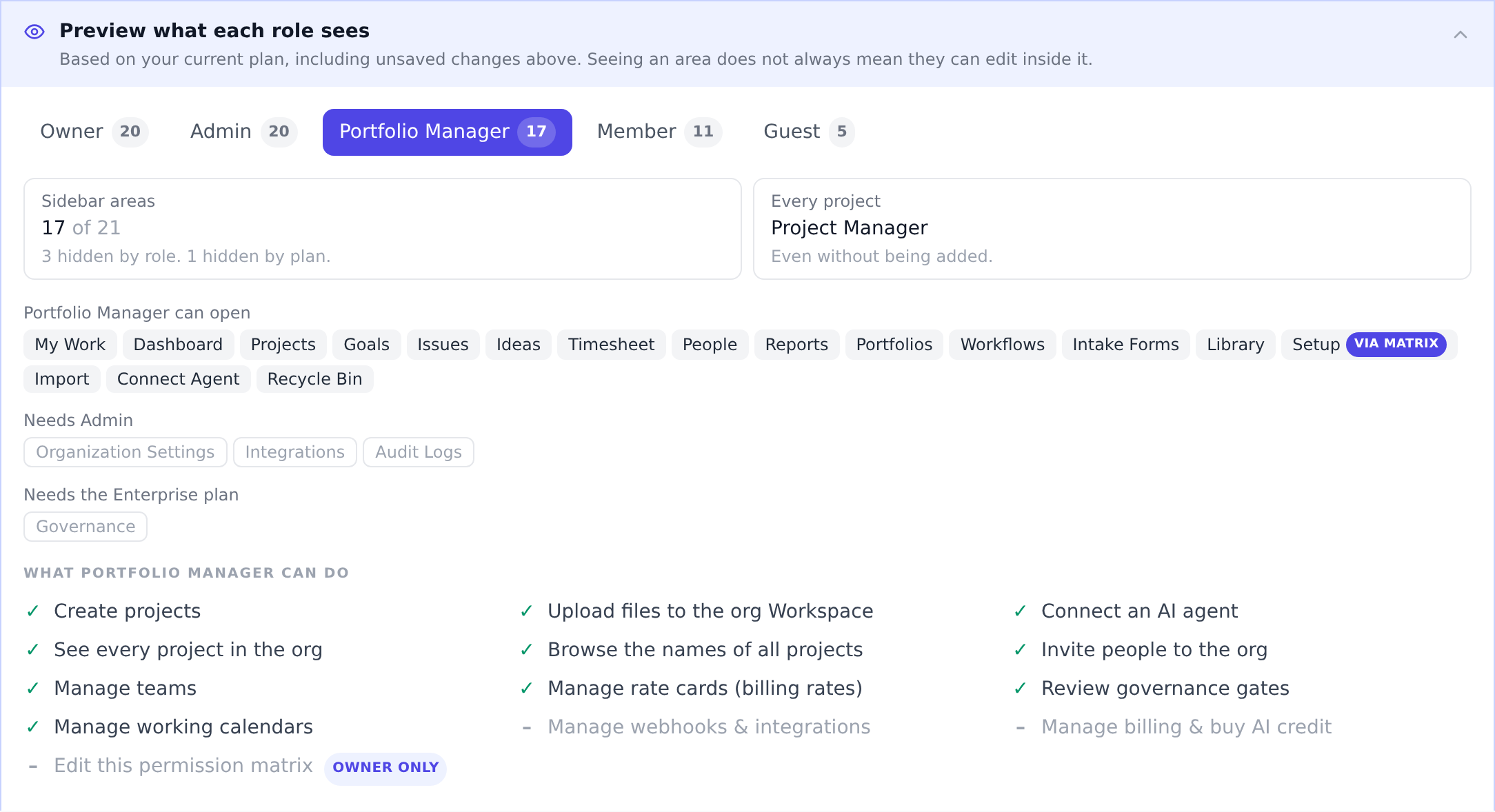
The panel opens with two tiles: how many sidebar areas the role reaches, and the standing it carries in every project (an Owner or Admin acts as Project Owner everywhere, a Portfolio Manager as Project Manager, even on projects nobody added them to). Choose Show what they’ll get for the areas themselves.
Everything the role can open is listed first. Everything else is grouped under a heading that names the fix, because the fix is different for each:
- Needs Portfolio Manager, Needs Admin, and so on: the role sits below that area’s floor. Give the person that role, or grant the matching permission in the matrix to lift this role instead. The heading always names the lowest role that opens the area, so it is the cheapest fix, and it follows your own matrix, not the defaults.
- Needs the Enterprise plan (or whichever tier): the role qualifies, but your plan does not include the feature. No permission change will reveal it.
- Via matrix on an area the role can open: it is visible only because a permission you granted lifts the role above its normal floor. Hover it to see which permission.
The preview reflects unsaved matrix changes, so you can toggle a permission and see the effect before you save. It covers sidebar reach and the shortlisted actions, not every one of the permissions in the matrix.
Changing someone’s role
Section titled “Changing someone’s role”Changing the role of a person who is already in your organization asks a different question: not “what is this role”, but “what changes for them”. So the confirmation shows the difference rather than a description.
Pick a new role from the dropdown on a member’s card in People & Teams and Onplana asks you to confirm, naming what that person gains or loses:
Change Aaliyah Gomez to Guest? Portfolio Manager -> Guest
Sidebar areas 18 -> 4 Every project Project Manager -> No role Loses Dashboard · Goals · Timesheet · Portfolios · Reports · People · Workflows · Intake Forms · Governance · Workspace · Setup · Recycle Bin · Import · Connect Agent
They keep the roles they have in their own projects.
The second row is the one that is easy to miss. An organization role carries a standing on every project, so demoting a Portfolio Manager does not only hide menu items, it removes their Project Manager authority across every project they were never explicitly added to. Roles you gave them inside a specific project survive, which is why the dialog says so.
Nothing changes until you confirm, and the lists are computed from your matrix, so a permission you have granted shows up as an area the person keeps. What someone can do inside an area can still differ.
Project roles have their own confirmation. Changing someone’s role in a project’s Team card asks the same way, listing the capabilities they gain or lose inside that one project.
What each role sees in the sidebar
Section titled “What each role sees in the sidebar”The preview above is the live version of this table. With the default permission matrix, each area of the app appears in the sidebar from the role listed below and up. Areas also carry a plan requirement where noted; a plan-gated area is hidden entirely on lower plans, whatever the role.
| Area | Visible to | Plan |
|---|---|---|
| My Work, Projects, Issues, Ideas | Everyone, including Guests | All plans |
| Timesheet | Everyone, including Guests | Pro and above |
| Dashboard, People, Workspace, Recycle Bin, Connect Agent | Member and up | All plans |
| Goals | Member and up | Business and up |
| Reports, Import | Portfolio Manager and up | All plans |
| Setup | Portfolio Manager and up (through Manage working calendars) | All plans |
| Workflows, Intake Forms | Portfolio Manager and up | Pro and up |
| Portfolios | Portfolio Manager and up | Business and up |
| Governance | Portfolio Manager and up | Enterprise and up |
| Organization Settings, Audit Logs | Admin and up | All plans |
| Integrations | Admin and up | Business and up |
Two rows deserve a footnote. A Member designated as a gate reviewer sees Governance while they have pending reviews, even without the matrix permission. And Billing is not a sidebar entry at all: it lives as a tab inside Organization Settings and is Owner-only by default.
What each role can do
Section titled “What each role can do”The matrix is the exhaustive list; this is the shortlist owners ask about, with the defaults. Every row except the last is a matrix toggle you can tighten or loosen.
| Action | Allowed for |
|---|---|
| Create projects (the creator becomes its Project Owner) | Member and up |
| Upload files to the organization Workspace | Member and up |
| Connect an AI agent | Member and up |
| See every project in the organization | Portfolio Manager and up |
| Invite people to the organization | Portfolio Manager and up |
| Manage teams, working calendars, and intake forms | Portfolio Manager and up |
| Manage rate cards and scenario planning | Portfolio Manager and up |
| Review governance gates | Portfolio Manager and up |
| Manage gate reviewers and evaluation criteria | Admin and up |
| Manage webhooks and integrations | Admin and up |
| Manage billing and buy AI credit | Owner |
| Edit the permission matrix | Owner (fixed, not a toggle) |
Project roles
Section titled “Project roles”Inside each project, membership carries its own role: Project Owner (automatically the creator), Project Manager, Project Member, Project Contributor, and Project Viewer. With the default matrix, each project action is available from the role listed below and up:
| Action | Allowed for |
|---|---|
| See tasks, docs, and boards | Viewer and up |
| Create tasks, change status, comment, edit their own tasks | Contributor and up |
| Upload files; add docs, wikis, and whiteboards | Contributor and up |
| Assign tasks; manage sprints, milestones, and dependencies | Member and up |
| Edit any task; delete tasks | Manager and up |
| Edit project settings; manage members; see budget and finance | Manager and up |
| Save the project as a template; manage automations | Manager and up |
| Delete the project | Owner only |
Organization roles floor into projects
Section titled “Organization roles floor into projects”Organization roles set a minimum inside every project, whatever the person’s project membership says. An organization Owner or Admin acts as Project Owner on every project, and an organization Portfolio Manager acts as Project Manager, even on projects they were never added to. Onplana always resolves the higher of the two, so adding your organization Admin to a project as a Viewer does not make them read-only there. Members and Guests have no floor: their access inside a project is exactly their project role.
The permission matrix
Section titled “The permission matrix”Open Organization Settings and go to the Permissions tab. The matrix shows two tables: organization-level actions (resolved against organization roles) and project-level permissions (resolved against project roles). Every cell is a toggle, so you can tighten or loosen the defaults to match how your organization operates.
Only the Owner can save changes to the matrix. Admins and Portfolio Managers can view it read-only. This is deliberate: it prevents an Admin from granting themselves broader rights through the matrix.
Posture presets
Section titled “Posture presets”Instead of toggling rows one by one, pick a posture above the matrix:
- Open: any member can do almost anything. Flat teams and startups.
- Standard (recommended): Members run their own work, Portfolio Managers oversee teams, Admins govern. This matches the defaults.
- Strict: Members consume the platform; Portfolio Managers and Admins build it.
- Formal PMO: projects originate only from the proposal pipeline, and every configuration change is centralized.
A preset stamps a coherent set of organization-level toggles; project-level rows and any custom roles are left untouched. You can still hand-tune individual rows after applying one, then select Save.
Selecting a posture does not apply it straight away. Onplana first lists every organization-level permission it would change, one line each, so you can see the effect before accepting it:
Applying Strict changes 8 org-level permissions. − Member loses Create new projects − Portfolio Manager loses Create & manage portfolios − Portfolio Manager loses Manage rate cards (billing rates)
The number is the difference between the posture and your matrix, not a fixed property of the posture. Eight is what Strict changes for an organization still on the defaults; once you have hand-tuned rows, the same posture will report a different count and a different list.
If your matrix already matches the posture you picked, it says so rather than showing an empty list. Choosing Apply preset only updates the draft; nothing reaches your organization until you select Save.
The last-Owner safeguard
Section titled “The last-Owner safeguard”An organization must always have at least one Owner. Onplana blocks demoting or removing the last Owner. To transfer ownership, promote another member to Owner first, then demote yourself or leave.
Best practices
Section titled “Best practices”- Pick a posture preset, then hand-tune sparingly. Standard works for most. Don’t accept defaults blindly; verify the preset matches your organization’s culture before going live.
- Treat Owner role as scarce. Two Owners is the minimum for redundancy. More than 3 is over-privileged. Last- Owner safeguard prevents accidental self-lockout.
- Document the matrix decisions. Why was scenario planning restricted to Admins? Write it down. Future admins will ask.
- Audit the matrix annually. Permissions drift as the organization evolves. A quarterly read of the matrix + posture-preset comparison surfaces policy drift.
- Use custom roles for genuinely-new patterns. Don’t recreate Member with one extra permission as a custom role. See Create custom roles.
Troubleshooting / common pitfalls
Section titled “Troubleshooting / common pitfalls”- Admin can’t edit the matrix. By design. Only Owner edits. This prevents privilege escalation.
- Posture preset highlight gone. Matrix hand-tuned beyond preset. Either save as custom or re-apply preset.
- Last-Owner can’t leave/demote. Promote another to Owner first. Required guardrail.
- Member can’t create project. Project creation is switched off in the permission matrix. Check the Formal PMO preset, or the individual toggle.
- Made an organization Admin a Project Viewer, but they can still edit. By design. Organization Owner and Admin act as Project Owner on every project, and Portfolio Manager as Project Manager; the higher of the two roles wins. A project role cannot demote an organization-level authority.
- Permission cell looks toggled but request denied. Plan-gating may override. Permission says yes; plan says no. The role preview names which one is blocking: an area grouped under Needs a role is blocked by the role or the matrix; one under Needs the … plan is blocked by the plan.
- A teammate says your link shows “You don’t have access”. Expected when they are in the organization but not on that specific project, page, library, or list. Roles govern what a person can reach in general; membership of an individual resource is separate. They can ask from that page, and you decide without changing anyone’s role. See Request access.
How this combines with other features
Section titled “How this combines with other features”- Roles + Custom roles. Defaults + custom roles cover most teams. See Create custom roles.
- Roles + Audit log. Every matrix change writes to audit log. See Read audit logs.
- Roles + SSO/SCIM. Roles can sync from IdP via SCIM. See Provision users with SCIM.
- Roles + 2FA. An organization can enforce 2FA per role tier. See Enforce two-factor authentication.
Coming from another tool
Section titled “Coming from another tool”| Tool | Mapping |
|---|---|
| SharePoint group permissions | Direct concept |
| ServiceNow ACLs | Direct |
| Jira project roles | Direct (project-level axis) |
| Asana workspace permissions | Direct (org-level axis) |
| Custom RBAC | Onplana uses standard role-based model |
Why can my Admin not edit the matrix? Matrix editing is restricted to the Owner so that nobody can widen their own permissions. Admins can review the matrix and ask the Owner to apply changes.
Can Members really create projects? Yes, by default, and the creator becomes the Project Owner of that project. Organizations that want projects to flow through a pipeline turn this off with the Formal PMO preset or the individual toggle.
What is the difference between Portfolio Manager and Project Manager? Portfolio Manager is an organization role with oversight across projects. Project Manager is a per-project role inside a single project. The same person can hold either, both, or neither.
Can I add roles beyond the defaults? Yes, on the Business plan and above you can define custom project roles. See Create custom roles.
Why does an Admin lose access to a feature after a plan downgrade? Plan-gating sits independently of permissions. The matrix says yes; the plan says no. Verify the feature is included on the current plan.
Can I see what a specific role can do before saving? Yes. The Permissions tab includes Preview what each role sees: pick any role and it shows the sidebar that role gets (with why each hidden area is hidden, role or plan) and a shortlist of what it can do, computed against your matrix including unsaved changes. The invite dialog shows the same preview for the role you are about to grant. Per-user calculation (role plus custom-role grants on specific projects) still requires looking the person up.
Does the matrix support deny rules? No, Onplana uses default-deny + explicit-allow. Permissions are positive grants.
Related
Section titled “Related”- Create custom roles, beyond defaults
- Request access, when a role is not the thing standing in the way
- Read audit logs, matrix change history
- Provision users with SCIM, IdP role sync
Was this helpful?
Thanks for your feedback!