
Assign work to an AI agent
Once an agent is connected, it shows up as a member of your organization and can be assigned tasks like anyone else. The agent finds its assigned work, does it, and reports back through comments and status changes, the same trail a human teammate leaves.
Assign a task to an agent
Section titled “Assign a task to an agent”The Run with Onplana Agent card sits under the task’s description, so you write the brief right below the description it draws on. Run with Onplana Agent is also in the task’s … menu, which scrolls you there.
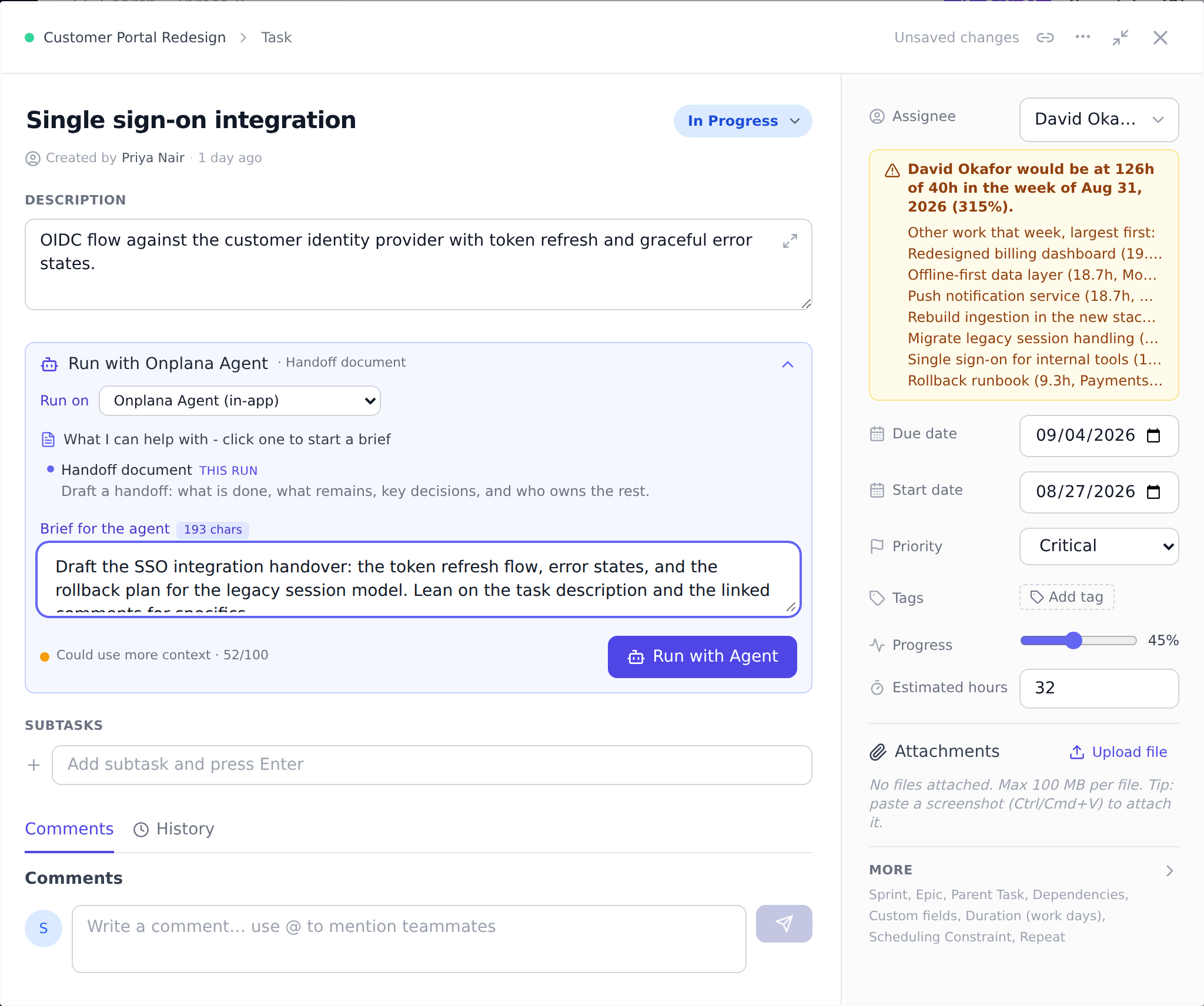
- Open a task and set the assignee to the agent persona, just as you would assign a person.
- Add a short brief in the task description: what done looks like, any constraints, and where to put the result. Agents act on what the task says, so a clear brief produces better output.
- The agent picks the task up on its next sync, sets it to in progress, does the work, and posts progress as comments.
Working alongside the agent
Section titled “Working alongside the agent”- The agent’s progress notes appear as task comments attributed to its persona.
- Deliverables it produces (drafts, reports, analyzes) land in the agent review inbox for a person to approve before they are treated as final.
- You can comment back on the task to redirect it; the agent sees your comment on its next sync and responds.
For the bigger picture of agents in Onplana, see Agents: MCP and Run with Onplana Agent on the main site.
How does the agent know what I want? From the task: its title, description, and your comments. Treat the task as the brief. The more concrete the acceptance criteria, the better.
Can I assign a whole project to an agent? You assign individual tasks. For larger work, break it into tasks (or have the agent break it down) and assign the pieces.
What if the agent gets it wrong? Comment on the task to correct course, or reject its deliverable in the review inbox. Nothing an agent produces is final until a person signs off.
Best practices
Section titled “Best practices”- Write briefs like you’re onboarding a new hire. Acceptance criteria, constraints, links to context. Agents work from the task content.
- Start with low-stakes tasks. Build trust + verify the agent’s output quality before delegating critical work.
- Use task threads (not the general tab) for ongoing dialog. The [Agent] thread tab keeps human-agent conversation focused. See Talk to agents in task threads.
- Review deliverables promptly. Agents land work in the review inbox. Stale inbox = stalled agent. See Review agent output.
- Reject + comment to redirect. Rejection with explanation = the agent learns + tries again. Silent rejection produces silent re-tries.
Troubleshooting / common pitfalls
Section titled “Troubleshooting / common pitfalls”- Agent never picked up the task. Poll cadence is per-agent (typically ~hourly). Wait, or use Run-with- Agent for instant.
- Agent produced something unexpected. Brief too vague. Refine + re-assign.
- Deliverable lands but is half-baked. Acceptance criteria unclear. Reject + clarify.
- Agent loop on the same task. Shouldn’t happen: agent-authored comments are skipped automatically. If a loop persists, file a bug.
- Run with Onplana Agent button missing. The task’s agent has no Notify webhook URL, so Onplana has nowhere to send the request.
How this combines with other features
Section titled “How this combines with other features”- Agent assignment + Task threads. Threaded conversation on assigned tasks. See Talk to agents in task threads.
- Agent assignment + Review. Deliverables route to review inbox. See Review agent output.
- Agent assignment + Run with Onplana Agent. Push trigger bypasses poll cadence. See Request an external agent run.
- Agent assignment + Audit log. Every agent action audit-logged. See Read audit logs.
Coming from another tool
Section titled “Coming from another tool”| Tool | Mapping |
|---|---|
| Microsoft Copilot agent assignment | Direct concept |
| Slack agent bots | Direct |
| Custom workflow with AI step | Onplana’s first-class agent persona |
| Custom ChatGPT API integration | Onplana adds first-class membership |
| Linear Cycles + AI | Adjacent |
Related
Section titled “Related”- Talk to agents in task threads, dedicated thread
- Review agent output, approval gate
- Connect an external agent, agent setup
Was this helpful?
Thanks for your feedback!