
Link task dependencies
A task list without dependencies is just a checklist; a task list with dependencies is a schedule. The arrows you draw between tasks are what let the Gantt chart compute the critical path, what surface scope creep when you compare to a baseline, and what let MS Project imports come across with the original logic intact. Wiring them is a five-second action per link, but the discipline of wiring them at all is what separates projects that finish on time from projects that surprise everyone.
The four link types
Section titled “The four link types”Onplana supports the four standard dependency types, the same set you know from Microsoft Project:
- Finish-to-Start (FS): the predecessor must finish before the successor starts. This is the default and covers most real cases.
- Start-to-Start (SS): the successor cannot start until the predecessor has started. Useful for work that runs in parallel after a shared kickoff.
- Finish-to-Finish (FF): the successor cannot finish until the predecessor finishes. Useful for activities that must wrap up together.
- Start-to-Finish (SF): the successor cannot finish until the predecessor starts. Rare, but it exists for shift-handover style work.
One pair of tasks can carry more than one link. Design and build that kick off together and must also land together is genuinely two relationships, so you add an SS and an FF between the same pair and the scheduler honours both. What Onplana refuses is the same type twice on one pair, which is a duplicate rather than a second relationship: that comes back as “A dependency of this type already exists between the selected tasks.”
Lag and lead time
Section titled “Lag and lead time”Every link takes an optional Lag value in days. A positive lag adds a waiting period (“start two days after the design finishes”); a negative lag is lead time, letting the successor overlap the predecessor by that many days. Links with lag show the offset next to the type, for example FS +2d.
Link two tasks
Section titled “Link two tasks”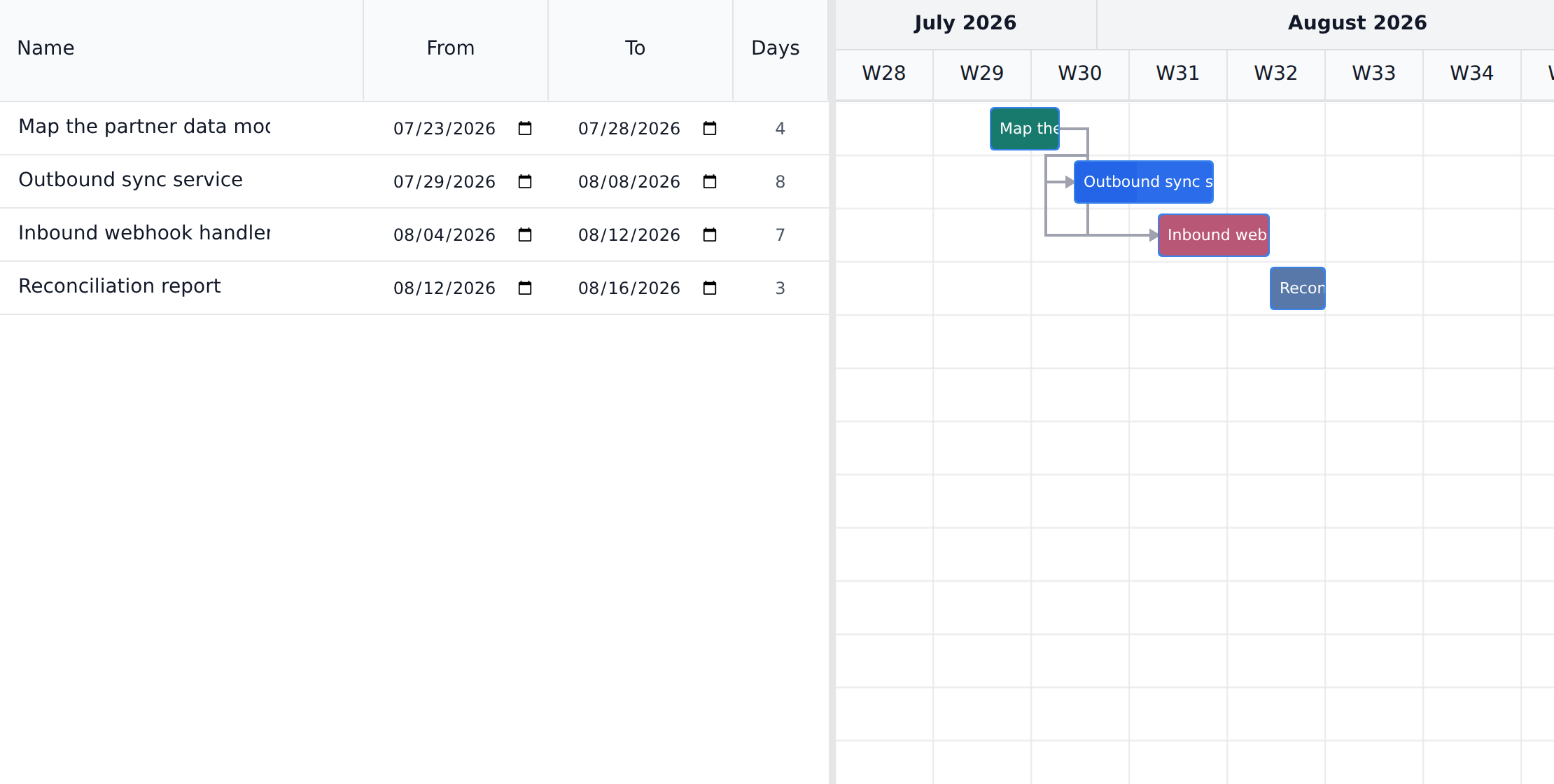
-
Open the task and find its dependencies section. It has two lists: Predecessors (tasks this one waits on) and the tasks blocked by this one.
-
Pick the other task, choose the link type (FS, SS, FF, or SF), and set a lag in days if you need one. Lag defaults to 0.
-
Add the link. It immediately appears on both tasks, and a finish-to-start link also draws as an arrow on the Gantt chart. SS, FF, and SF links are recorded and enforced by the scheduler but are not drawn as arrows (the arrow shape can only express finish-to-start, so drawing them would misstate the logic); the task’s bar tooltip notes when it carries undrawn link types.
Remove a link
Section titled “Remove a link”The reliable way is the same place you created it, and it differs between the web app and the desktop app.
-
In the web app, open either task, expand More in the properties rail, and use the remove button on the link’s row under Predecessors or Successors. The link disappears from both tasks at once, because a dependency is one record shared between them. While More is folded it lists what it holds, so you can confirm Dependencies is in there before opening it.
-
In Onplana Schedule, edit the Predecessors cell in the grid and delete the entry, the same way you would in Microsoft Project. The Task details panel deliberately does not repeat the control: predecessors live in the grid, where they already edit.
You can also delete a link on the chart itself. Click the arrow to select it, and a round red delete button appears on the successor’s bar, at the end the arrow attaches to. The button is not on the arrow you clicked, so look at the bar rather than at the arrow.
Two things stop the chart gesture working at all, and both are silent:
- In Onplana Schedule, the chart is read only until you start editing. Clicking an arrow in view mode does nothing, by design. Use the Predecessors cell, or switch to editing first.
- In the web app, changing links needs permission. If your role does not allow managing dependencies, the chart refuses the change without a message. The dependencies section on the task is the better route, because it shows you what you can and cannot do.
Changing a link is a delete and a redraw. There is no edit in place: the link type and its two endpoints are what a link IS, so a link with a different type is a different link.
Circular dependency protection
Section titled “Circular dependency protection”Onplana refuses any link that would create a loop. If task A waits on B, and B waits on C, then linking C to wait on A would mean nothing can ever start; the app rejects it with the message “This dependency would create a circular chain”. The check walks the whole dependency graph, so it catches indirect loops through any number of intermediate tasks, not just direct A-to-B-to-A pairs.
Scheduling constraints
Section titled “Scheduling constraints”A dependency says what a task waits for. A constraint says what its dates have to be, whatever the dependencies work out to. Open the task, expand More in the properties column, and set Scheduling Constraint. A task carrying anything other than the default shows its code next to More even while that section is closed, so a pinned date is visible without going looking for it.
All eight Microsoft Project constraints are here, and they group by what they actually do to the schedule:
| Constraint | What it does |
|---|---|
| As Soon As Possible | The default, and not really a constraint: the task starts as early as its predecessors allow. |
| As Late As Possible | Slides the task as late as it can go, spending its own float rather than banking it. |
| Start No Earlier Than, Finish No Earlier Than | Push the early dates forward. Nothing may be scheduled before this. |
| Start No Later Than, Finish No Later Than | Bound the late dates. The plan has to reach the task by then. |
| Must Start On, Must Finish On | Pin both ends to one day, early and late together. |
The six that name a date need one, so a date field appears when you pick one of them. The two “as possible” options take none, and the field disappears.
The difference between those two middle rows matters more than it reads. A “no earlier than” constraint moves work later and the plan absorbs it. A “no later than” constraint moves nothing: it sets a date the plan has to meet, and when the work does not fit, the shortfall surfaces as negative float instead of a task quietly sliding somewhere it does not belong.
Constraints warn, they do not overwrite
Section titled “Constraints warn, they do not overwrite”Setting a constraint does not rewrite the dates you saved. Where the computed schedule cannot honour one, the Gantt lists it under Scheduling Constraint Violations above the chart, naming the task and the exact miss, for example “Scheduled to start 12 May but must start on 5 May”. What to do about it is your call; the app will not move a date you set so its own arithmetic comes out even.
Reading float, including below zero
Section titled “Reading float, including below zero”Float is how long a task can slip before it moves the project’s finish, and each bar’s tooltip on the Gantt gives you the number:
- N days of float, shading green to blue to amber as the number shrinks, is room you have.
- Critical, no float is zero. Any slip here moves the end date.
- N days over-committed, in a deeper red, is float below zero.
That last one is the payoff for modelling constraints properly. Negative float means the network cannot reach a date something has already promised, whether that is a “no later than” constraint, a deadline, or the project finish itself. Three days over-committed means precisely that: the chain needs three days it does not have. No amount of rescheduling inside the plan recovers them, so read it as a prompt to change the promise, the scope, or the resourcing rather than the dates.
Deadlines are a promise, not a constraint
Section titled “Deadlines are a promise, not a constraint”Hard Deadline is a separate field on the task, meant for the contractual or compliance date rather than the one you are working to. It blocks nothing and moves nothing. It works by narrowing the room the task has: the scheduler counts the deadline among the dates the plan must reach, so missing one shows up as negative float on that task and on the chain feeding it. There is no deadline marker or banner of its own today, which makes the float number the place you read it.
So use a deadline for a date you have promised but do not want argued with, and a “finish no later than” constraint when you want the miss called out by name in the violations list.
Best practices
Section titled “Best practices”- Default to Finish-to-Start; reach for the others only when needed. FS is the type ~95% of real-world dependencies should be. SS, FF, and SF exist for real cases but are often picked for “looks right at the moment” reasons that don’t survive a replanning session. If you can describe the dependency as “X must finish before Y starts,” it’s FS.
- Use lag for handovers, not slack. Positive lag is for real waiting time (curing concrete, regulatory cooling-off, batch processing). Don’t use lag to “buy yourself room”, pad the task’s own estimate instead, where it shows up in the capacity math.
- Wire dependencies before capturing the baseline. The baseline records the dependency graph along with the dates. If you capture a baseline first, then wire dependencies, the baseline doesn’t have the structure it needs to be useful for drift detection. Order: tasks → estimates → dependencies → baseline.
- Sequence with dependencies, pin with constraints, and in that order. A constraint is a fixed date, so every one you add is a piece of the schedule that can no longer respond to the plan changing around it. Most “this task must be in March” feelings are really a dependency nobody wired. Save constraints for dates the outside world sets: a delivery window, a regulator, a venue booking.
- Treat circular-chain rejections as a planning bug, not a tool bug. When Onplana rejects a link as circular, the schedule has a logic problem: somewhere in the chain you already established Z → A, and you’re now trying to add A → Z. The fix is to reconsider which dependency is real and remove the redundant one.
Troubleshooting / common pitfalls
Section titled “Troubleshooting / common pitfalls”- My dependency picker does not list the task I want. The picker only shows tasks from the same project. A dependency can still span two separate projects, and the schedule honours it, but the picker will not create one: those links arrive by moving a task that already has dependencies, or from an AI agent or the API. See “Can I link tasks in different projects?” below. If you would rather keep two plans apart, milestones work as handoff points, one per project, marked done when the project hands off.
- The arrow on the Gantt looks wrong. Common cause: the lag is negative when it should be positive (or vice versa). Open the link in the task’s edit view and check the lag sign; the link list there shows the offset next to the type. The arrow itself does not render the lag.
- I linked two tasks but see no arrow. Only finish-to-start links draw as arrows; an SS, FF, or SF link is recorded and enforced by the scheduler, and the task’s bar tooltip notes that it carries link types that are not drawn. An arrow can also be hidden when its predecessor is filtered out of the chart (done tasks hidden, another assignee selected, or a collapsed subtask).
- I added an FS link but the successor still has a date before the predecessor finishes. Adding a link records the logic, it does not reschedule anything by itself. From then on, though, editing either task’s dates or duration does push whatever depends on it. So the two quick fixes are to nudge the predecessor’s dates, which cascades down the chain, or press Recalculate on the Gantt to re-run the whole network and apply the computed dates in one go.
- Onplana rejected a link as “circular” but my plan is small. Walk the chain backward from the task you’re trying to add the link to. The cycle is usually two or three hops out and easy to miss, Onplana’s check catches indirect loops, not just direct A-to-B-to-A.
- “GRAPH_TOO_LARGE” error. The cycle check is bounded at 500 tasks in the walked subgraph. If your schedule has linkage going through a thousand tasks, the project probably has more dependencies than it needs, collapse pass-through chains (A → B → C where B has no real work) into direct links.
How this combines with other features
Section titled “How this combines with other features”- Dependencies + Gantt. The Gantt is where dependencies become visible; the dependency arrows make schedule conflicts obvious in seconds. The Gantt also exposes the critical path (computed from dependencies), which is the only useful signal for deciding which task slippage matters. See Plan on the Gantt chart.
- Dependencies + Baseline. Capture a baseline once dependencies are wired and dates feel right. The baseline records the dependency structure, so a later “the critical path changed” question can be answered against the original plan, not just the current state. See Capture and compare baselines.
- Dependencies + Auto-Schedule. The Gantt’s Auto-Schedule button reads the dependency graph (types + lag + working calendar) and propagates earliest-start dates from project start. Useful after a major replanning session when you’ve moved several tasks manually and want the cascade computed for you.
- Dependencies + Import.
.mppand Project Online imports preserve the dependency graph with link type and lag intact, and all eight constraint types plus each task’s deadline come across as themselves rather than being flattened into the nearest thing we supported. After import, the Gantt’s critical path computation matches what you would have seen in MS Project. See Import from Microsoft Project.
Coming from another tool
Section titled “Coming from another tool”| Tool | Dependency mapping |
|---|---|
| Microsoft Project | Same four link types (FS/SS/FF/SF), the same lag-in-days convention, and all eight constraint types |
| Asana | Asana has FS only; SS/FF/SF imports map to FS in Asana, but Onplana preserves the original |
| Jira | Jira issue links (“blocks”, “is blocked by”) map to FS dependencies in Onplana |
| ClickUp | Same four link types; ClickUp lag is in working days, same as Onplana |
| Primavera P6 | Identical four link types + lag; .xer imports preserve all four |
Do dependencies move dates automatically? Partly, and the split is worth knowing. Creating a link changes no dates. After that, editing a task’s dates, duration, or constraint reflows whatever depends on it, so moving a predecessor carries its successors along. Three things stay put deliberately: the task you just edited, any task with no predecessors at all (those dates are yours, not the network’s), and a successor you left undated on purpose. Recalculate on the Gantt re-runs the whole network on demand and does fill in those undated tasks. Auto-Schedule is a different button: the AI-assisted planner, not this.
What does “3 days over-committed” mean on a task? Its float is negative by three days, so the plan cannot reach a date something has promised. See Reading float, including below zero.
Are dependencies imported from Microsoft Project? Yes. Links from an imported plan come across with their type and lag intact, and so do task constraints and deadlines, all eight constraint types rather than the closest match. See Import from Microsoft Project.
Can I link tasks in different projects, or integrate two separate projects? Yes, and the schedule honours it: a task waiting on a task in another project is scheduled after it finishes. If you meant integrating Onplana with another system such as Microsoft or Google, that is a different kind of integration, see Connect Google and Microsoft. Two things are worth knowing. The dependency picker offers tasks from the current project only, so these links come from moving a task that already had dependencies, from an AI agent, or from the API. And the link works one way: Onplana schedules one project at a time, so the project holding the predecessor is scheduled without reference to the one that follows it, and a change there reaches the follower the next time the follower is recalculated. If two files are really one schedule, put them in one project instead, see Combine several schedule files.
What’s the maximum lag I can set? There’s no hard upper limit; the value is days. Practical lag is usually 0-30 days. If you find yourself setting a 90-day lag, the “waiting time” probably deserves to be its own task instead.
Can I bulk-create dependencies?
Not from the UI today. The MCP API supports link_dependency calls
which let connected AI agents wire dependencies in bulk based on
patterns you describe. See
Connect an external agent.
Why is my critical path empty after I wired dependencies? The critical path is computed from the entire dependency graph; if no task has both a predecessor and a successor (i.e., the graph is a loose forest, not a connected tree), there’s no chain to compute. Wire dependencies through the schedule and the path appears.
Can I see all dependencies in a list? The Gantt is the strongest visual surface for the full graph. The list view of each project doesn’t yet have a “Dependencies” column, but every task’s edit view shows its predecessors and successors inline.
Related
Section titled “Related”- Plan on the Gantt chart, where the arrows live visually
- Capture and compare baselines, the right next step after wiring dependencies
- Import a Microsoft Project file, bring dependencies in from an existing plan
Was this helpful?
Thanks for your feedback!