
Submit a proposal
A proposal is how an idea enters the governance pipeline. You describe the initiative, its cost, and its justification; reviewers then decide at each gate whether it deserves to become a project. Any member can submit one.
Create the proposal
Section titled “Create the proposal”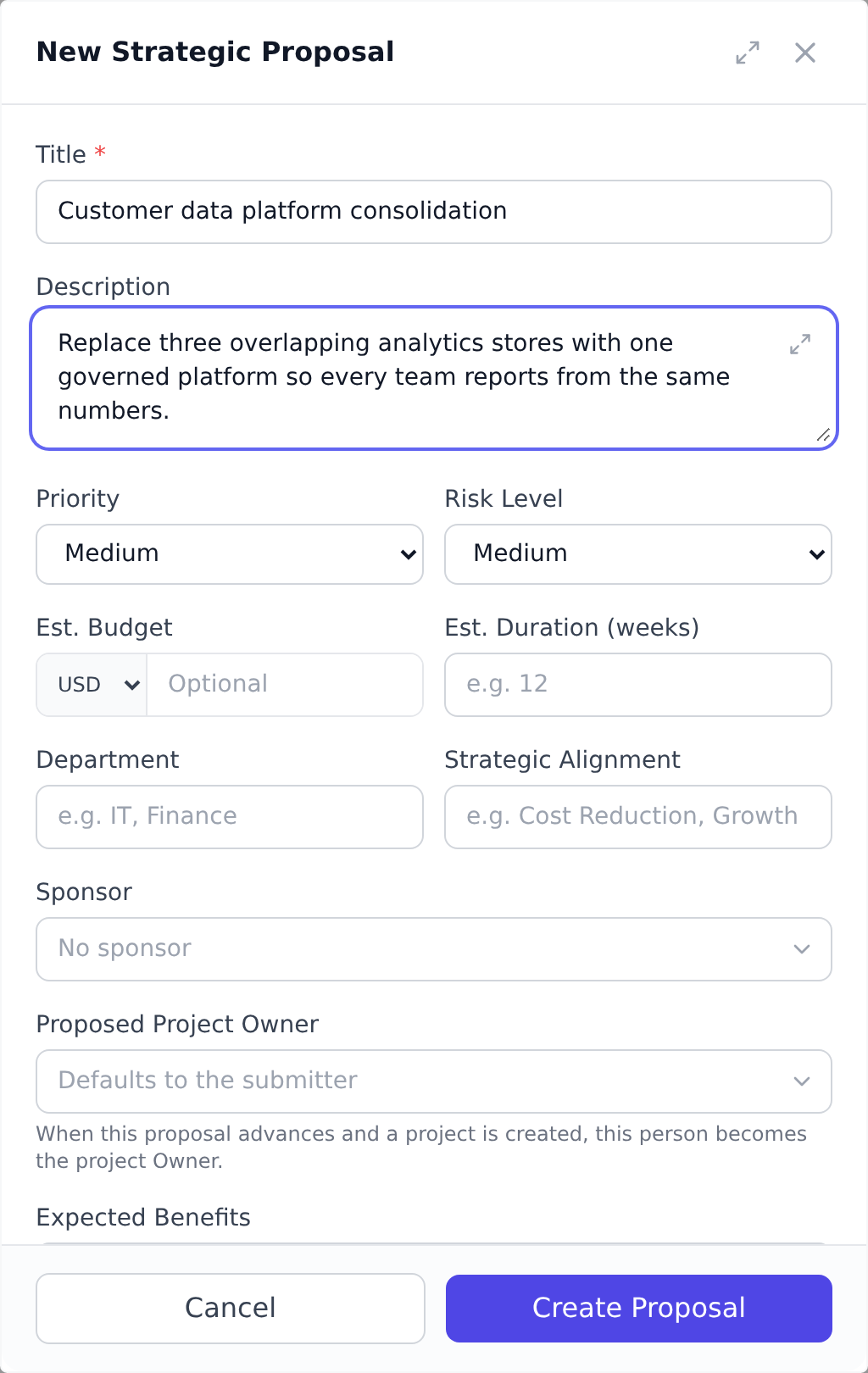
-
On the Governance page, select New Proposal. If your organization routes project creation through governance, selecting New Project on the Projects page opens the same proposal form, see Classify strategic vs operational work.
-
Give it a Title (required) and a description of the initiative.
-
Fill in the decision-making fields: Business Justification, the estimated budget with its currency, the estimated duration in weeks, the Department, expected benefits, a risk level, and a priority. Your organization controls which of these fields appear and which are required, so your form may differ.
-
Pick a Sponsor. The sponsor must be a member of your organization and will receive notifications as the proposal moves through the pipeline.
-
Save. The proposal starts in Draft, where you can keep editing it.
Submit it for review
Section titled “Submit it for review”When the proposal is ready, open it and select Submit for Review. It moves to Submitted, where a reviewer picks it up and starts the first gate. From that point the stages and gates described in Understand the proposal pipeline take over.
What you see, and what reviewers see
Section titled “What you see, and what reviewers see”On the Governance page, members without governance review rights see only the proposals they submitted. Reviewers (Portfolio Manager and above by default) see the entire pipeline. Your proposals are always visible to you at every stage, including after rejection or approval.
Staying informed
Section titled “Staying informed”You are notified whenever someone else acts on your proposal: when it is moved into review, put on hold, rejected, or when a gate decision is recorded. If the proposal is approved and a project is created from it, the notification includes the new project. Your sponsor receives the same updates.
Best practices
Section titled “Best practices”- Write the business justification with the reviewer’s question in mind. “Why does this matter, and what happens if we don’t do it?” is what gate reviewers actually ask. A justification that answers both directly (measurable benefit, real downside) advances; one that gestures at “strategic alignment” without specifics gets sent back.
- Cite numbers, not adjectives. “Reduces ticket volume by 20%” beats “improves customer experience”; “$120k saved in vendor fees over 2 years” beats “significant savings”. Quantified benefits move through scoring criteria faster.
- Pre-attach supporting documents in the proposal’s workspace. Reviewers prefer “here’s the financial model and the customer survey” to “we’ll send those over later.” The proposal workspace exists precisely for this; use it.
- Pick a sponsor who will actually advocate. A sponsor named on the proposal but uninvolved becomes a question at the first gate: “is the sponsor really bought in?” Talk to them first, get their commitment, and only then list them.
- Submit when you’d defend the proposal in a five-minute meeting. Drafts are free to evolve; submitting is the moment the organization commits to spend reviewer time on it. The polish-to-submit ratio matters, the first three drafts should be raw, the submitted version should be tight.
Troubleshooting / common pitfalls
Section titled “Troubleshooting / common pitfalls”- The Submit button is grayed out. Required fields are missing. The form highlights which ones; usually the missing fields are sponsor, business justification, or estimated duration.
- My proposal went straight to Rejected on first review. Reviewers can reject at any gate. Open the proposal to see the rejection reason and reviewer comments. The proposal stays in your list for reference and can be resubmitted as a new proposal with the issues addressed.
- I can’t see other people’s proposals. That’s by
design, non-reviewers only see their own. Becoming
a designated gate reviewer (see
Set up gate reviewers)
or holding the
org.governance.reviewpermission gives the org-wide view. - My submitted proposal seems stuck. Three causes: (a) reviewers haven’t picked it up yet (governance pipelines often run weekly cycles); (b) it’s on a hold state set by reviewers awaiting more info; (c) the assigned reviewer is OOO. The proposal page shows the current stage and any reviewer notes; if it’s been stalled for over a sprint, ping the sponsor.
- I need to change something after submitting. Submitted proposals stay editable by their submitter, the same as Draft and the working stages between gates. Editing is locked while the proposal sits at a review gate, and also while it is on hold, rejected, completed, or archived. There’s no withdraw action, so once it is at a gate the way to get changes in is a reviewer’s More Info decision plus the proposal’s comments, or a rejection followed by a fresh proposal.
How this combines with other features
Section titled “How this combines with other features”- Proposal + Proposal documents workspace. Each proposal gets a small workspace (documents library + stakeholder register) that you can populate during drafting. When the proposal is approved and becomes a project, the workspace transfers, the new project starts with the documents already attached. See From proposal to governed project.
- Proposal + Intake forms. Public intake forms can feed proposals automatically: customer suggestions become proposals at draft stage, ready for the PMO to refine. See Turn intake submissions into proposals.
- Proposal + Evaluation criteria. Each gate’s scoring uses the org-defined evaluation criteria. Understanding what reviewers will score against helps you frame the proposal to match. See Configure evaluation criteria.
- Proposal + Designated reviewers. Gates can have designated reviewer panels. Knowing who reviews the first gate lets you have informal conversations before submission (a healthy pattern, not gaming). See Set up gate reviewers.
Coming from another tool
Section titled “Coming from another tool”| Tool | Mapping |
|---|---|
| Microsoft Project Online, Project Detail Pages | Proposals ≈ project requests in PWA; same idea of “demand intake before scheduling” |
| ServiceNow Project Portfolio Management | Direct concept; ServiceNow Demand ≈ Onplana proposal |
| Smartsheet Project Portfolio Management | Similar intake forms feed proposals |
| Jira plus Advanced Roadmaps | No native proposal flow; teams use a “Demand” project type |
| Spreadsheet-based intake | Onplana proposals replace this with structured fields + auditable workflow |
Can I edit a proposal after submitting it? Drafts are freely editable. Once a review starts, editing is locked so reviewers score a stable document. If reviewers need changes, they can record a “more info” decision and the conversation continues on the proposal.
Do I need a sponsor? That depends on your organization’s form settings; some require one, some leave it optional. A named sponsor strengthens the proposal at the first gate, where executive backing is one of the default scoring criteria.
Who reviews my proposal? Either the designated reviewer panel for each gate, or anyone with governance review rights if no panel is configured. See Set up gate reviewers for proposals.
Can I save a draft and come back to it later? Yes, drafts persist indefinitely until you submit or delete them. The Governance page shows your drafts as the first list when you have no other proposals in flight.
What happens to my proposal if I leave the organization? Proposals stay in the system, tied to the org. If it’s later approved and a project is created from it, that project is owned by the proposal’s named proposed owner if they’re still an active member, otherwise by whoever originally submitted the proposal, the sponsor is never assigned ownership. Drafts persist until someone deletes them; there’s no retention window or automatic archiving.
Can a proposal be withdrawn after submission? No, there’s no withdraw action for proposals. While a proposal is still in a working stage its submitter can revise it directly. Once it reaches a review gate it is read-only, including while it is on hold, so the way to change it is a reviewer’s More Info decision plus comments, or a rejection followed by a new proposal. A proposal still in Draft can simply be deleted.
What’s the difference between proposals and projects? A proposal is “asking permission to do this work”; a project is “the work itself.” Proposals carry the decision-making artifacts (business case, sponsor, evaluation scoring); projects carry the execution artifacts (tasks, milestones, budget). The transition happens at the approval gate.
Related
Section titled “Related”- Understand the proposal pipeline, the 12 stages a proposal moves through
- Configure evaluation criteria, what reviewers score against
- From proposal to governed project, what happens after approval
Was this helpful?
Thanks for your feedback!