
Set up recurring tasks
Standing work, the weekly status report, the monthly invoice run, the biweekly retrospective notes, eats real PM time when someone has to remember to create the task each time. A recurring task makes the memory unnecessary: the original task carries a repeat rule, and Onplana generates the next copy automatically before it’s due. The discipline of using recurring tasks for genuine recurring work clears mental space for the actual work; the discipline of NOT using them for one-off things keeps the project from filling up with phantom tasks.
Set a repeat rule
Section titled “Set a repeat rule”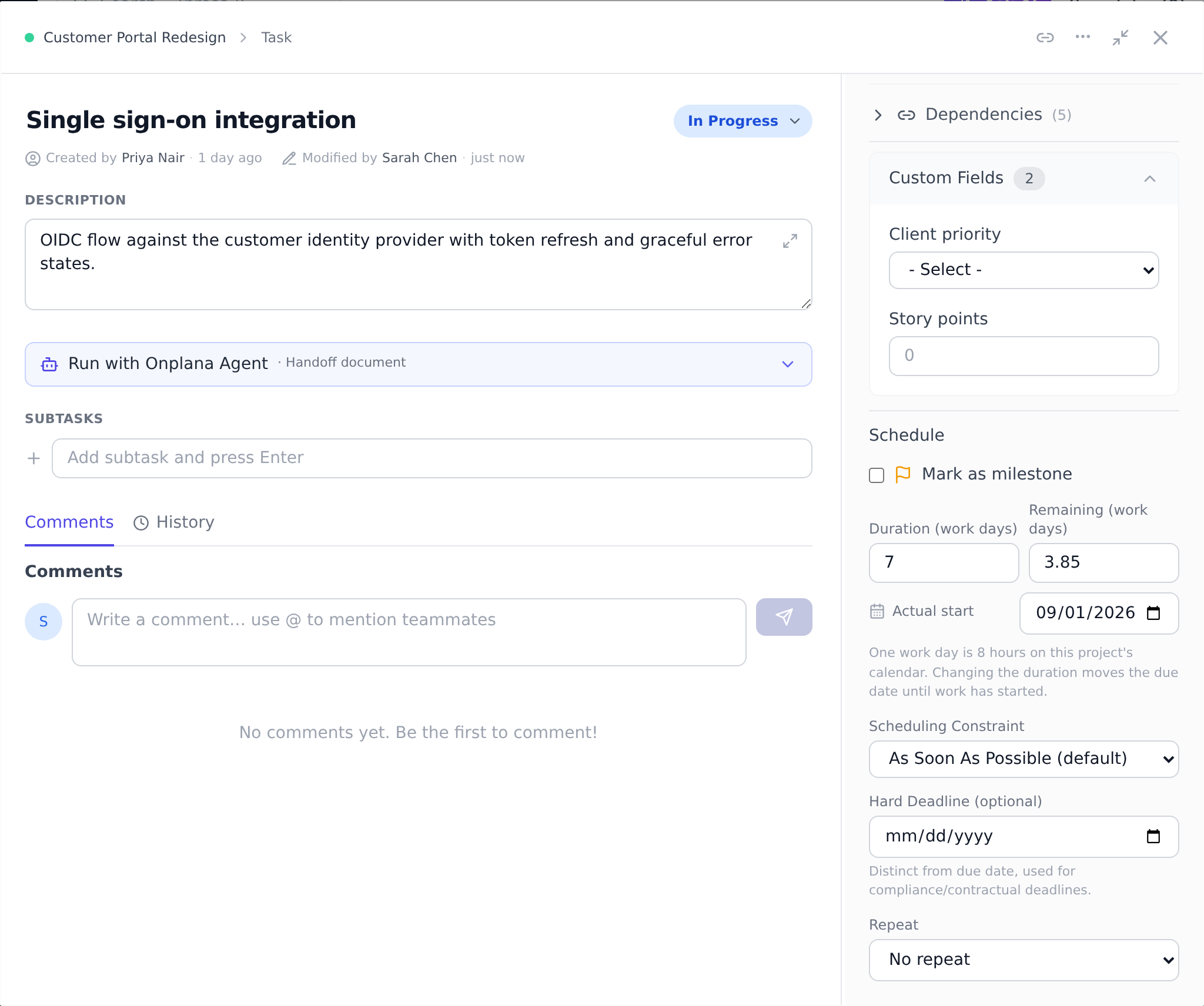
-
Open the task and find the Repeat dropdown. Choose Daily, Weekly, or Monthly (the default is No repeat).
-
Set the interval in the Every field: every 1 week is weekly, every 2 weeks is biweekly, every 3 months is quarterly. The interval can be anything from 1 to 99.
-
Optionally set an End repeat date. Once that date passes, no further copies are created.
-
Make sure the task has a Due date. The repeat schedule is anchored to it, and a recurring task without a due date cannot generate occurrences.
How the copies behave
Section titled “How the copies behave”- Each new copy is created automatically shortly before it is due (within a day of the next due date), arriving as a fresh To Do task at 0% progress.
- The copy inherits the original’s title, description, priority, assignee, and estimated hours.
- If the original has both a start and a due date, the copy keeps the same gap between them.
- The next occurrence is always scheduled from the most recent copy’s due date, so the rhythm stays steady.
- Copies are independent tasks. They do not carry the repeat rule themselves, so completing, editing, or deleting one copy never affects the series. The rule lives only on the original task.
Stop a recurrence
Section titled “Stop a recurrence”Either set an End repeat date in the past or switch the Repeat dropdown back to No repeat on the original task. Copies that were already created stay where they are.
Best practices
Section titled “Best practices”- Use recurring tasks only for genuinely standing work. A weekly status report, a monthly billing run, a quarterly retrospective, yes. A one-off “follow up with client” that you’ll only need twice, no; create those as separate tasks so the project’s task count reflects real scope rather than recurring ceremony.
- Put the standing recipe in the original task’s description. “Send weekly status email” is the title. The description should be the recipe: which template to use, what’s in scope, who’s the audience. Future copies inherit the description, so the recipe travels with every recurrence. The team member running it next month doesn’t need to know the history.
- Anchor the cadence to a meaningful day. “Every Friday” for weekly status reports beats “every 7 days” for the simple reason that everyone knows what Friday means. Onplana uses the original task’s due date as the anchor, so pick a Friday for the original task and the series stays on Fridays.
- Set an End date if you know the series has a horizon. A “biweekly retro” for a 6-month project should end with the project. Leaving the series open-ended means the bin fills with retros after the project closes. Five seconds to set end repeat at the project end date.
- Edit the original task to change all future copies. Editing the original updates the template for future occurrences. Editing a single copy only changes that one copy. This is by design, the original is the canonical pattern, the copies are individual instances.
Troubleshooting / common pitfalls
Section titled “Troubleshooting / common pitfalls”- My recurring task never generates copies. Three causes in order of likelihood: (a) the original doesn’t have a due date (the repeat schedule is anchored to it; without a due date, nothing fires); (b) the End repeat date has already passed; (c) the interval is set to a value that’s never been hit yet (a “every 6 months” task created yesterday won’t fire for another six months).
- I changed the assignee on the original but the future copy has the old assignee. Copies inherit the original’s state at the time the copy is created. If you edit the original after the copy was created, the existing copy doesn’t update. Future copies will use the new value.
- I deleted a copy by mistake and now the rhythm is off. It depends which copy you deleted. The next occurrence is anchored to the most recent copy that’s still around, so deleting the LATEST copy shifts that anchor back to whichever one came before it, and if that’s now due within a day, the next hourly run generates a replacement. It’s a fresh copy though, not the exact one you deleted, so any edits you’d made to it are gone. Deleting an OLDER copy doesn’t move the anchor and doesn’t get auto-replaced. Either way, if you want the exact copy back, restore it from the Recycle Bin instead of waiting.
- The next copy doesn’t have the original’s subtasks. This is expected: copies never inherit subtasks, only title, description, priority, assignee, estimated hours, and dates carry over. If you need a checklist to travel with every occurrence, put the recipe in the original’s description instead (see Best practice 2), descriptions ARE copied, subtasks are not.
- My recurring task shows up twice on the same day. Two causes: (a) you accidentally created two recurring tasks with the same schedule (check the project’s task list for duplicates); (b) the task’s due date is the same day as the interval triggers a new occurrence, so today’s copy and yesterday’s leftover both exist. Delete one.
How this combines with other features
Section titled “How this combines with other features”- Recurring tasks + Notifications. When a copy is created, the assignee gets a “Task assigned to me” notification (per their preferences). For high-rhythm recurring tasks (daily standups), an assignee who doesn’t want a notification every morning can disable the toggle. See Manage notification preferences.
- Recurring tasks + Sprints. When a sprint contains a recurring task, the next copy lands in the project’s task pool, not automatically in the next sprint. Move it into the next sprint at planning time. Recurring tasks pre- populating future sprints is on the roadmap.
- Recurring tasks + Calendar. Recurring task copies show on the calendar like any other task; the calendar is the best view for spotting “I have five recurring tasks landing the same Thursday” capacity collisions. See Use the calendar and burndown views.
- Recurring tasks + Workflow automations. For more complex patterns (recurring tasks with conditional routing, escalation, or external triggers), a workflow automation is the better tool than a basic repeat rule. See Build a workflow.
Coming from another tool
Section titled “Coming from another tool”| Tool | Mapping |
|---|---|
| Asana recurring tasks | Direct concept; Asana’s recurrence happens on completion, Onplana’s on due date |
| Jira recurring issues (plugin) | Direct mapping; Onplana is built-in |
| Todoist | Direct mapping; the same “Every Friday” style cadence works |
| Outlook recurring meetings | Recurring tasks ≈ recurring meetings, but for work items not invites |
| Trello (plugin) | Direct mapping; Onplana is built-in |
Why hasn’t my next copy appeared yet? Copies are generated close to their due date, not far in advance. A monthly task due on the 30th will not show its next copy weeks early; it appears within a day of when it is due.
What happens if I never complete a copy? The series keeps its schedule regardless. Occurrences are based on due dates, not on completion, so a skipped week does not delay the next one.
Can I change the assignee for future copies? Yes. Edit the original task (the one carrying the repeat rule); future copies inherit whatever it says at the time they are created. Copies that already exist keep their current assignee.
Can I have a recurring task with a different assignee each occurrence (e.g., rotating ownership)? Not natively. Two patterns work: (a) assign the recurring task to a team alias address that an automation distributes; (b) edit the assignee on each occurrence after it’s created. Rotation isn’t a first-class feature today.
Do recurring tasks count against my task quotas? Each copy counts as a real task. A weekly recurring task active for a year produces 52 task records. For very high-rhythm patterns (daily standups), think about whether the recurring task is the right tool or whether you’d be better served by a workflow automation that doesn’t produce 365 tasks per year.
Can a recurring task have dependencies? The original task can carry dependencies. Copies do not inherit dependencies, each copy is independent, since the typical dependency case (“X must finish before Y starts”) doesn’t apply to standing work.
What happens to copies when I delete the original task? Already-created copies stay; future copies stop. To remove all the copies too, delete them in bulk from the project’s task list and then delete the original.
Related
Section titled “Related”- Work with tasks, the underlying task fields recurring copies inherit
- Use the calendar and burndown views, see recurring tasks land on real dates
- Build a workflow, for more complex recurring patterns than the built-in rule
Was this helpful?
Thanks for your feedback!