
Comment on tasks and mention teammates
Every task has a comment thread, so discussion stays attached to the work it is about. Comments support replies, @mentions, and editing, and the task’s assignee is notified automatically when someone comments.
Comment and reply
Section titled “Comment and reply”Open a task and scroll to Comments. Type your comment and send it. To respond to a specific comment rather than the whole task, use Reply on that comment: replies nest under their parent so side discussions stay readable. You can edit or delete your own comments.
Mention someone
Section titled “Mention someone”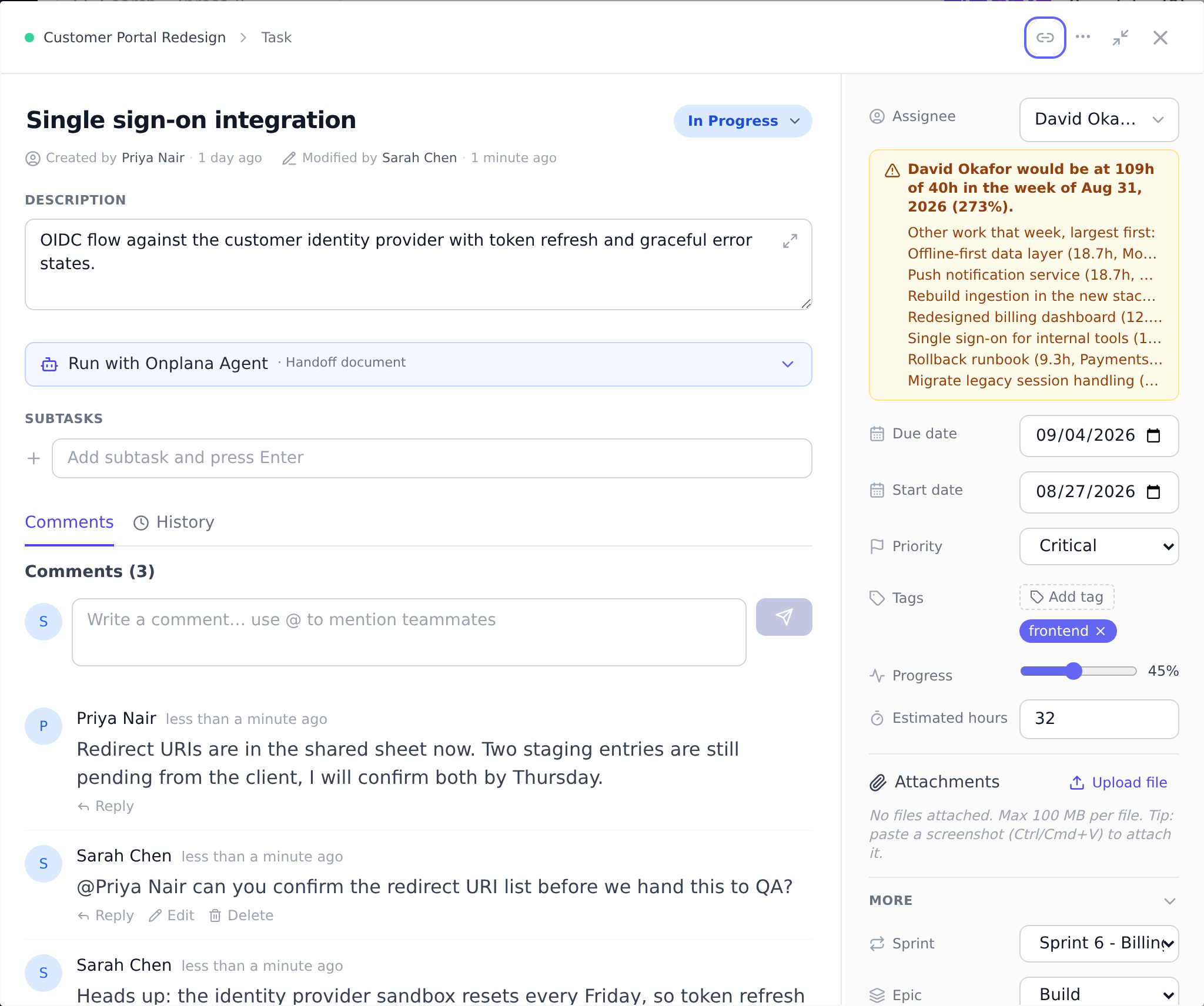
To pull a teammate into the conversation, type @ followed by their name
as it appears in your organization, for example @Anne Marie. Matching
is case-insensitive and handles multi-word names. The mentioned person
gets a notification (“mentioned you in a comment”) that links straight to
the comment.
Notifications arrive on the in-app bell and, depending on each person’s preferences, by email. Everyone tunes their own notification behavior under Settings, on the Notifications tab.
The Agent thread
Section titled “The Agent thread”When a task involves a connected AI agent (for example, the agent created the task, or the task was delegated to one), the comment area splits into two tabs: Comments for the team discussion, and Agent for talking directly to the agent. Anything you write on the Agent tab is addressed to the agent automatically, and its replies land there too, so the human conversation and the agent conversation never tangle.
For how agents pick up your messages and how fast to expect replies, see Talk to an agent in a task thread.
Comments beyond tasks
Section titled “Comments beyond tasks”Comment threads also exist on issues (see Track issues in the issue log) and on governance proposals, with the same reply and mention behavior.
Best practices
Section titled “Best practices”- Keep discussion threaded. Reply directly to the comment you’re responding to, not at the bottom. Threaded conversations are readable months later; flat lists become archaeology.
- @mention for action, not awareness. A mention notifies; use it when you need someone to do something. For “FYI” without action, write the name without @, the person can read it without a notification.
- Use the Agent thread for agent-targeted work. Mixing agent and team comments on one thread confuses both. The split tabs exist exactly for this; use them. See Talk to agents in task threads.
- Edit own comments to fix typos; don’t delete and retype. Edits preserve the thread + reply chain; deletion breaks replies pointing at the deleted comment.
- Use mentions in PROPOSALS for governance reviewer engagement. Mentioning a designated reviewer on a proposal comment nudges them to act. Same mechanism as tasks. See Review a gate.
Troubleshooting / common pitfalls
Section titled “Troubleshooting / common pitfalls”- My mention shows highlighted but they’re not notified. Two causes: (a) the user was deactivated; (b) they have notification preferences turned off for mentions. Check Settings → Notifications.
- Reply landed at the bottom, not nested. You used the top-level comment box instead of the parent comment’s Reply button. Delete + redo via Reply.
- Agent tab missing on a task. The task was not created by an agent and has not been delegated to one. The tab appears only when an agent persona is linked.
- Comments not appearing in real-time. The live connection dropped. Refresh the page.
- Mention matched the wrong person.
Onplana’s name match is fuzzy. For
ambiguous names, use the full name
(
@Jane Smith-Brownnot@Jane).
How this combines with other features
Section titled “How this combines with other features”- Comments + Mentions + Notifications. Mentions drive notifications; notification preferences shape delivery. See Manage notification preferences.
- Comments + Agent thread. The split- thread UI lets humans + agents share a task without conversation contamination. See Talk to agents in task threads.
- Comments + Project mailbox. Inbound emails can become comments. See Receive email into projects.
- Comments + Issues + Proposals. The same threaded comment pattern applies. See Track issues and Submit a proposal.
Coming from another tool
Section titled “Coming from another tool”| Tool | Mapping |
|---|---|
| Jira comments | Direct concept; threaded + @mentions |
| Asana | Direct |
| Microsoft Project Online | Limited comment support; Onplana richer |
| Slack | Onplana comments are attached-to-work; Slack is channel-based |
| Email threads | Onplana keeps discussion in context with the work |
Why did my @mention not notify anyone?
The text after @ must match the name of a member of your organization.
A typo, a nickname, or a person who is not in the organization will not match, and
nothing is sent.
Does the assignee get notified for every comment? Yes, the task’s assignee is notified of new comments on their task (unless they wrote the comment themselves). They can adjust how they receive these under Settings → Notifications.
Can comments be created from email? Yes. Projects with the Mailbox feature turn inbound email into tasks or comments automatically, which is useful for looping in people who live in their inbox.
Can I edit someone else’s comment? No, comments are editable by author only.
Can I mention an external user via their email? Mentions only match organization members. To loop in an external user, use the project’s email mailbox or share link.
Is there a way to follow a comment thread without commenting? Adding yourself as a project member subscribes you to project activity. Per-thread following isn’t supported today.
Related
Section titled “Related”- Talk to agents in task threads, the Agent thread side
- Manage notification preferences, what triggers notifications
- Track issues, comment threads on issues
Was this helpful?
Thanks for your feedback!