
Use the Kanban board
The Kanban board shows a project’s tasks as cards in five status columns. It is the fastest view in Onplana for the question every standup asks (“what’s everyone working on, what’s done, what’s stuck?”), because moving a card answers it for the whole team in one drag. Teams that adopt the board as their standup surface tend to keep status accurate; teams that try to update status via the list view often end up with stale statuses by Friday.
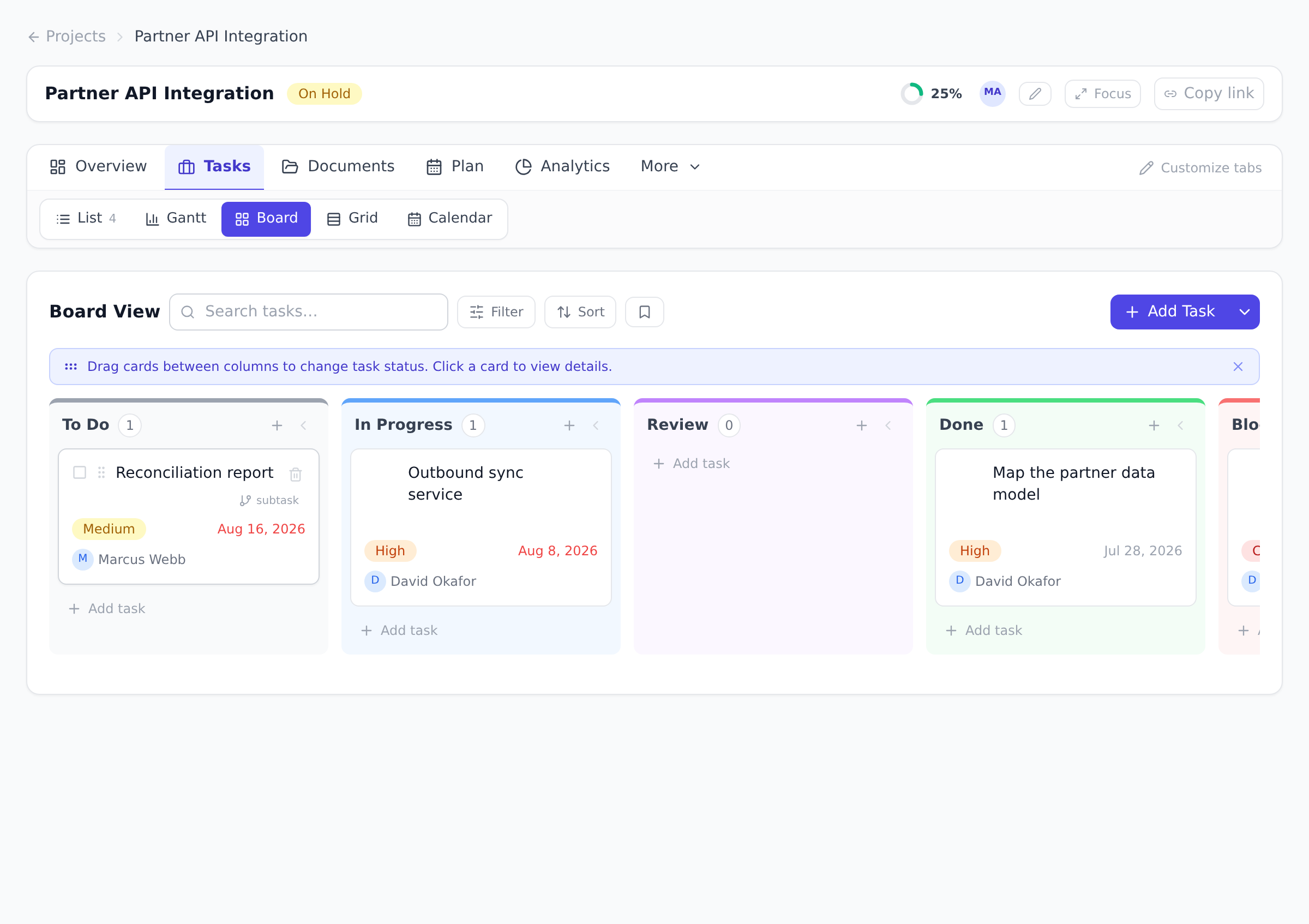
Move work
Section titled “Move work”-
Open a project, open the Tasks tab under the project header, and select Board.
-
Drag a card into another column to change its status. The change saves immediately; there is no separate confirm step.
-
Select a card to open the full task and edit anything else (assignee, dates, subtasks, dependencies).
Filter, search, and sort
Section titled “Filter, search, and sort”The board has its own toolbar:
- Search narrows the board to matching cards.
- Filters let you show only certain priorities, or only one assignee’s cards.
- Sort orders the cards inside each column by Priority, Due Date, or Title, or leaves the board in its Default order.
Filter combinations you use often can be saved and re-applied from the board’s saved-filters control, the same idea as saved views on the Projects page (see Organize the Projects page).
Tidy the board
Section titled “Tidy the board”Columns can be collapsed individually, and the board remembers which ones you collapsed per project. Teams that rarely use Review, for example, collapse it and get the space back.
Bulk actions
Section titled “Bulk actions”Select several cards to act on all of them at once: set a status, a priority, or an assignee in one stroke. This is the quickest way to sweep a sprint’s leftovers back to To Do or hand a batch of work to a teammate.
Best practices
Section titled “Best practices”- Run standup on the board, not the list. A 15-minute standup gets through 8-15 cards on the board; the list takes double the time for the same coverage because status changes require clicks rather than drags. The board’s “what moved yesterday” reading is also visual. Your eye picks up anything that didn’t move in two seconds.
- Use Blocked aggressively; close-out Blocked daily. Blocked is the most valuable column because it’s where the team’s collective attention should focus first. The discipline that makes it work: drag the card to Blocked the moment something stalls (don’t leave it In Progress and forget it), and close-out Blocked at every standup (drag it out, or escalate the unblock). Blocked-as-parking-lot defeats the point.
- Filter by assignee for one-on-ones. “Show me only Alex’s cards” turns the board into a personal review surface for a one-on-one without changing what anyone else sees. Cleaner than the full list, and the conversation focuses on the columns Alex’s work is in.
- Collapse columns the team doesn’t use. Some teams skip Review (small batches, no formal QA); others rarely Block. Collapse those columns to give the columns that matter more space. The board remembers the collapse per project and per user.
- Use the bulk-action row for sprint cleanup. At sprint end, multi-select all “still To Do” cards and either move them to a new sprint or back to the backlog in one stroke. See Run and complete a sprint.
Troubleshooting / common pitfalls
Section titled “Troubleshooting / common pitfalls”- The card I dragged didn’t update. Two causes: (a) network blip (the page shows a transient error toast; the card snaps back, drag it again); (b) your role doesn’t include task-status-edit on this project (the card is marked read-only, the cursor stays default). Check the project’s permission matrix.
- The board feels slow on a big project. Above ~500 visible cards the board’s drag responsiveness drops noticeably. The fix isn’t a faster computer. It’s filtering. Pick a meaningful filter (sprint, owner, priority) and the board loads instantly. The Gantt view is the better lens for whole-project navigation at that scale.
- A blocked card sat in Blocked for two weeks. This is a process problem, not a tool problem, but the board makes it visible. The fix: close-out Blocked at every standup. The red column should be either empty or actively under discussion at all times.
- A “Done” card came back as “In Progress” and I want it staying Done. Anyone with task-edit-any on the project can change a card’s status. Restrict who can change task status in the permission matrix if you want only managers reopening finished work. See Understand roles and permissions.
- Subtasks aren’t showing as cards. By design, the board shows top-level tasks, and a card’s subtasks live inside it (open the card to see them). This keeps the board at the level you plan and report on.
How this combines with other features
Section titled “How this combines with other features”- Board + Sprints. Sprint detail view shows a per-sprint Kanban board with only the sprint’s tasks. Same drag, same bulk actions, but scoped to the sprint commitment. See Run and complete a sprint.
- Board + Custom fields. Custom field values can be added as visible card chips so the board carries the project’s domain vocabulary. See Create custom fields.
- Board + Dashboards. The Custom Dashboard supports a Task Status Chart widget that summarizes the same status counts the board shows, useful for executives who want the rollup without seeing individual cards. See Build a custom dashboard.
- Board + Agents. Connected AI agents can update task statuses programmatically (e.g., “mark all my Review tasks as Done if their PRs merged”). The board surface picks up agent changes in real time. See Assign work to an agent.
Coming from another tool
Section titled “Coming from another tool”| Tool | Mapping |
|---|---|
| Trello | Card ≈ task card; columns are fixed (5) here vs Trello’s free-form; checklists ≈ subtasks |
| Jira board | Direct mapping; columns are Onplana’s 5 statuses rather than Jira’s per-board configurable |
| Asana board view | Direct mapping; Asana’s “sections” ≈ Onplana’s 5 fixed columns |
| ClickUp board | Direct mapping; ClickUp’s “Group by” status ≈ Onplana’s default |
| Microsoft Planner | Bucket ≈ status column (closest analog); cards ≈ tasks |
Can I add a column or rename the statuses? The five columns mirror the task statuses, which are fixed. Keeping the lanes consistent is what makes boards comparable across projects and keeps the progress rollup meaningful.
Why can’t I drag cards? Dragging updates the task, so it requires task-edit rights in the project. Viewers see the board read-only.
Do subtasks appear on the board? The board shows top-level tasks as cards; a card’s subtasks are managed inside the task itself. This keeps the board at the level you plan and report on.
Can two people drag the same card at the same time? Yes; the last write wins and both users see the live position update. In practice this almost never causes problems because the status reflects the team’s collective decision anyway.
Is there a WIP limit per column? Not as a hard cap today. The Custom Dashboard widgets can show in-progress counts, which is enough for teams to spot when too many tasks are open at once. Hard WIP limits are on the roadmap.
Can I add a task straight into a column other than To Do? Yes. Every column header carries its own quick-add button, and the task it creates lands directly in that column’s status, no need to create it in To Do and drag it over.
Does the board update in real time when teammates change cards? Yes, over the same WebSocket channel as the rest of the project. Drag a card on one screen, see it move on a teammate’s screen within a second.
Related
Section titled “Related”- Work with tasks, the underlying data the board surfaces
- Plan a sprint, when sprints become the scope the board reads from
- Use calendar and burndown views, the other two daily-driver lenses
Was this helpful?
Thanks for your feedback!