
Detect project risks with AI
AI risk detection reads a project’s current state, its schedule, task statuses, dependencies, and workload, and proposes concrete risks: things like a critical-path task with no assignee, a milestone with everything bunched in the final week, or one person carrying half the plan.
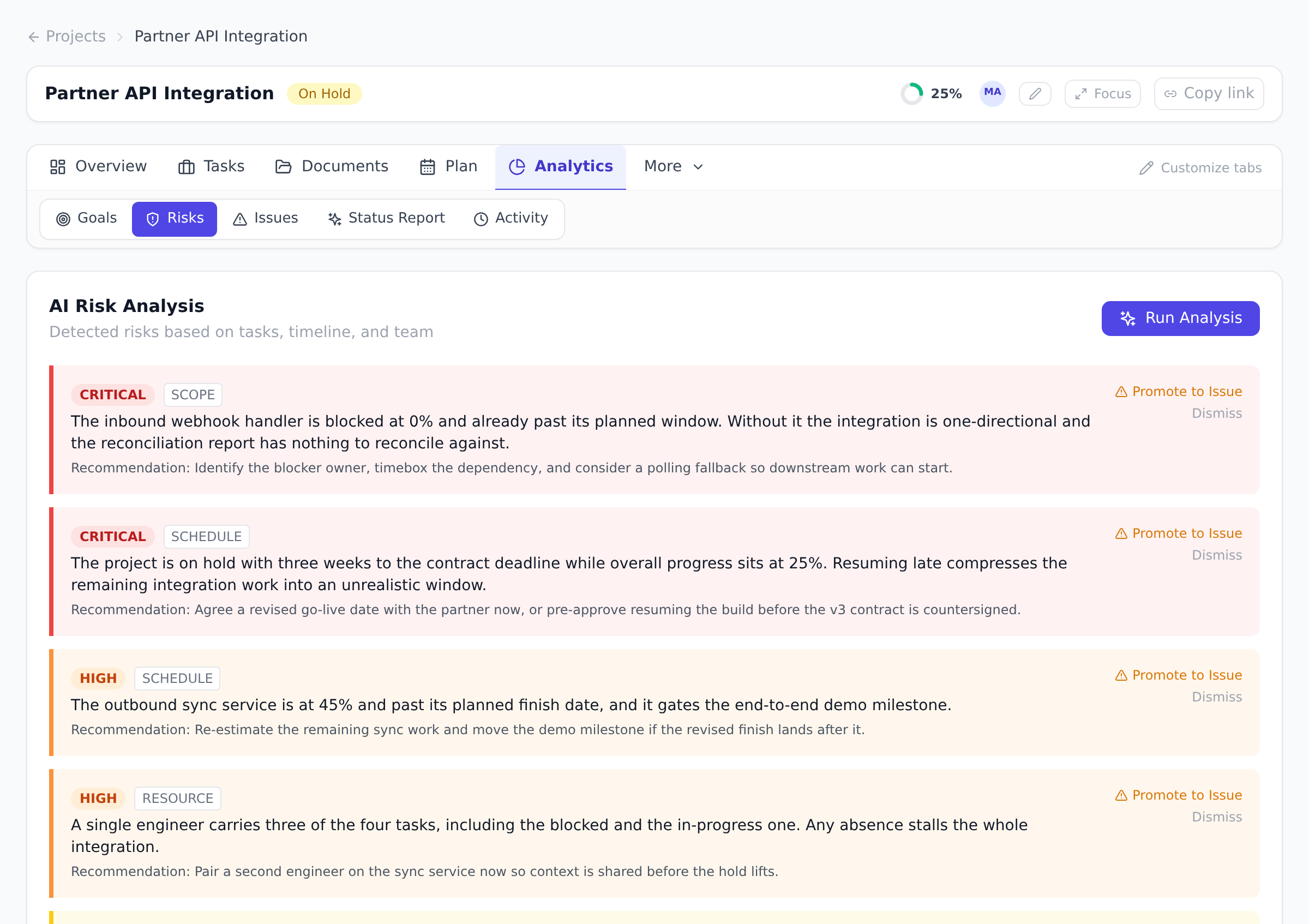
Run an analysis
Section titled “Run an analysis”- Open the project and go to its Risks view.
- Run the AI analysis. It writes the detected risks straight to the project’s risk register, replacing the open, non-dismissed risks from any earlier run. Each proposed risk comes with a severity, a category, and a short explanation of why it was flagged.
- Accept the risks worth pursuing; this creates a mitigation task and marks the risk as resolved. Dismiss the ones that do not apply; the dismissal stays on record and the risk drops off the open register, though a later run can still detect the same thing again.
Risks your agents record by hand
Section titled “Risks your agents record by hand”Not every risk comes from an analysis. When a connected agent spots a risk during its work, it records it as a real risk-register entry (description, severity, category, and an optional mitigation) instead of burying it in a comment. Hand-recorded risks work on every plan.
The two paths behave differently, and the difference matters:
- Recording a risk is additive. It never touches the risks already on the register.
- Running an AI analysis refreshes the detected set. It replaces the open, non-dismissed risks with the new findings, so dismiss or resolve what you’ve handled before re-running.
Does the analysis change my project? Yes. Running an analysis writes the detected risks straight to the register, replacing the open, non-dismissed risks from any earlier run. Accept and Dismiss don’t decide whether a risk is tracked, they decide what happens next: Accept creates a mitigation task and marks the risk resolved, Dismiss takes it off the open register and records the dismissal. It does not stop a later run detecting the same risk again.
How is this different from project health (RAG) status? Health status is a quick computed indicator. Risk detection produces specific, explainable items you can act on, each with its own severity and owner.
Which plan includes risk detection? Risk detection is part of the advanced AI features, available on the Business plan and above.
Best practices
Section titled “Best practices”- Run analysis after major changes. New tasks, schedule shifts, member adds. Fresh analysis catches new risks before they materialize.
- Accept selectively; dismiss irrelevant. Don’t accept every suggested risk. The dismiss feedback improves future suggestions.
- Promote materialized risks to issues. The risk→issue handoff is a first-class pattern. See Track issues in the issue log.
- Re-run weekly during execution. Risk landscape changes weekly. Weekly cadence keeps the radar fresh.
- Review with the team. Don’t act on AI risks unilaterally. The team knows context the AI doesn’t.
Troubleshooting / common pitfalls
Section titled “Troubleshooting / common pitfalls”- Analysis returned no risks. Either project is healthy or analysis lacks context. Verify project has tasks, dates, and assignees.
- Same risk suggested again after dismiss. Dismiss is per-suggestion; recurring patterns may surface a semantically similar risk.
- Risk severity feels off. AI’s severity is an estimate. Edit after accepting if needed.
- Analysis timed out. Large projects (1000+ tasks) may exceed time limit. Filter to subset.
- Risk category unexpected. AI categorizes by detected pattern. Edit category after accepting.
- AI tokens used up. Run Analysis stops, because detection is an AI call. The risks already on the register stay readable, and you can still accept or dismiss them. See Understand your AI token budget.
How this combines with other features
Section titled “How this combines with other features”- Risks + Issues. Promote risks to issues when they materialize. See Track issues.
- Risks + Project health. Risks feed RAG health computation.
- Risks + EVM. Critical risks affect SPI/CPI predictions. See Read the EVM dashboard.
- Risks + Workflows. Workflow can notify on new risk acceptance.
Coming from another tool
Section titled “Coming from another tool”| Tool | Mapping |
|---|---|
| Microsoft Project Online risk register | Direct concept |
| ServiceNow PPM risk module | Direct |
| Custom risk spreadsheet | Onplana automates the detection |
| Custom Excel risk matrix | Direct |
| Jira risk plugin | Direct |
Related
Section titled “Related”- Track issues, promote risks to issues
- Read the EVM dashboard, risk impact on cost/schedule
- Chat with Onplana AI, ad-hoc risk questions
Was this helpful?
Thanks for your feedback!