
Restore deleted work from the Recycle Bin
Deleting in Onplana is a soft delete. Projects, tasks, and most other content move to the Recycle Bin first, where they can be brought back with their full structure intact (subtasks, members, comments, attachments, milestones, sprints, dependencies). A mis-click on a year-old project doesn’t destroy a year of work; you have until the retention deadline to bring everything back exactly as it was, under its original ids, so deep links from external systems keep working after restore.
Undo, before the bin
Section titled “Undo, before the bin”Most deletes no longer ask you to confirm. The item goes, and a message offers Undo for about eight seconds. Taking it puts the item straight back.
That is a deliberate trade rather than a dropped safeguard. A confirmation on something the bin already catches costs every person a click and buys no safety: anyone who confirms by reflex, which is most of us, still ends up here hunting through the bin. Spending that click on a way back instead is worth more than spending it on a question.
The delete happens immediately and Undo restores it, rather than the delete being held for a few seconds and cancelled. That matters more than it sounds: if it were held, the item would be missing from your list while the server still had it, so a refresh, a second tab, or a colleague’s screen would bring it back from the dead, and closing the tab would quietly abandon the delete. What you see is always what the server holds.
Undo is offered when you delete a task from the task list, the board, a sprint board, the task form or the new Gantt chart, and also for an epic, a wiki page, a whiteboard, an idea, a governance proposal, and a client or contact. Deleting a selection of rows in the Grid gives you one Undo for the whole selection, not one per row.
Miss the eight seconds and nothing is lost. Undo and the Recycle Bin restore from the same place, so everything below is still open to you.
What still asks first
Section titled “What still asks first”Anything the bin does not catch still stops and asks, and the test is not how alarming the action sounds. It is whether the server keeps a copy you could restore:
- Permanently deleting an item from the bin, or emptying the bin.
- Revoking an API token or a share link.
- Removing a member from your organization, or leaving one yourself.
- Anything that reaches another system, where we cannot take it back.
On those, an Undo button would be a lie, so you get the question instead.
What lands in the Recycle Bin
Section titled “What lands in the Recycle Bin”Deleted projects, tasks, epics, sprints, milestones, goals, issues, ideas, governance proposals, pages, workspace documents and document libraries, task attachments, wiki pages, whiteboards, and workspace table rows and tables all pass through the Recycle Bin before anything is permanently removed.
Restore an item
Section titled “Restore an item”-
Open Recycle Bin from the sidebar.
-
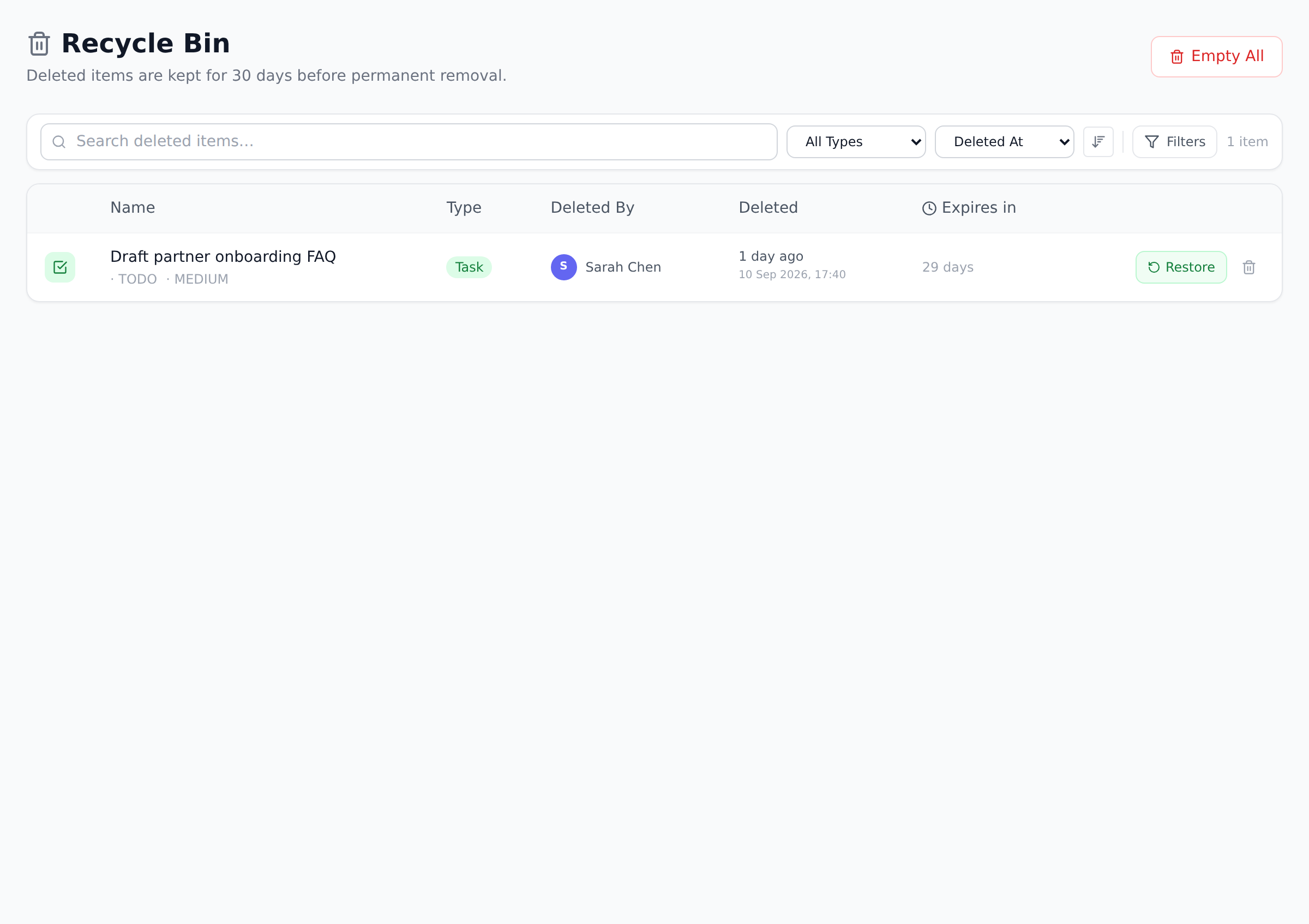
Find the item. You can search, filter by entity type or who deleted it, and sort by deletion date.
-
Select restore on the item. It returns to where it lived, with its contents intact; restoring a project brings back its tasks and structure together.
Who sees what
Section titled “Who sees what”You always see and can restore the items you deleted yourself. People with organization-wide project visibility (Portfolio Managers and above by default) see every deleted item in the organization and can restore any of them.
The retention window
Section titled “The retention window”Items do not sit in the Recycle Bin forever. By default, each item is kept for 30 days after deletion and then purged automatically; the bin shows a countdown on every item so you can see exactly how long is left, with the timer turning amber and then red as expiry approaches.
Organizations with a stricter data retention policy are different: the Recycle Bin follows your organization’s configured retention period, so compliance-driven setups (for example HIPAA or FINRA presets) keep deleted items for much longer.
Empty the bin
Section titled “Empty the bin”Items can also be removed ahead of the deadline: delete a single item permanently from its row, or empty the entire bin in one action. Both are confirmed before anything happens, and both are recorded in the audit trail.
What “full restore” actually includes
Section titled “What “full restore” actually includes”Onplana doesn’t store a bare shell of the deleted item; it snapshots the full graph at delete time and rebuilds it on restore:
- Project restore brings back: tasks (under their original ids), task dependencies with type and lag, project members with their project-role, epics, sprints, milestones, task attachments (the underlying blob stays in storage during the retention window), risks, issues, comments (parent-reply structure preserved), tag joins, custom field values, and baselines.
- Task restore brings back: the task plus its full subtree (subtasks of any depth) under their original ids, attachments, comments, tags, custom field values, and dependency rows pointing at the restored ids. Subtasks of a deleted parent are restored with the parent, not orphaned.
- Document restore brings back the document with its blob intact. The byte content survives the soft delete and is re-attached at restore time.
- Workspace table restore rebuilds the table, all columns, all rows, and all cell values. Cell column-ids are remapped to the freshly created column ids during restore.
- Issue restore brings back the Issue plus its comment thread, with cross-links to tasks/risks/CRs re-attached only when the target still exists.
What’s NOT in the snapshot (intentional, all also lost on the original delete): workspace libraries belonging to a deleted project, whiteboards, wikis, automation rules, change requests attached to the project, intake links, AI conversations, activity logs, and revision history (the audit trail of the edits, separate from the data itself).
Best practices
Section titled “Best practices”- Restore early in the retention window. During the retention window the underlying file blobs and the full graph snapshot are kept. At purge time, the underlying files are deleted alongside the row. Restoring on day 1 is trivial; restoring on day 29 is fine but cuts it close.
- Use restore even when you’re “pretty sure” you don’t need the data. Restore is reversible (you can delete again afterward) and gives you a chance to verify before committing to permanent loss. Cost: two clicks.
- Don’t reach for “Empty the bin” as routine housekeeping. The bin is your safety net; emptying it is removing the net. Items auto-purge per the retention policy anyway. The only reason to empty is to free storage immediately, which is rare.
- Train the team to use the Recycle Bin search before asking IT to restore from backup. A mis-clicked project is in the bin for 30 days. Searching the bin takes ten seconds; restoring from a Postgres backup takes considerably longer and requires Onplana’s ops team.
- Note that delete + restore preserves ORIGINAL ids. A project’s id is unchanged through soft delete + restore. This is intentional: external links (Slack, Confluence, stakeholder emails) referencing the project’s URL keep working after restore. The same applies to task and issue ids.
Troubleshooting / common pitfalls
Section titled “Troubleshooting / common pitfalls”- I can’t find the item I deleted. Two causes: (a) someone with broader visibility deleted it (check with your admin; the bin shows items you personally deleted unless you have org-wide visibility); (b) the retention window expired and the item was purged. The bin’s audit log shows who deleted what and when.
- Restore is grayed out for my role. Restore requires matching permissions to the original delete. If you can’t restore an item, an admin or the original deleter usually can.
- The restored project has all the tasks but the documents are gone. Two causes: (a) the documents had been deleted separately before the project was deleted (they’re in the bin independently, so restore them separately); (b) the project was restored AFTER its retention-window-end purged the document blobs. Items purge in retention-window order, so a long-deleted document inside an otherwise-still-deletable project can be gone while the project itself is restorable.
- Restoring a task gave me a copy in the wrong place. Tasks restore under their original parent if the parent still exists. If the parent was also deleted but later restored, re-attach the task to the parent via the task’s edit view. If the original parent is permanently gone, the task lands at top-level.
- I want to restore just one task from a deleted project, not the whole project. Today the project restore brings the whole subtree. The cleanest workaround: restore the project, then move the one task to a different project (using the bulk-move action), then re-delete the rest. An agent connected over MCP can list what’s in the bin, but restoring is a step you take in the app, same workaround as above.
How this combines with other features
Section titled “How this combines with other features”- Recycle Bin + Audit Logs. Every delete and restore is recorded in the audit trail. The bin tells you “what’s recoverable now”; the audit log tells you “what was deleted, by whom, when, even after purge.” Together they answer compliance questions about lost data.
- Recycle Bin + Permission matrix. Who can delete and who can restore are configured per role in the permission matrix. If your organization has a “no permanent delete” posture, restrict the Empty-bin action to Owner-only via the matrix while leaving Restore broadly available. See Understand roles and permissions.
- Recycle Bin + AI Agents. Agents with
task.deleteorproject.deletepermissions can soft-delete, which lands the item in the bin like any other delete. The governed-operations policy controls whether agents can delete at all: the recoverable deletes are on until an admin saves a choice, and any of them can be turned off. See Control what agents can delete. - Recycle Bin + Workspace. Deleted documents and libraries pass through the bin too; restoring brings back the byte content plus any per-resource sharing grants the library or document had. See Share libraries and lists.
Coming from another tool
Section titled “Coming from another tool”| Tool | Mapping |
|---|---|
| Asana | Asana has Trash; similar 30-day retention; project-only |
| Jira | Jira’s Trash is project-scoped; Onplana’s is org-wide and broader |
| Microsoft Project | No native Recycle Bin; deletion is final unless you have a backup |
| Notion | Trash with restore is similar; Notion preserves block-by-block, Onplana preserves graph-by-graph |
| Smartsheet | Recycle Bin with similar restore semantics |
I deleted a task inside a project. Where do I look? The Recycle Bin is one organization-wide list covering every project. Filter by entity type or search the task’s title; you do not need to remember which project it came from.
Does restoring a project restore its files too? Restored documents and attachments come back along with their files, as long as the item is still within the retention window. After a file has been purged, only the item’s metadata could remain, which is why restoring early beats restoring on day 29.
Can I recover something after the Recycle Bin purged it? No. Purge is permanent by design, and the retention countdown shown on each item is the real deadline. If your organization needs a longer window, an admin can adjust the data retention policy.
Do my dependencies survive a project restore? Yes. Dependencies are restored under the same task ids, with their link type and lag preserved. If the dependency points at a task that was permanently purged, that one dependency is dropped on restore; the rest survive.
Are the original ids preserved on restore? Yes for projects, tasks, and issues. Restore brings them back under their original ids so external links keep working. Workspace tables remap cell column-ids during restore because the columns are recreated.
Why does the Recycle Bin show items that aren’t mine? You have org-wide visibility on your role (typically Portfolio Manager or higher). Members only see their own deletes; admins see everyone’s. The matrix can tune this.
What happens to AI conversations and activity logs on delete? They aren’t part of the recycle snapshot. AI conversation history and activity log entries are kept separately by the organization’s retention policy, not by the deleted item’s countdown.
Related
Section titled “Related”- Read audit logs, the historical trail beyond the recycle window
- Restrict by IP allowlist, for organizations with stricter data posture
- Understand roles and permissions, control who can permanently delete
Was this helpful?
Thanks for your feedback!