
Track goals and OKRs
The Goals page is Onplana’s OKR (Objectives and Key Results) home. Goals capture what your team is trying to achieve; Key Results capture how you will measure progress; Updates capture the weekly state of each Key Result and produce the trend sparkline you see on the page.
Goals are available on Business and above. Managers and above see every goal in the organization. Members see goals they own, goals with no linked projects, and goals linked to a project they belong to; only the goal’s owner or a manager can change the goal itself (title, dates, status, linked projects) or delete it, but any member who can see a goal can add key results, log weekly updates, and link tasks. Guests cannot see or edit goals at all.
The model in one paragraph
Section titled “The model in one paragraph”A Goal has a title, a type (Objective by default), an owner, an optional parent goal (so you can stack team goals under a company goal), a start and due date, and a list of Key Results underneath it. A Key Result has a title, a unit (percent by default), a start value, a target value, and a current value. Its progress is either updated manually or rolled up from a set of linked tasks. A Goal’s overall progress is the average of its Key Results.
Create a goal
Section titled “Create a goal”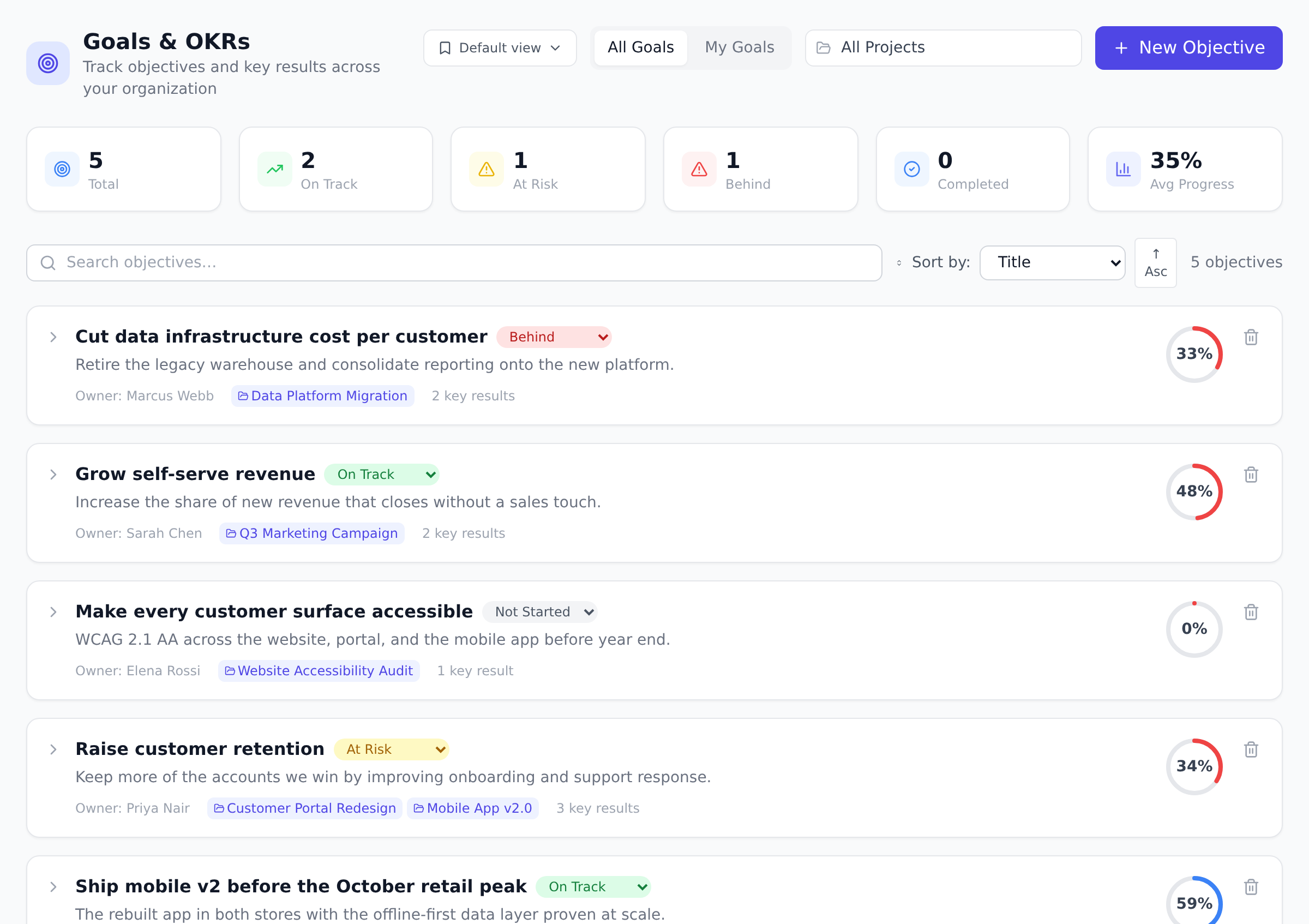
-
Open Goals from the sidebar.
-
Select New goal and fill in: title, owner, start and due date, description, and (optional) parent goal.
-
Pick a goal type. Objective is the most common. The other types let you tag aspirational, committed, and initiative-shaped work distinctly for reporting.
-
Save the goal. It appears in the list and waits for Key Results.
Add key results
Section titled “Add key results”Open the goal, then under Key results select Add key result.
For each KR:
- Title, the thing you are measuring (Activation rate, Trial conversion, Tickets resolved per week).
- Unit, the unit you are measuring in. Default is percent;
override with anything (
%,customers,min,MRR, etc.). - Start, current, target, the three numbers that anchor the
bar. Progress is
(current - start) / (target - start) * 100, capped at 100. - Rollup method, leave as manual to enter weekly numbers yourself, or pick Task count or Task percentage to derive the current value from a set of linked tasks (handy when the KR is “ship N features” or “close 80% of these tickets”).
Link projects and tasks
Section titled “Link projects and tasks”Two link mechanisms make goals concrete:
- Linked projects at the goal level: tag the projects that contribute to the goal so reports and rollups know which work feeds which objective.
- Linked tasks at the key result level: when the KR uses a task-rollup method, every linked task that hits a chosen status bumps the current value automatically.
The link is bidirectional. Each project shows the goals it contributes to; each goal shows the projects driving it.
What a linked task looks like
Section titled “What a linked task looks like”The point of linking is that somebody doing the work can see what it is for, so the link shows up where the work is:
- A green goal chip on the task row, in the project task list and in My Work. It names the first goal, and adds “+2” when the task serves more than one. Hover for the full list, or click through to the goal.
- A read-only Goals section in the task, naming the goal and the key result it feeds.
- A “What this serves” block in the scheduled project summary email, with the goal, its rollup and its key results, when the project is linked to one.
Linking still happens here, on the Goals page. The task side is read-only on purpose: a goal is decided by whoever owns it, not changed in passing by whoever picks up a ticket.
A task with no link looks exactly as it did before, and a project serving no goal gets an unchanged summary email. Nothing new appears until a link exists.
Weekly updates and the sparkline
Section titled “Weekly updates and the sparkline”Each Key Result update is a timestamped record of the current value. Updating weekly is what produces the spark chart on the right side of the KR row, so the goal’s history reads as a trend, not a single number.
Can a Key Result roll up from more than one project? Yes. The KR is linked to a set of tasks rather than to a project, so the tasks can come from any project you can see. The KR ticks up when each linked task hits the rollup-defined status.
Why is my goal’s progress stuck at zero?
A goal’s progress is the average of its Key Results. If a KR has the
same start and current value, it shows 0%. Update the KR (or wire
its rollup) and the goal moves with it.
Can I have sub-goals under a department goal? Yes. Pick a parent goal when creating a goal and the new goal nests under it. Hierarchies are usually shallow (company → team → squad), and Onplana does not impose a depth limit.
Are goals visible to everyone in the organization? No. Managers and above see every goal. A member sees only goals they own, goals linked to a project they belong to, or goals with no project link at all, so leaving a sensitive goal unlinked doesn’t hide it, that makes it visible to every member. To actually narrow who sees it, link it to a project whose own membership is restricted.
Best practices
Section titled “Best practices”- Cap KRs at 3-5 per goal. More KRs dilute focus. Three is the classic OKR convention.
- Make KRs measurable, not activity-based. “Reach 1000 active users” beats “Launch marketing campaign”. KRs measure outcomes.
- Update weekly during the quarter. Sparklines need data points. Monthly updates make the chart useless.
- Link projects + tasks liberally. The auto-rollup is the magic. Manual updates work too, but linking lets the platform do the math.
- Review goals at quarter-end with a retro. What landed? What didn’t? Why? The retrospective + next-quarter plan are the OKR cycle.
Troubleshooting / common pitfalls
Section titled “Troubleshooting / common pitfalls”- Progress stuck at 0%. KR start = current. Update the value or fix the rollup.
- KR auto-rollup not firing. Linked tasks not status-matching the rollup rule. Verify the rule + task statuses.
- Sub-goal hierarchy unclear in UI. Parent goal must exist before sub-goal can pick it. Create parent first.
- Sensitive goal accidentally visible. An unlinked goal is visible to every member. Link it to a project whose own membership is restricted to narrow who sees it.
- Goal target moving target. KRs should be locked at the start of the quarter. Don’t edit mid-quarter; track via comments instead.
How this combines with other features
Section titled “How this combines with other features”- Goals + Tasks. Tasks link to KRs for auto-rollup. See Work with tasks.
- Goals + Milestones. Milestones are delivery markers; KRs are outcome measures. Pair them at quarter end. See Track milestones.
- Goals + Dashboards. Pin the Goals progress widget on the executive dashboard. See Build a custom dashboard.
- Goals + Reports. Cross-project Reports can roll up OKR progress. See Run cross-project reports.
Coming from another tool
Section titled “Coming from another tool”| Tool | Mapping |
|---|---|
| Workboard | Direct OKR concept |
| Lattice goals | Direct |
| Microsoft Viva Goals | Direct |
| Ally.io | Direct |
| Asana Goals | Direct |
Related
Section titled “Related”- Track milestones, delivery markers that pair with quarterly Key Results
- Build a custom dashboard, pin the Goals progress widget for a manager view
- Run cross-project reports, roll up OKR progress across projects
Was this helpful?
Thanks for your feedback!