
Understand the proposal pipeline
The proposal pipeline is a staged workflow for deciding which initiatives become projects. Every proposal passes through the same sequence of working stages and review gates, so approvals are deliberate decisions with a recorded trail, not a thumbs-up in chat.
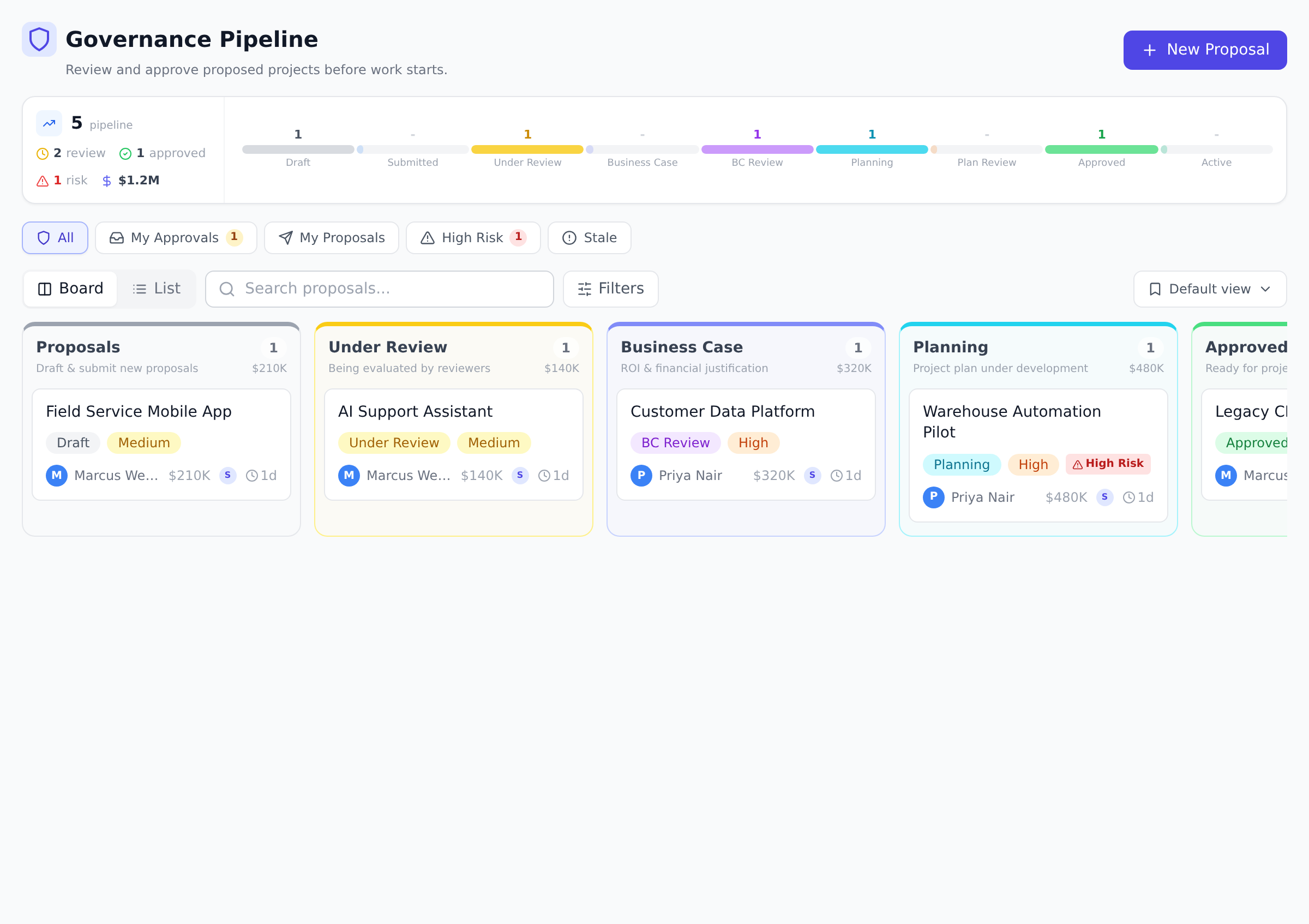
The stages
Section titled “The stages”A proposal on the happy path moves through:
- Draft, the author is still writing. Submitting sends it straight into Proposal Review.
- Submitted, a holding stage you only see on older proposals.
- Proposal Review, the first gate: is this worth investigating?
- Business Case, the author builds out costs and benefits.
- Business Case Review, the second gate: do the numbers hold up?
- Planning, the author drafts the delivery plan.
- Plan Review, the third gate: is the plan executable?
- Approved, then Active once delivery starts, and Completed when the work is done.
A rejection at any gate moves the proposal to Rejected. Finished proposals (completed, rejected, approved, active, or on hold) can be archived to keep the pipeline tidy.
There is no separate hand-off step between a working stage and its gate. When the business case or plan is ready, the author can select Ask for review to notify the next gate’s reviewers. The proposal stays where it is and stays editable. A reviewer then selects Review, and approving or rejecting moves the proposal into the gate. A More Info review leaves it at the working stage so the author can keep editing.
Board and list views
Section titled “Board and list views”The Governance page in the sidebar shows the whole pipeline. Toggle between Board (a column per stage, drag-free Kanban reading) and List (a sortable, filterable table that loads more as you scroll). Quick views above the pipeline narrow it down: My Approvals shows proposals waiting on your gate decision, and there are filters for stage, priority, risk, and department.
What you see depends on your rights: reviewers see every proposal in the organization, while members without governance review permission see only the proposals they submitted.
Put a proposal on hold
Section titled “Put a proposal on hold”Sometimes a proposal is sound but the timing is not. Holding parks it without losing its place.
-
Open the proposal and select Put on Hold. Any proposal that is not completed, rejected, or already on hold can be held.
-
The proposal moves to On Hold. It stays visible in the pipeline with an amber marker, and the submitter is notified.
-
When you are ready, select Resume. The proposal returns to the exact stage it was at before the hold, so a proposal held during Business Case Review picks up at Business Case Review, not back at the start.
Holding and resuming require governance review rights, which is Portfolio Manager and above by default.
Who gets told what
Section titled “Who gets told what”The submitter is notified whenever someone else moves their proposal (submitted for review, put on hold, rejected, and so on). If the proposal names a sponsor, the sponsor receives the same stage-change notifications. When a proposal enters a gate that has designated reviewers, each reviewer gets an approval request in their inbox, see Review a gate.
Best practices
Section titled “Best practices”- Run gate panels on a known cadence. Weekly gate reviews work for most organizations; bi-weekly for slower-moving portfolios. The cadence matters more than the day. Sponsors and submitters can plan around “every Tuesday” in a way they can’t around “whenever reviewers get to it”.
- Use the Board view for triage, the List view for reporting. The Kanban shows where flow is bottlenecked (a fat Business Case Review column means too many proposals stuck at gate 2); the list view answers “show me all high-risk proposals submitted this quarter” with one filter.
- Treat “On Hold” as a real state, not a graveyard. Holds need a reason and an expected revisit date. Otherwise the pipeline fills with held proposals nobody remembers why they’re held. Add a comment when you hold; set a calendar reminder to revisit.
- Resist re-opening rejected proposals. A rejected proposal can be re-submitted as a NEW proposal that addresses the rejection reasons. Re-opening the original muddles the audit trail. The new submission also forces fresh framing, usually better than the original.
- Archive completed proposals quarterly. The pipeline board should show in-flight work; completed and rejected proposals belong in the archive. Quarterly archive sweeps keep the board scannable without losing history (archived proposals are still searchable).
Troubleshooting / common pitfalls
Section titled “Troubleshooting / common pitfalls”- A proposal isn’t moving forward despite all reviewers approving. The multi-reviewer quorum requires ALL approve; if even one reviewer hasn’t decided yet, the stage stays at “pending”. Check the gate’s review list to find the missing decision.
- The Reject button isn’t visible. Two cases: (a) the proposal is in Approved or Active (rejection is intentionally unavailable past approval; cancel the linked project instead). (b) You don’t have governance review rights.
- A held proposal won’t resume. Three causes: (a) governance review rights (only Portfolio Manager and above can resume by default); (b) the proposal was on hold from a stage no longer valid (rare, e.g. if evaluation criteria changed); (c) browser cache (refresh).
- Two reviewers can’t agree on a gate decision. The quorum rule: ANY rejection rejects, ALL must approve to advance. So one rejection wins. The dialog also allows recording a “More Info” decision, which doesn’t change the stage, it just records the reviewer’s questions and leaves the proposal waiting at the gate. A proposal at a gate is read-only, so the submitter answers in the proposal’s comments rather than by editing it. Use that for “we need more information” cases.
- My filter narrowed it but the count looks off. Filter counters on the pipeline page count unique proposals across stages; a single proposal appearing in My Approvals + High Risk shows in both filters but is one proposal. Total count at the bottom is accurate.
How this combines with other features
Section titled “How this combines with other features”- Pipeline + Designated reviewers. Gate-level reviewer panels let specific people (e.g., Finance for Business Case Review) own a gate. Without panels, any Portfolio Manager can decide; with panels, the named reviewers must. See Set up gate reviewers.
- Pipeline + Evaluation criteria. Each gate scores the proposal against criteria you configure (strategic fit, financial return, risk, etc.). The scoring produces a number that backs the decision. See Configure evaluation criteria.
- Pipeline + Project creation. An Approved proposal becomes the seed for a project. The new project inherits the proposal’s sponsor, budget, scope, and associated documents. See From proposal to governed project.
- Pipeline + Notifications. Submitters and sponsors get notified on every stage transition; gate reviewers get an approval-request notification when a proposal enters their gate. The notification model keeps the pipeline running without anyone refreshing the page. See Manage notification preferences.
Coming from another tool
Section titled “Coming from another tool”| Tool | Mapping |
|---|---|
| MS Project Online Demand Management | Direct concept: same stage-gate flow with Project Detail Pages and workflow approval |
| ServiceNow PPM | Demand management module ≈ Onplana proposal pipeline; same Kanban + gate review pattern |
| Smartsheet Control Center | Intake-then-gate flow is analogous |
| Spreadsheet + email approval | Onplana replaces “fill row, email approval chain” with an auditable workflow with role-gated decisions |
| Jira + Advanced Roadmaps | No native gate model; teams use a “Demand” project type with custom statuses, weaker than Onplana’s built-in 12 stages |
Can a proposal skip stages? No. The three review gates can only be passed by a recorded review decision, and an approval or rejection submitted from Business Case or Planning enters the gate before it decides it.
Who can move a proposal between stages? The author can submit their own draft and ask for a review once a business case or plan is ready. Reviews move a proposal through the gates, and everything else (holding, resuming, rejecting, archiving) requires governance review rights, Portfolio Manager and above by default.
What does archiving do? It moves the proposal out of the active pipeline views without deleting anything. Reviews, scores, and history remain available.
Can we customize the 12 stages? The 12 stages are fixed today. Field-level customization (which proposal fields appear, which are required) is configurable per organization; stage-level customization is on the roadmap.
What’s the typical time from Submitted to Approved? 3-8 weeks for most organizations running weekly gate reviews. The bottleneck is usually the Business Case stage (the work the proposer does between gates 1 and 2), not the reviews themselves.
Can multiple proposals be approved in one gate review session? Yes, each proposal is reviewed independently. A typical gate session reviews 3-8 proposals; spending 10-15 minutes per proposal is the common pacing.
Does the pipeline support escalation paths? A proposal stuck at a gate for too long can be escalated via the sponsor (who is notified at every stage). There’s no automatic escalation chain today; ad-hoc escalation is the pattern.
Related
Section titled “Related”- Submit a proposal, the entry point
- Review a gate, what reviewers do at each gate
- From proposal to governed project, what happens after approval
Was this helpful?
Thanks for your feedback!