
Invite your team
The role you pick when you send the invitation sets the access ceiling for that person across every project in your organization, today and in the future. Demoting someone later is awkward (they notice access disappear from features they were using); promoting later is trivial. So when in doubt, invite at the lower role and bump up; do not invite everyone as Admin “just to keep things simple.”
Send invitations
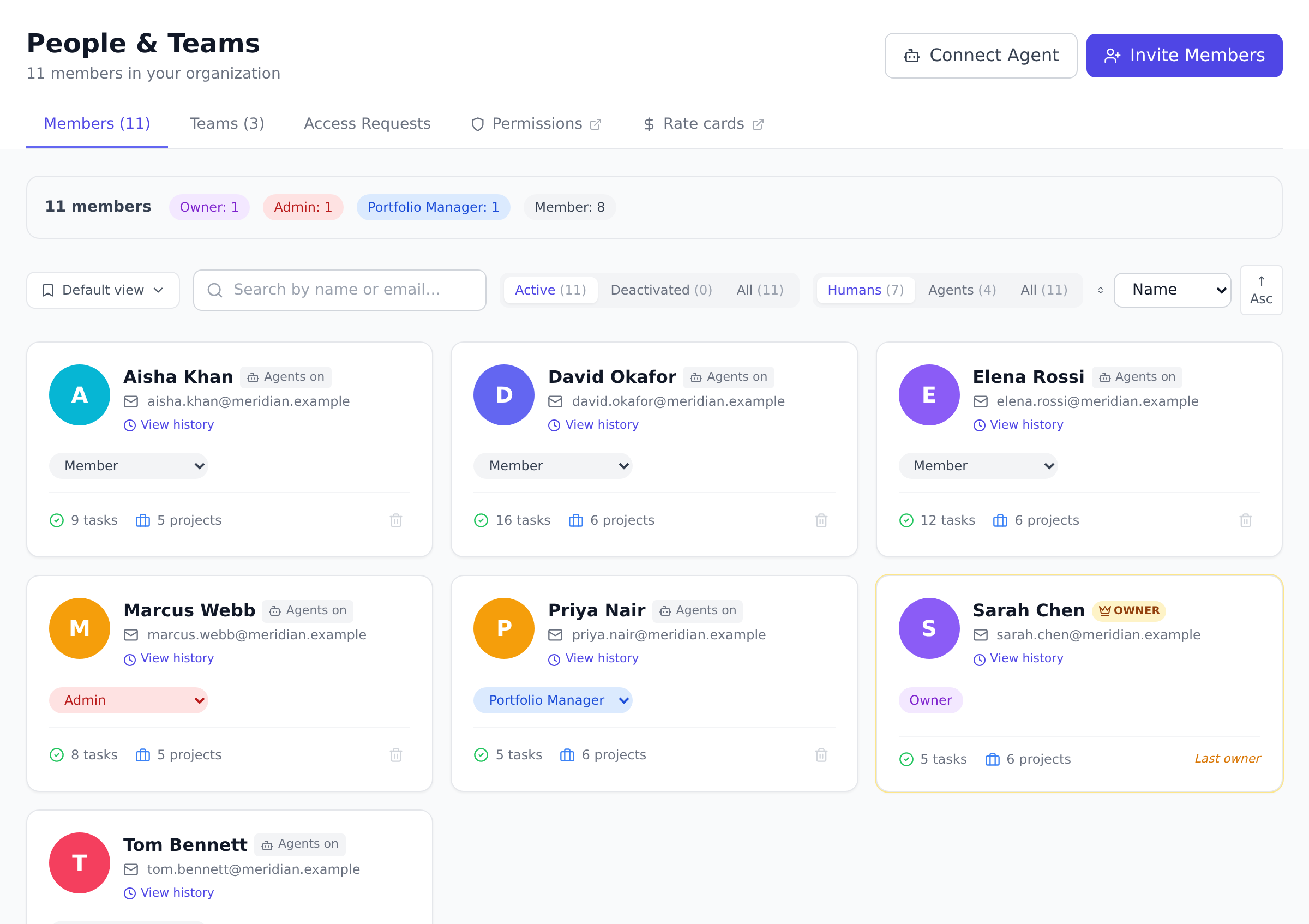
Section titled “Send invitations”- Open People from the navigation.
- Select Invite and enter one or more email addresses.
- Choose a role for the people you are inviting.
- Send the invitations. Each person gets an email link to join your organization.
The invitation does not vanish once sent. It lands in Pending Invitations at the foot of the member list, with who sent it, when, and how long the link has left, so an invitation nobody acted on is still findable a week later.
As you pick the role, the dialog states the seat consequence before you send: Guests within your plan’s free guest allowance cost nothing, and every other role is a billable seat, priced per your plan. Roles above your own tier render locked in the list, with the reason on hover: nobody can invite at or above their own level, so only the Owner can invite Admins, and an Admin tops out at Portfolio Manager.
People who already have an Onplana account join instantly; new people create an account from the invitation link and land in your organization ready to be assigned work. The invitation page works out which of those two applies and shows the recipient a single path, so they are not asked to remember whether they signed up before. What they see is documented in Join a workspace by invitation, which is worth skimming before you field questions about it.
Roles at a glance
Section titled “Roles at a glance”- Owner: full control, including billing and permissions.
- Admin: manages people and settings, but not billing.
- Portfolio Manager: manages projects, teams, and reviews across the organization.
- Member: works on the projects they are added to.
- Guest: limited access, typically an external collaborator.
The exact abilities of each role are configurable in the permission matrix, which an Owner manages in Organization Settings.
Inviting from inside a project
Section titled “Inviting from inside a project”Project owners and managers can invite people straight from a project’s Add Members dialog, choosing a project role for each. When the list includes someone who is not yet in your organization, the dialog says so: those addresses appear in a highlighted block with a seat choice, Member by default or Guest, and the billing consequence stated before you send. Sending then asks you to confirm, because those people will join the organization as well as the project when they accept.
When such an invitation is accepted, every organization Owner and Admin gets a notification and an email naming who joined, at which seat, and through which project, so a seat never appears on the bill unannounced. Accepting also lands the person directly in the right workspace with the project open.
Best practices
Section titled “Best practices”- Default to Member; promote on demand. Member is the right role for almost everyone: they can create projects, see and act on projects they are on, and view dashboards. Promote people to Portfolio Manager or Admin only when they have a concrete responsibility (run portfolios, manage roles, etc.). Most “we made everyone Admin” organizations regret it the first time a permission tightening lands.
- Send invitations in named batches. Inviting your eight engineers separately produces eight little notifications; inviting them as a batch sends one welcome experience and gives you a single line in the Invitations list to monitor. The bulk invite is also faster: paste the eight emails separated by commas or newlines.
- Use guest seats for external collaborators. A client reviewing your project plan, a contractor on a single milestone, an auditor checking financials, all of these are guest-shaped. Guests don’t count against billable seats up to the free guest allowance on your plan, so reserve them for external scope rather than burning a full member seat.
- Re-check role assignments quarterly. People change roles inside companies; an organization chart from January is not the organization chart in October. A 10-minute quarterly review of the People page (filter by role, scan for “this should be different now”) keeps the organization clean and the permission matrix honest.
Troubleshooting / common pitfalls
Section titled “Troubleshooting / common pitfalls”- The invitation email never arrived. Check Pending Invitations at the foot of the People page; if the row is there, the email is in flight (most arrive within 60 seconds; some IT systems delay external email by minutes). Check the recipient’s spam folder. If still missing, Resend issues a fresh 7-day link (and the previous link stops working, so point them at the newest email).
- I invited the wrong email; how do I take it back? Open Pending Invitations, find the row, and select Revoke. The link stops working immediately. If the recipient has already accepted, remove them from the People list instead.
- The role I want to invite at isn’t in the list. Owner role is only assignable by an existing Owner. If you’re an Admin, you can invite at Portfolio Manager, Member, or Guest; a second Admin has to be invited by an Owner.
- My invitation says “seat limit reached.” Your plan caps how many billable seats can be active simultaneously. Either upgrade your plan (see Change your plan or billing cycle), remove inactive members, or invite at the Guest role if the person is an external collaborator that fits the guest model.
- The accepted invite landed at the wrong role. Open the People page, find the person, and use the role dropdown to change it. The change applies immediately and they are notified via the live role-change push so they don’t see stale UI for the next 30 seconds.
How this combines with other features
Section titled “How this combines with other features”- Invitations + Custom roles. On Business and above, you can define custom org-level roles beyond the five defaults (Finance Reviewer, Procurement Lead, Customer Success Lead). Define the custom role first in Create custom roles, then invite the right people directly into it instead of promoting them later.
- Invitations + Permission matrix. The role you pick at invitation is the floor; the matrix configures what each role can actually do. If a particular permission feels wrong for an entire role (e.g., “Members shouldn’t see budgets by default”), tune the matrix once and it applies to every member you invite from then on. See Understand roles and permissions.
- Invitations + SSO. Enterprise organizations using SSO (SAML or OIDC) can configure auto-provisioning so signing in via the IdP creates the account in the right role automatically. Invite-and-link mode is the legacy path; SSO auto-provision is cleaner once it’s set up. See Configure SSO.
Coming from another tool
Section titled “Coming from another tool”| Tool | Mapping |
|---|---|
| Asana | Organization member ≈ Member; team admins ≈ Portfolio Manager; organization admins ≈ Admin |
| Jira | Site administrator ≈ Admin/Owner; project lead ≈ Portfolio Manager on the relevant projects; team member ≈ Member |
| Trello | Workspace member ≈ Member; workspace admin ≈ Admin |
| Microsoft Project Online | Portfolio Viewer ≈ Member with read-only filtering; Project Manager ≈ Portfolio Manager; Administrator ≈ Admin/Owner |
| Slack-only workspaces | Slack guests ≈ Onplana Guests; member ≈ Member |
What is the difference between a member and a guest? Members are part of your team and can be given broad access. Guests are external collaborators with limited access and their own seat allowance.
Can I change someone’s role later? Yes. On the People page, an Admin or Owner can change any member’s role, within the last-Owner safeguard that stops you removing the final Owner.
Do invitations expire? Yes, and the window depends on the role you invited them as. An Owner, Admin or Manager invitation lasts 21 days. Every other role lasts 7, including a custom role you have defined yourself. The longer window is for the roles usually invited to evaluate Onplana rather than to use it, where the reply cycle runs in weeks rather than days.
After that the link stops working and the invitation shows as expired under Pending Invitations, where you can resend it (which issues a fresh link with a new window for that role), revoke it, or clear all expired invitations in one click.
You do not have to watch for this yourself. Onplana emails you twice about an invitation nobody has accepted: three days before it lapses, while the link still works and a nudge from you can still save it, and again once it has lapsed. Both go to you rather than to the person you invited, who has had one email from us already and is not ours to chase. You are the one who can.
Someone says their invitation link is dead. What happened? Almost always a resend: resending mints a fresh link and the previous one stops working at that moment. If they are looking at the original email after a resend, the dead link is expected, and the newest email is the live one. Ask them to open the most recent invitation email, or resend once more and have them use that.
Can the invited person pick their own role on acceptance? No. The role is set when you send the invitation. The recipient sees their role on the People page once they join; if it’s wrong, the inviter can change it immediately.
Do guests count against my billable seat count? Up to the free-guest-seat allowance on your plan, no. Above that allowance, a guest costs the same as a member. The plan-tier guest allowance is shown on the Billing page; see Manage seats and guests.
Can an invited person reset their password before they accept? The invitation link itself is the join path, there is no password to reset until they have an account.
What if they sign up directly instead of clicking the link? They get an account and a personal workspace of their own, and your invitation stays pending. Signing up with an invited address is not enough to join your organization on its own, because knowing an address does not prove you control it. Ask them to click the invitation link and accept from there; Onplana then offers to tidy up the empty workspace their signup created.
Can I add someone to a specific project before they accept the organization invite? No, the project assignment can only land once they exist in your organization. Send the organization invite first, then add them to the project from the project’s Members tab after they accept.
Related
Section titled “Related”- Join a workspace by invitation, what the person you invited sees
- Understand roles and permissions, the matrix that defines what each role can do
- Manage seats and guests, how seats and guest seats are counted
- Create custom roles, Business+ option for non-default roles
Was this helpful?
Thanks for your feedback!