
Chat with the Onplana AI assistant
The AI assistant lives in a panel on the right side of the app and works with your real project data. You can ask it questions (“what is overdue in the website project?”), have it do work for you (“create tasks for these five action items”), or get summaries and status write-ups.
Open the assistant
Section titled “Open the assistant”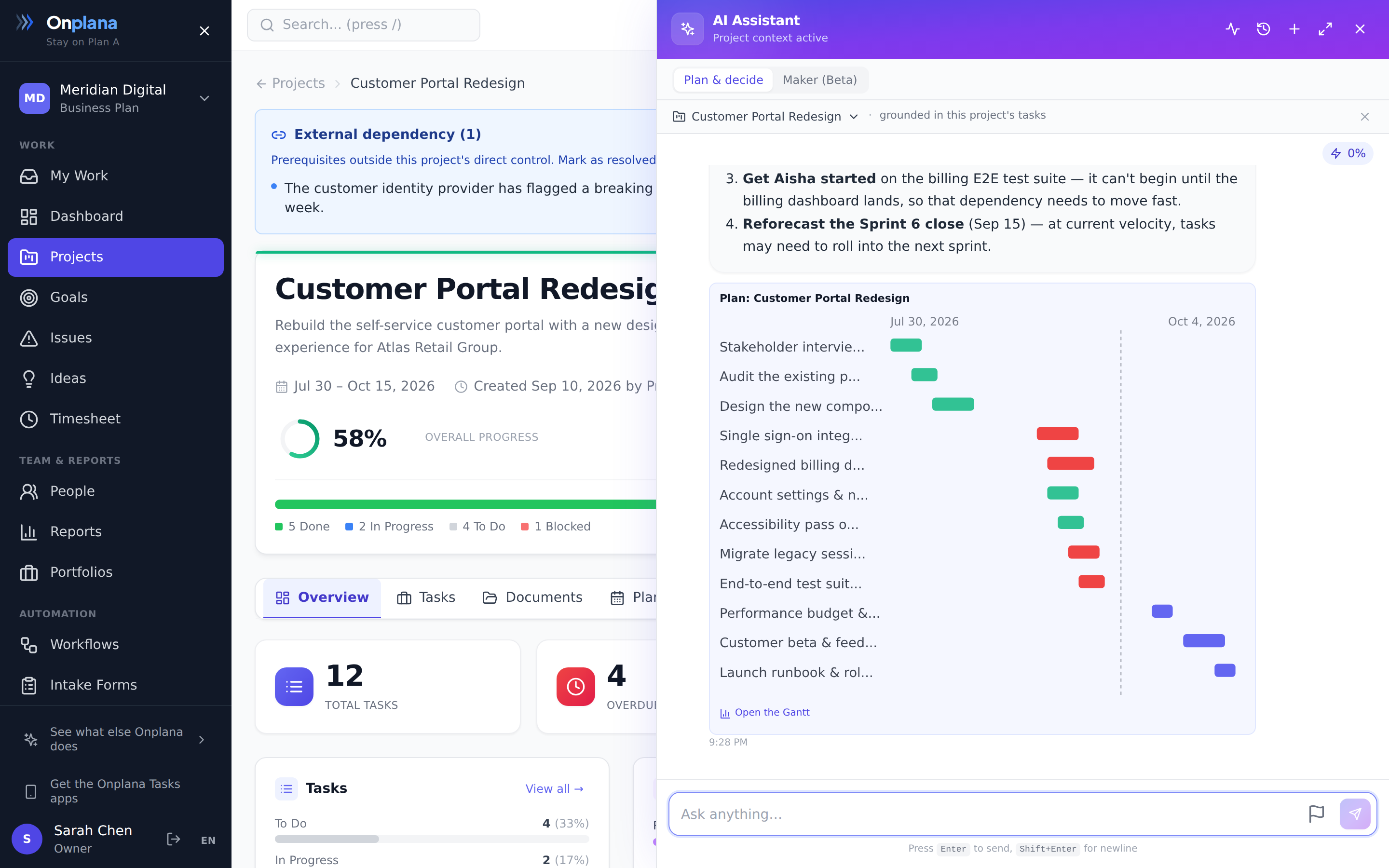
- Select the sparkles button in the top bar (visible on every page).
- Type your question or instruction. If you open the assistant from inside a project, it already knows which project you mean.
- Start a new conversation any time with Start a new chat; previous conversations are kept so you can pick one back up.
Connect a project for grounded answers
Section titled “Connect a project for grounded answers”The assistant works best grounded in a specific project. Its answers, drafted plans, and decision options are then based on that project’s real tasks.
- Open the assistant from inside a project and it auto-connects that project; you will see it selected in the Connect a project picker at the top of the panel.
- Opened the assistant from elsewhere? Use the Connect a project picker to choose one. Select Disconnect to go back to general questions.
When a project is connected, the panel shows “grounded in this project’s tasks” and the assistant scopes its answers, plans, and recommendations to that project.
What it can do
Section titled “What it can do”- Answer questions about your projects, tasks, deadlines, and people, using live data from your organization.
- Do work for you: create and update tasks, set assignees and dates, add subtasks, search across your workspace.
- Summarize: project status, risks, and progress in plain language.
- Draft a forward plan: ask it to plan the rest of a project and it proposes a structured set of tasks (subtasks, priorities, estimates) grounded in what already exists. Review it, then have it create the tasks.
- Help you decide: ask “should we build or buy this?” or “what should we focus on next sprint?” and it weighs the options (pros and cons) and recommends one, with its reasoning.
What it can search
Section titled “What it can search”“Search across your workspace” above is broader than it sounds. When a question cannot be answered from the project in front of it, the assistant searches your organization’s own content and answers from what it finds.
| It can find | Which covers |
|---|---|
| Projects and tasks | Names, descriptions, and the work itself |
| Risks and issues | Both registers, across every project you can open |
| Goals | Objectives and their key results |
| Comments | Discussion on tasks, issues, and ideas |
| Ideas | Only ideas set to organization-wide visibility |
| Wiki pages | Your projects’ wikis |
| Pages | Published web part pages, at organization and project level |
| Agent drafts | What an agent has written and left for review |
| Clients | Companies, contacts, and deals, on Onplana Services |
So “where did we write down the rollout plan” or “has anyone raised this before” looks across all of it at once, rather than only the project you have open.
Three limits are worth knowing, because each one is deliberate rather than a gap:
- A private idea is never searchable. Only ideas you have opened to the whole organization are indexed. One kept private, or shared with a couple of named people, stays out entirely, including from you.
- An unpublished or restricted page is never searchable, for the same reason. Publishing a page is what makes it findable.
- Client records need Onplana Services and the permission to open Clients. Without both, no client record is searched, and the assistant is told so rather than left to guess, so it will say the records were not searched instead of reporting that none exist.
Some detail is deliberately left out of the index even where the record itself is searchable: a deal’s stage, value, and probability, and a contact’s email address and phone number. Search will find you the client; it will not repeat their commercial position or their phone number back at you.
It reaches everything, on demand
Section titled “It reaches everything, on demand”The assistant starts each conversation with a focused set of capabilities and pulls in more as your request needs them, so it can reach the full range of Onplana actions without carrying all of them into every message. If you ask about something outside its current set (your connected Outlook mail, say), it expands on its own and continues; you may briefly see an Expanding capabilities chip while it does.
If the assistant ever told you “I can’t do that” in the past, it’s worth asking again.
What it respects
Section titled “What it respects”The assistant acts as you. It can only see the projects you can see and only do what your role allows. Every action it takes is recorded in the activity log like any other change.
When an answer is wrong
Section titled “When an answer is wrong”The assistant answers from your project data and from Onplana’s own documentation, and it will sometimes be wrong: it may describe a control that is not where it says, or tell you something is not possible when it is. Two things under every reply exist for exactly that.
Rate the reply. The thumbs under each answer take one click. A thumbs-down optionally lets you add a note saying what was wrong. This is not decoration: a reply marked unhelpful is put in front of the Onplana team with your note attached, and it is the signal that gets a wrong answer fixed at the source, whether that is a documentation page or the assistant itself.
Contact support from the chat. The life-ring button beside Send opens the feedback form with your last question and the assistant’s answer already filled in, so you do not retype anything. Add what you actually needed and send it. Because you are signed in, it reaches the team with your workspace and the page you were on attached. Use this when you need a person to answer, rather than just to flag that the assistant did not.
Both go to the Onplana team, not to your organization’s administrator. An administrator in your workspace cannot fix the assistant or the documentation, so if the assistant ever points you at one for a product problem, that is itself worth a thumbs-down.
Which plans include the assistant? All plans, including Free. The core AI suite (chat, plan generation, status summaries) ships on every plan; the brake is the one-time AI token bonus, after which organizations buy prepaid credit or upgrade. See Understand your AI token budget.
Does it use my organization’s data to train models? No. The assistant reads your data to answer your question in the moment. The underlying AI provider is chosen by Onplana platform operators, not workspace admins, this lets us route around upstream outages without customer coordination.
Is there a usage limit? AI usage draws from your organization’s token allowance. See Understand your AI token budget.
Best practices
Section titled “Best practices”- Be specific about scope. “What’s overdue?” → “What’s overdue in the Q3 website project?” The narrower the question, the better the answer.
- Check batch operations right after. When asking the assistant to create 20 tasks, scan the result and undo anything wrong. Catches misnames and date errors early.
- Use it for summaries first, edits later. “Summarize the marketing project’s risks” is lower-stakes than “create 5 risk-mitigation tasks”. Build trust gradually.
- Start a new chat per topic. Long threads bleed context. Topic-per- chat keeps each conversation focused.
- Cite findings + decisions in comments. When the assistant surfaces an insight (“this project is behind”), capture it in a task comment for durable record.
Troubleshooting / common pitfalls
Section titled “Troubleshooting / common pitfalls”- Assistant returns “I don’t have access”. You don’t have project access for what you’re asking about. Verify membership.
- A change went through wrong. Changes apply immediately, there’s no confirmation step. Open Recent actions and undo it.
- Assistant runs out of tokens. The one-time token bonus is exhausted. Buy prepaid credit or upgrade.
- Response looks hallucinated. Common with vague prompts. Re-ask with specifics + provide context.
- Conversation gone. Cleared cache or signed out elsewhere. Past conversations persist; check the chat history sidebar.
How this combines with other features
Section titled “How this combines with other features”- Chat + Task creation. The assistant can create tasks right away; undo any that are wrong. See Work with tasks.
- Chat + Plan generation. Use the assistant for ad-hoc questions; plan generation for full project scaffolds. See Generate a project plan with AI.
- Chat + AI tokens. Chat consumes tokens; budget shared across all AI features. See Understand your AI token budget.
- Chat + Audit log. Every AI-driven change goes to audit log + activity feed. See Read audit logs.
Coming from another tool
Section titled “Coming from another tool”| Tool | Mapping |
|---|---|
| ChatGPT in Slack | Direct concept; Onplana adds project context |
| Microsoft Copilot in Teams | Direct |
| Jira AI assistant | Direct |
| Linear AI features | Direct |
| Custom OpenAI integration | Onplana adds first-class context |
Related
Section titled “Related”- Open artifacts with deep links, share a clickable link to any artifact
- Generate a project plan with AI, plan scaffolding
- Detect risks with AI, proactive scanning
- Understand your AI token budget, usage limits
Was this helpful?
Thanks for your feedback!