
Collect form submissions from your app
A Maker app is static, great for landing pages, portfolios, and signup pages, but static apps have no server, so on their own they can’t save anything a visitor types. Form collection fixes that without a backend: your app posts a form’s fields to an Onplana endpoint, and each submission becomes a row in a list you own. You read, filter, and export those submissions in Onplana’s Lists, the same place your other lists live.
Turn on collection
Section titled “Turn on collection”Steps
- In Build, open the Forms panel (the toggle on the bottom strip, next to Files and Secrets).
- Click Enable form collection. Onplana mints a form endpoint and creates a list to hold the submissions (you’ll see its name).
- Copy the endpoint or the ready-made fetch snippet, or just ask the agent for a form that saves entries, it wires the endpoint for you.
That’s it. The endpoint is a public, append-only address; it’s safe to embed in your app’s code. It survives a rename or re-publish, so you can add it during a build before the app is even live.
Let the agent wire it
Section titled “Let the agent wire it”You don’t have to touch code. Ask for what you want, for example:
“Add a contact form with name, email, and message that saves submissions.”
The agent builds the form, posts the fields to your app’s form endpoint, shows a success message, and adds a hidden anti-bot field for you.
If you haven’t enabled collection yet, the agent still builds the form UI and tells you to turn on collection in the Forms panel to get the endpoint.
Where submissions go
Section titled “Where submissions go”Every submission appends a row to the bound list. The form’s field names become the list’s columns automatically, so you don’t define a schema up front, whatever fields your form has just show up as columns. From there you get everything Lists already gives you: sorting, filtering, per-row delete, and export.
If the same submission also uploaded a file (see Accept file uploads in your app), the row shows a paperclip that opens that file, and the file shows a Submission chip pointing back at the row, one submission, one linked pair.
You also get a notification when submissions come in (in-app, and by email if you have approval emails on). It’s throttled to at most one an hour per form, so a busy form nudges you without flooding your inbox, every submission still lands as a row regardless.
The Status column
Section titled “The Status column”A list the app creates for you also gets a Status dropdown with New, Reviewed and Done. Every submission arrives as New, so the moment you open the list you can see what you have not dealt with yet.
It is an ordinary column, not machinery. Rename it, change its options, add your own, or delete it outright: nothing breaks. If you rename or remove it, new submissions simply stop being marked New and keep landing as normal. Nothing errors, and a deleted Status column does not come back.
If you attach a list you already own instead of letting the app create one, the Status column is never added. Your existing schema is left exactly as it is.
Spotting app data in your workspace
Section titled “Spotting app data in your workspace”Data your app collects is not filed away somewhere separate. It lands in a normal list in your workspace that you can sort, filter, export and share like any other. So the workspace marks which things are wired to a live app, in four places:
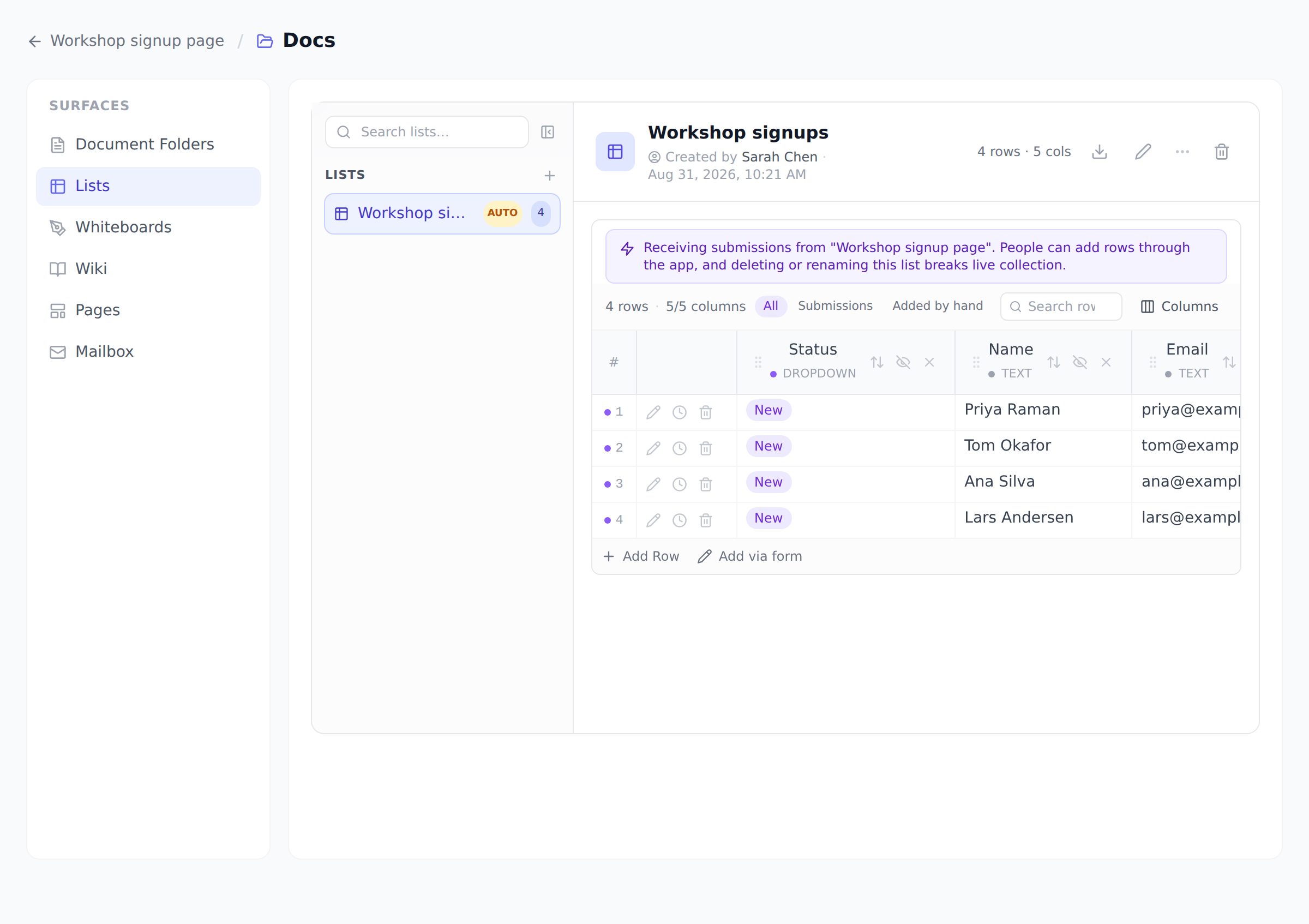
- A banner on the list itself, reading “Receiving submissions from your app. People can add rows through the app, and deleting or renaming this list breaks live collection.” It names two genuinely different hazards, which is why it is more than a label: people outside your organization can append rows here, and the list is load-bearing for a running app.
- An AUTO badge next to the list in the sidebar, for lists the app created.
- A violet dot on each row that arrived through the app, so a hand-typed row and a submission are never confused.
- An All / Submissions / Added by hand filter above the grid. It appears only once the list actually holds app submissions, so a list you maintain by hand never grows a control it has no use for.
Keeping it clean
Section titled “Keeping it clean”Public endpoints attract spam, so a few controls are built in:
- A hidden honeypot field. The agent adds a hidden field a real person never fills in. If it comes back filled, the submission is silently dropped.
- A captcha, optional. Toggle Require captcha on a form to make the app verify a captcha before a submission is accepted, worth it for a public form that’s getting sprayed.
- Rate limits. Submissions are rate-limited per source, and each form has a daily submission cap that scales with your plan (100 a day on Free, up to unlimited on Enterprise+; see the pricing page), so a flood can’t run away with your list or your quota.
- Big or malformed submissions are trimmed, and a form on one app can’t post to another app’s endpoint.
Keeping an eye on your daily limit
Section titled “Keeping an eye on your daily limit”Each form in the Forms panel shows how much of today’s limit it has used, for example “137 of 20,000 submissions today”. If a form reaches its cap, that line turns into a warning and we email you, because past the cap new submissions are not saved. The form’s public address keeps answering normally (it never tells a visitor about your plan’s limits), so that notification is your signal that entries are being missed. The limit resets within 24 hours, and upgrading your plan raises it.
The other limit: how many rows you can keep
Section titled “The other limit: how many rows you can keep”The daily cap is about how fast entries arrive. There is a second, separate limit on how many you keep: a total row count per project, counted across every list in that project together, so adding a second list does not raise the ceiling. Free holds 1,000 rows per project, up to 500,000 on Enterprise (unlimited on Enterprise+); the pricing page has the full ladder.
The important difference: the daily cap clears itself, this one does not. Once a project is full, submissions keep being dropped until you delete rows or upgrade, so the notification you get for it is worth acting on rather than waiting out. As with every public endpoint, the visitor is never told, they get a normal success response either way, and you are the only one who learns the entry was not kept.
Managing your forms
Section titled “Managing your forms”In the Forms panel you can, per form:
- Pause it: flip Accepting submissions off to stop new rows without losing the ones you have.
- Require a captcha: toggle it on or off anytime.
- Remove it: the endpoint stops working. Submissions you already collected stay in your list.
Questions
Section titled “Questions”Do I need a database or any server code? No. The app stays 100% static; Onplana holds the submissions in a list for you.
Can someone read other people’s submissions from the public endpoint? No. The endpoint only accepts a submission, it can’t return any. Only you, signed in to Onplana, can read the list.
What happens to submissions if I delete the form? They stay. Removing a form only stops new submissions; the list and its rows are yours to keep, export, or delete.
Where do I view them? In Onplana’s Lists, the form’s panel shows which list it saves to.
Related
Section titled “Related”- Control who can use your published app, the access mode decides whether this feature can be per-person or stays anonymous.
- Accept file uploads in your app, let the same form take attachments.
- Show collected data in your app, display what the form has collected.
- Take payments in your app, sell unlocks to the same visitors.
Was this helpful?
Thanks for your feedback!