
Create a project from ChatGPT or Claude
Describe a piece of work in one sentence. Get back a real project: epics, tasks, estimates, owners, dependencies, and a schedule where each task starts when the one before it finishes.
Not a draft to review. Not a suggestion to copy out. The project exists in Onplana by the time the answer comes back, and the reply carries a link straight to it.
Ask for a plan
Section titled “Ask for a plan”If Onplana is already connected in ChatGPT or Claude, this is the whole thing. Say what the work is and that you want it in Onplana. The word “plan” steers the agent toward building a structure rather than answering a question:
Plan a website redesign in Onplana. We are rebuilding the marketingsite on the new design system, starting in September. Break it intodiscovery and build, with dependencies and estimates.The more you give it, the less it invents. Durations, an order of work, who owns what, a start date: each one it has is one it does not have to guess.
The reply comes back with a link to the project. Open it and the work is there.
Why the dates are the interesting part
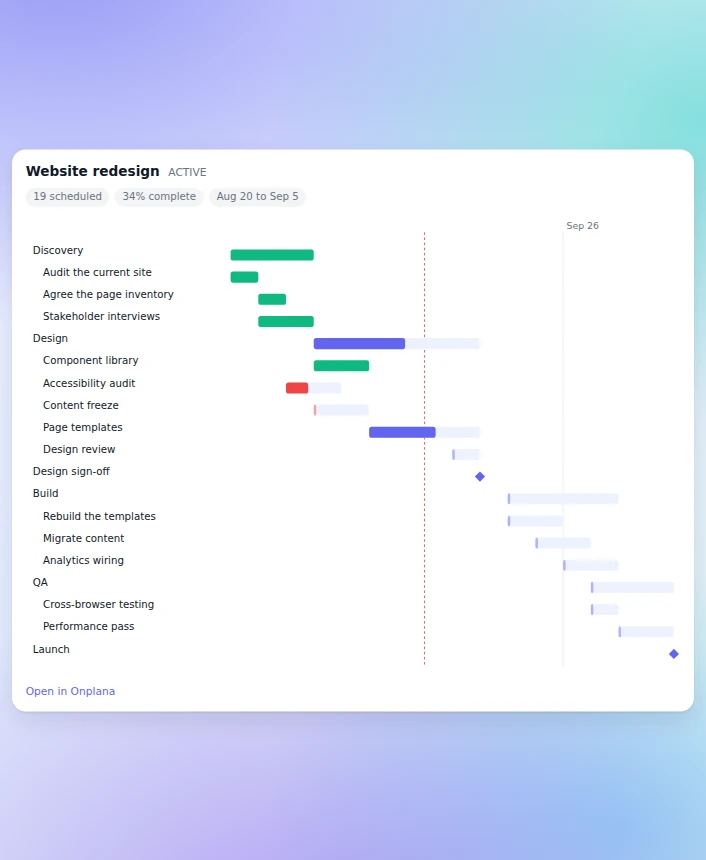
Section titled “Why the dates are the interesting part”Look at the schedule in the screenshot rather than the task list. Each task starts the day the one before it finishes, because the request declared dependencies and Onplana resolved them into an actual chain.
That is the difference between a plan and a list. Most AI tools hand you tasks that all share one deadline, which tells you nothing about what is blocking what, or what slips when a task runs late. Here, move one task and everything downstream moves with it.
It is a real project, not a preview
Section titled “It is a real project, not a preview”Open it and you get the epics in the sidebar, the tasks under them, and a Gantt with the dependency arrows already drawn. Nothing is flagged as machine-generated and nothing sits in a draft state waiting for approval. Your team can work in it immediately, and you can edit any of it by hand.
Worth knowing
Section titled “Worth knowing”- Tasks are assigned to you unless the plan names someone else, and the project is yours, so nothing lands on a colleague without you asking for it. The agent does not take the work by generating it; hand it a task explicitly when you want it worked on.
- You can add to an existing project instead of making a new one. Say which project and the agent extends it, leaving what is already there alone.
- Dates come from your estimates and dependencies, not from a calendar the agent invented.
- A strategic project starts as a proposal in an organization that
classifies its projects. There, asking the agent for a strategic project
is refused with
STRATEGIC_NEEDS_PROPOSAL; ask for an operational one, or submit a proposal. See Classify strategic vs operational work. - One request builds up to 100 tasks and 20 epics. A bigger plan is split across several, which happens without you doing anything.
- Everything is permission-checked and audited. The agent acts through a shared agent persona that defaults to Member and is capped at your own role, so it can never reach more than you can, and by default reaches only the projects that persona belongs to. See what agents can and cannot do.
Getting better plans
Section titled “Getting better plans”Onplana publishes a planning skill that teaches an agent to interrogate the brief before it builds: what the deadline really is, who is available, what the acceptance criteria are. Plans that come out of it are noticeably less generic.
You do not have to install anything to use it. Ask for it in the same chat:
Fetch the Onplana planning skill and follow it.See Install the Onplana agent skills for per-client setup and the download route.
Related
Section titled “Related”- Connect Onplana to ChatGPT, one-time browser sign-in
- Connect Onplana to Claude, from the connectors directory
- Install the Onplana agent skills, the playbooks that make an agent better at this
- Assign work to an agent, hand the plan back for execution
- Generate a project plan with AI, the same outcome from inside Onplana
- What agents can and cannot do, the gates that apply
Was this helpful?
Thanks for your feedback!