
How your published app and its data are kept safe
When you build an app with Onplana Maker, the AI writes the code, runs it, and
publishes it to a live onplana.app URL. This page explains how that stays safe,
both for you and for anyone who visits your app, and the one thing that is your
responsibility.
The short version
Section titled “The short version”- Every build runs in an isolated, single-use sandbox. Your app can never see another customer’s app, data, or credentials.
- Your published app is public. Anything in it, including any secret you paste into the code, is readable by anyone who visits the URL.
- App secrets stay off the public page. Store keys in the app secret store, not in your source, and they never ship in the published bundle.
- We scan every publish for hardcoded credentials, warning you about most and blocking the publish on a live Stripe key.
- Published apps are served over HTTPS with a web application firewall, are not search-indexed by default, and can be reported and taken down if abused.
How a build runs
Section titled “How a build runs”The AI agent that builds your app can only write files inside your own app. It cannot run arbitrary commands, reach the network on its own, or read anything outside your project. So even if you paste something unusual into your app description, the result is bounded to your app, which publishes to your own URL.
Your secrets stay off the public bundle
Section titled “Your secrets stay off the public bundle”A published app is static and world-readable at its onplana.app URL. That means
anything embedded in the code, an API key, a password, a token, is visible to anyone
who opens it or views the page source.
So the rule is simple: never hardcode a secret into your app. Use the app secret store instead. Secrets you add there are kept in Onplana’s backend and are never included in the published bundle, the AI agent that builds your app never sees them either.
How the store works. Each app has its own Secrets panel in the Build view, managed by workspace owners and admins. A secret is write-only: after you save it, the panel shows only its name and the last few characters as a reminder, the value itself never comes back to the browser. Values are held in a dedicated encrypted secrets vault, each secret scoped to a single app. Secrets power Onplana’s managed capabilities, taking payments stores its Stripe signing secret this way, and your app’s own code can never read one back, which is the point: nothing in the published page can leak what the page cannot see.
As a safety net, every publish is scanned for things that look like hardcoded
credentials (API keys, tokens, private keys). Most findings are a warning at
publish time: the publish still succeeds, and you should move the key to the
secret store. Live Stripe keys are the exception: a sk_live_, rk_live_, or
whsec_ value blocks the publish until it’s removed, because those move
real money.
What protects a published app
Section titled “What protects a published app”- HTTPS everywhere, with HTTP Strict Transport Security so browsers only ever connect securely.
- A web application firewall in front of every
onplana.appapp. - Not indexed by search engines by default on its
onplana.appaddress, so your app is not advertised to the world unless you share the link. An app served on your own domain would be indexable, which is usually the point of putting it there; connecting one is not available yet. - Abuse reporting and takedown: anyone can report an app that violates the acceptable-use policy. Reports are reviewed, and an abusive app can be taken offline. If your app is taken down by mistake, you can appeal. See Publishing apps, limits, and reporting abuse.
Deleting something a live app depends on
Section titled “Deleting something a live app depends on”Once an app is collecting, some of your ordinary workspace items become load-bearing for it: the list its form posts to, the folder its uploads land in, the columns it displays publicly. Deleting any of those is still entirely your call. Onplana just makes sure the decision is an informed one, by telling you the actual cost in the confirmation dialog rather than asking a generic “are you sure?”.
Deleting a wired list or folder tells you that collection stops immediately, and that new submissions or uploads are then dropped without telling the sender. That second part is the one people do not expect: a visitor filling in your form afterwards gets no error, so you would never hear about the ones you missed. The dialog also counts what is going to the recycle bin, for example “48 collected rows go to the recycle bin.”
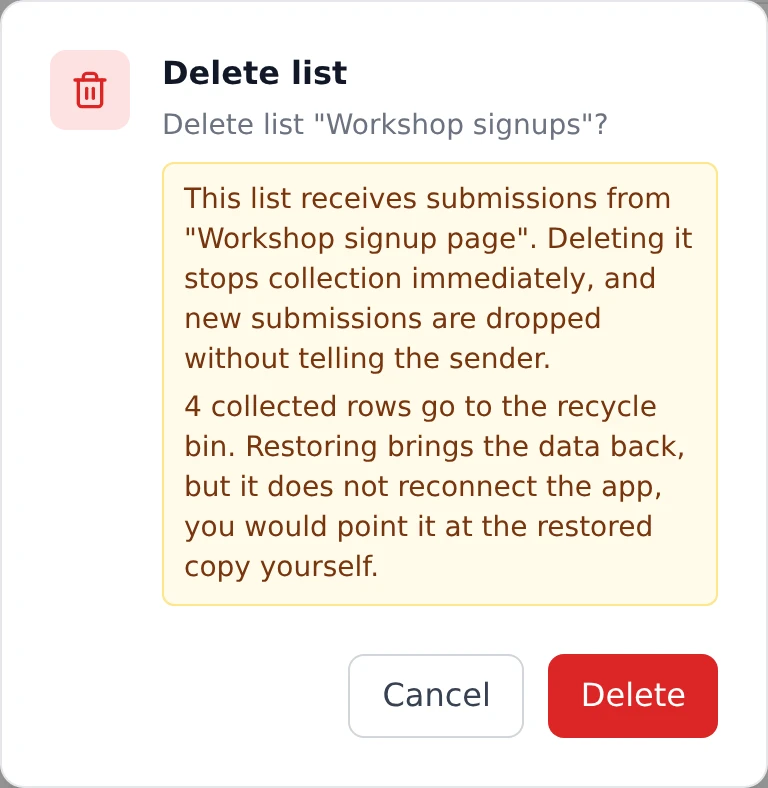
Restoring from the recycle bin brings the data back, but it does not reconnect the app. A restored list is a new list as far as the binding is concerned, and the app keeps posting to the old one. If you delete and then change your mind, expect to point the app at the restored copy yourself. This is the single most useful thing to know before you delete something wired, and the dialog says it outright.
Deleting a column the app publishes leaves that field blank in the live app until you update it. Nothing crashes; the app simply renders a gap where the value used to be.
What you are responsible for
Section titled “What you are responsible for”- Don’t hardcode secrets. Use the app secret store.
- Don’t build or publish abusive content (phishing, malware, spam, anything against the acceptable-use policy), a published app is yours, and you’re accountable for what it does.
- Rotate anything you exposed. If you published a real credential, assume it’s compromised.
Questions
Section titled “Questions”Can another Onplana user see my app or its data while it’s building? No. Each build is isolated in its own sandbox with no path to other tenants.
If I put my Stripe key in the code, is it safe? No, a published app is public, so a key in the code is exposed. Put it in the app secret store instead. A live Stripe key in the code blocks the publish until you remove it; other credentials we spot get a warning.
Is my app visible to the whole internet the moment I publish?
It’s reachable at its URL, but its onplana.app address is not search-indexed by
default, so it’s discoverable mainly by people you share the link with. On your own
domain it is indexable.
Was this helpful?
Thanks for your feedback!