
Track resale margin
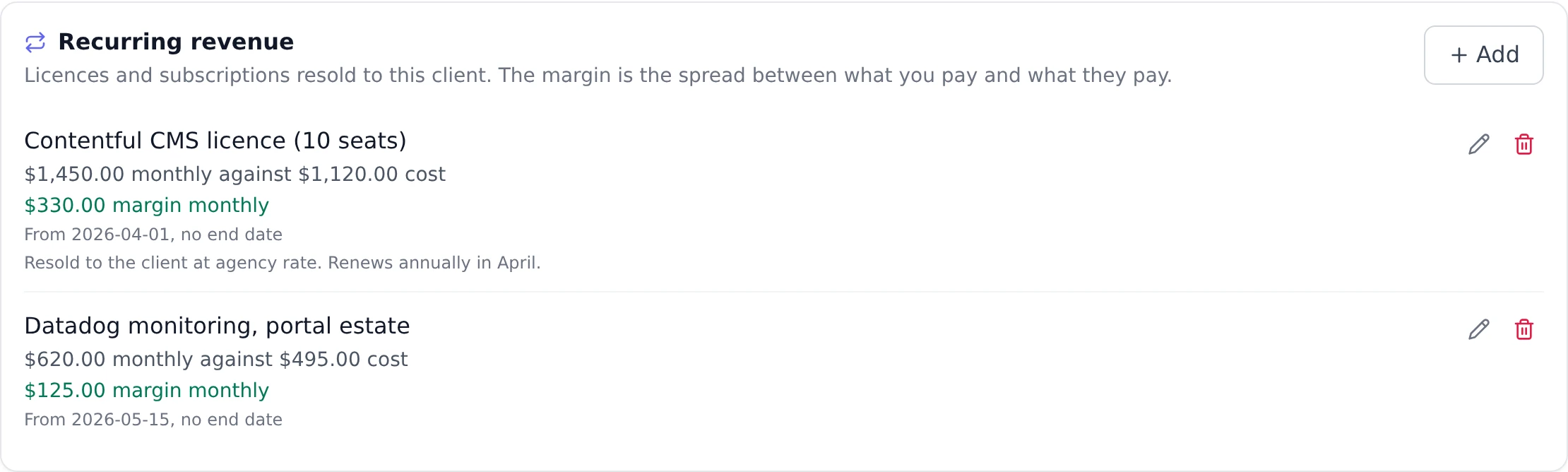
If you resell licences, subscriptions or hardware, the number you care about is the spread: what the client pays you, less what your supplier charges. A recurring revenue line records both, so that spread shows up on your margin report next to the margin on your billable work.
Why not a billing model
Section titled “Why not a billing model”Every billing model turns hours or milestones into revenue, and nobody logs hours against a licence renewal. A renewal recorded as time and materials reports zero revenue, zero cost and zero margin, however large the contract.
A revenue line is separate from the model for a second reason: a project bills one way, but a managed-services client who also buys licences from you is one engagement, not two. A line sits alongside whichever model the project uses, so a retainer project can carry a licence book without splitting it in half.
A project line or a client line
Section titled “A project line or a client line”A line belongs to a project or to a client, never both. Choose by what the charge belongs to:
- On a project, for something bought in for one engagement: the licences a rollout needs, or equipment for one site.
- On the client, for a standing subscription, such as a managed licence that renews whether or not any engagement is open. It needs no project at all.
Both places show the same Recurring revenue panel and work the same way. The one difference is the margin report, covered below.
Add a line
Section titled “Add a line”- For a project line, open the project, choose More on the tab bar, then Finance, and select the Expenses and revenue section, where Recurring revenue sits below the expenses list. For a client line, open the client from Clients.
- In Recurring revenue, choose Add.
- Fill in What is being sold, the Sell price per period and the Supplier cost per period.
- Choose How often: one-off, weekly, monthly, quarterly or yearly.
- Set Starts, and Ends if the agreement has an end date. Leave Ends empty for something that renews until it is cancelled.
- Choose Add line.
Enter the amounts at whatever frequency you actually price at. A licence billed annually goes in as one yearly line at the annual figures; you do not need to divide it by twelve, because the report does the pro-rating.
From a won quote
Section titled “From a won quote”A deal’s quote can carry Resale lines, with the sell price the client sees and, if you manage rate cards, the supplier cost they never see. When you win the deal, each resale line becomes a line here on the new project, starting on the project’s first day, so the licence book is not typed twice. See quote a deal and get it accepted.
When a line renews
Section titled “When a line renews”Each line shows Renews and the date it next renews, worked out from its start date and how often it repeats. It lands on the same day of the month as the start, or on the last day of a shorter month, so a monthly line that started on the 31st renews on the 30th in a 30-day month.
- The first charge is not a renewal. A line added today renews one period from today, and a line that starts next month renews one period after that.
- A one-off line reads “Does not renew again”, because it is a single charge. So does a line whose end date has passed, or whose next renewal would fall after its end date.
The date is worked out each time you look, never stored, so it cannot fall behind.
Record a price change
Section titled “Record a price change”When a price goes up or down, record the change rather than editing the line.
- On the line, choose Record a price change (the rising-arrow icon beside the pencil). It is offered only on a line that has not ended.
- The form opens filled in from the line, starting today. Change the sell price, the supplier cost or anything else, and set Starts to the day the new price takes effect.
- Choose Save.
Onplana ends the current line the day before the new price starts and opens the replacement, together, so there is never a day with both lines live or with neither. The new price has to start after the line it replaces began; before that, edit the line instead.
Why not just edit the amount? The margin report reads a line’s current amount and pro-rates it over whatever window you ask for. Nothing keeps a copy of last quarter’s price, so editing the amount rewrites what past periods earned, with no record that it moved. Recording the change keeps each period at the price that was actually charged in it.
Editing, with the pencil, is for genuine mistakes: an amount mistyped an hour ago, or a misspelt name.
Ended lines stay in the register
Section titled “Ended lines stay in the register”The line a price change replaces is not deleted. It stays in the register, ending the day before the new price starts, because the period it covered really was charged at that price, and the margin report still reads it for that period.
Once a line’s end date has passed it leaves the default view, so recording a price change does not double the list. Show ended brings ended lines back, and Hide ended puts them away again. The button appears only when at least one line has ended.
What the margin report does with it
Section titled “What the margin report does with it”The report counts each line by calendar period, and counts both sides. A whole calendar month of a monthly line is exactly its amount, whatever the month’s length, and a part month is the share of that month’s days. A yearly or quarterly line works the same way against the calendar year or quarter: a yearly line of 136,840.80 against a supplier cost of 118,072.80, read over a 31-day month of a 365-day year, contributes about 11,622 of revenue, 10,028 of cost and 1,594 of margin.
A one-off line is different: it earns in full on its start date and nothing on any other, because a single sale is earned when it happens.
On the Why it moved panel, resale has its own bar. That keeps it separate from Rate, so a month where your licence book grew reads as exactly that rather than as a change in what you charge for time.
Leave the supplier cost out and the report says so
Section titled “Leave the supplier cost out and the report says so”If you do not know the supplier cost yet, leave the field empty. Onplana treats an empty cost as not recorded, which is different from recording a cost of zero:
- The line reads “No supplier cost recorded, so this reads as all margin”.
- The margin report names the amount of resale revenue with no cost against it.
Both exist because a resale showing 100% margin is nearly always a line that is half filled in, and a confident wrong number is worse than a visible gap. Fill the cost in and both notes disappear.
Show a client their charges
Section titled “Show a client their charges”A client portal built in Build can show each client the recurring charges they pay for. In the app’s Data panel, choose Recurring charges. Each signed-in client sees the lines on their own client record and on their own projects, and nobody else’s.
The fields you can publish are Charge, Amount, Currency, Recurrence, Starts, Ends and Renews.
See Give each client their own view for how the portal matches a visitor to their client.
Frequently asked
Section titled “Frequently asked”Does deleting a line change past reports? Yes. The margin report reads your current lines over whatever date range you ask for, so removing a line changes every period it covered. Set an end date instead when an agreement stops, which keeps the history and stops the line earning after that date. When only the price changes, record a price change instead.
What happens if the project is not billable? Nothing is recognised, revenue or cost, the same rule the rest of the report applies to a non-billable project.
Does it appear in the accounting export? Yes, for a line on a billable project. It goes out as a resale line at its sell price for the period, invoiced to the project’s client. The supplier cost stays out of the export, because the supplier’s own bill already brings it into your ledger. A line recorded against a client rather than a project is not exported.
Who can see and edit these? The same people who manage rate cards, because
a line carries your buy price. That holds on the project Finance tab and on
the client page alike: anyone else sees no Recurring revenue panel at all. An
administrator can change that in the permissions matrix under
org.ratecard.manage.
Related
Section titled “Related”- See your margin, where project lines are counted.
- Give each client their own view, for showing a client their charges.
- Choose a billing model, which a line sits alongside.
- Export to your accounting system, which carries project lines at their sell price.
- Quote a deal and get it accepted, where resale lines start.
Was this helpful?
Thanks for your feedback!