
Track task costs
Each task can carry three costs of its own, the same three a Microsoft Project file holds:
| Field | Meaning |
|---|---|
| Planned cost | What the task is expected to cost now |
| Fixed cost | A cost that does not depend on the hours worked, such as a licence or a supplier’s fee |
| Baseline cost | What the task was expected to cost when the plan was agreed |
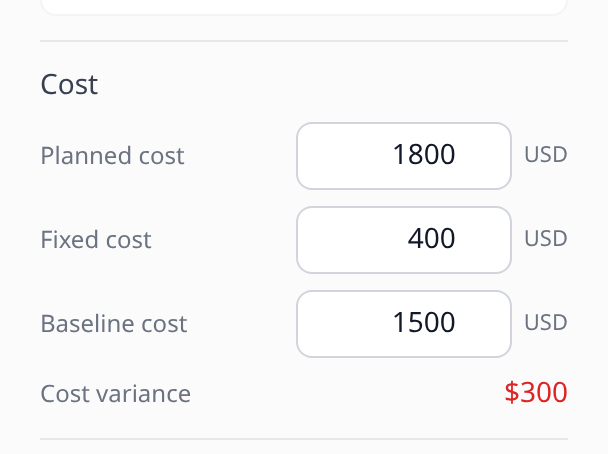
From planned and baseline cost, Onplana shows the cost variance: planned cost less baseline cost. Above zero, the task now costs more than its baseline.
Imported schedules often arrive with these values already filled in. See Import from Microsoft Project.
Enter a task’s costs
Section titled “Enter a task’s costs”-
Open the task, then open More options at the bottom of the form.
-
Find the Cost group. It holds Planned cost, Fixed cost and Baseline cost, each in the project’s currency. A task that holds no cost yet shows one closed Cost line instead: open it to reach the three fields.
-
Type an amount of zero or more, then press Enter or move to another field. Each field saves on its own as soon as it loses the focus, so the rest of the form is not touched. Leave a field empty to clear it.
Amounts are kept to the cent. A negative amount or text that is not a number is refused with “Enter an amount of zero or more, or leave it empty.”, and the field goes back to its saved value.
Once the task has a baseline cost, a Cost variance line appears under the three fields. It is shown in red when it is above zero.
 Without a
baseline cost there is nothing to vary from, so no variance is shown.
Who sees and edits task costs
Section titled “Who sees and edits task costs”- See them: people who can see the project’s costs (the View project budget permission). By default that is the project’s owner and managers, and organization owners and admins. Other members see no Cost group in the form and no cost columns.
- Edit them: people who can both edit the project and see its costs, the same rule as editing the project budget and its cost lines. Anyone else who can see the costs reads them as text, with “Not set” for an empty field and a note that only people who can edit the project’s budget can change them.
The same rule applies to changes made through an AI assistant with the
update_task tool. Permissions are set in
roles and permissions.
The cost columns in Task costs
Section titled “The cost columns in Task costs”On the project’s Finance tab, the Task costs section lists each task’s estimated hours, Planned Cost, Earned Value, Actual Cost and CPI. Two more groups of columns appear when a task needs them:
- Fixed Cost, once any task in the project has a fixed cost.
- Baseline Cost and Cost Variance, once any task has a baseline cost. Here the variance is the row’s Planned Cost less its baseline cost, so it matches the line in the task form.
A summary task’s figures in these columns are the sum of the tasks beneath it, never the summary’s own stored values, so a phase is not counted twice. The Total row adds up the leaf tasks only.
The cost columns on the Gantt
Section titled “The cost columns on the Gantt”The web Gantt offers the same four columns as Onplana Schedule: Fixed Cost, Cost, Baseline Cost and Cost Variance. Turn them on under View > Columns (see Plan on the Gantt chart). They are read-only on the Gantt: edit the values in the task form. Summary rows show the roll-up of their tasks, and a cost variance above zero is shown in red. Only people who can see the project’s costs are offered these columns.
Is fixed cost added to planned cost? No. The three are separate fields, and the cost variance compares planned cost with baseline cost only, the same rule as Onplana Schedule’s Cost Variance column.
Does the baseline cost change when I capture a baseline? The Baseline cost field is the task’s own stored value, such as an imported Baseline 0 cost or one typed in. A baseline you capture in Onplana keeps its own snapshot of each task’s planned cost for comparison.
Why can’t I see the Cost group? You do not have permission to see the project’s costs. Ask a project manager or an organization admin.
If you see a closed Cost line in its place, the task holds no cost yet: open the line to reach the fields. If you may see the project’s costs but not change them, a task that holds no cost shows no Cost group at all, since there is nothing to read.
Related
Section titled “Related”- See why a project is over budget, the CV column and the Why line
- Read the EVM dashboard, the rest of the Task costs table
- Track project cost lines, costs that belong to the project rather than one task
Was this helpful?
Thanks for your feedback!